Children around the world can learn how to make shiny 3D pie charts, thanks to the Create a Graph page on the National Center for Education Statistics (NCES) web site.
See more about those charts below, and we’ll take a look at a Hey Scale chart too!
One of the things that I do while drinking my morning coffee is to check the statistics for my website and blog. It’s interesting to see the fluctuations in traffic, and discover where’s it coming from.
I use Google Analytics and my web host also has a daily statistics file that shows me the hits and downloads.
Not that I’m obsessed or anything, but I track the statistics in a couple of Excel files, and even have a line chart for the monthly totals.
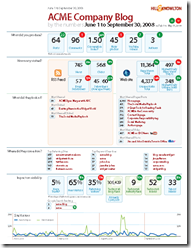
Blog Statistics Dashboard
Today I saw a blog statistics dashboard that a Canadian PR firm uses for its clients, and it puts my little system to shame.
Apparently the reports are created monthly, with lots of cutting and pasting, but you could probably automate something similar in Excel.
It has a nice clean look, and you customize it to show the statistics of interest to you or your clients.
You can download the dashboard template in pdf format, and make changes to it, if you have Adobe Acrobat.
I had to change the font before I could edit the text, but maybe that’s because I’m still using Acrobat 5.0.
Have you ever bought software that came with free upgrades for life?
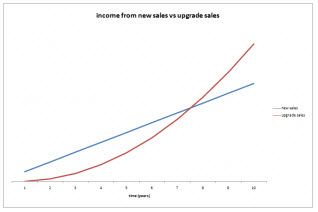
In the Successful Software blog, Andy Brice asks if you should give customers free software upgrades for life.
He created an income model in Excel 2007 that you can download, to test different scenarios.
I can’t imagine why anyone would offer free software upgrades for life. Certainly, if there are minor upgrades or patches to the current version, or a major upgrade is released shortly after a purchase, then I would expect to get those at no charge. Otherwise, if I want to enjoy the new features that a developer has worked hard to create, I’d pay for the upgrade.
The article has an excellent list of things customers should expect in major upgrades, including two points that are key:
Any major bugs in version n should be fixed before releasing version n+1.
A major upgrade should have significant new features.
But don’t worry, upgrades to this blog will continue to be free, as long as I can afford it!
I use Google to do web searches, and am pretty efficient at finding things, in my humble opinion. Last week my son sent me a link to All My Faves, which lets you find things, but in a completely different way than Google.
The Home page has rows of web site logos, grouped in categories such as Travel, Sports, Finance and Tech. The top row has weekly favourites.
There’s a Weekly Faves tab, that has archived links from earlier weeks, and there’s a best of 2007 row at the bottom of that page. Also, there are specialized tabs for Travel, Entertainment, Kids and Shopping.
This could be a great starting point if you’re trying to generate ideas, or find new sources of information (or entertainment!)
Instead of starting from a narrow search term, and digging in to different sites, All My Faves lets you start from the forest, and pick a few trees to examine.
A while ago (in May!), I posted about using Taskbar Shuffle to rearrange the icons in your Windows taskbar. This is handy when I have lots of windows open, and I want a couple of them to be readily available.
If I drag their icons to the far left of the Windows Taskbar, they’re easier for me to find when I need to access those windows.
Yesterday, Lifehacker posted an article about Taskix, which is another tool for rearranging taskbar icons. Apparently it’s much smaller than Taskbar Shuffle, and very similar in functionality.
I’ve installed it, and it’s working very smoothly, with no noticeable difference from Taskbar Shuffle.
You can download Taskix for 32-bit or 64-bit systems, then use it to rearrange or close the windows icons on your taskbar.
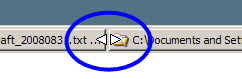
Simply drag a Window icon to a different position on the toolbar, and release it to place it in the new spot. Or, point to an icon and click the mouse wheel to close that window.
I’ve thought about getting a Wii, with a balance board, for a bit of fun and exercise (and to steer the Roomba). Maybe I should get a treadmill for my computer desk instead.
At Salo LLC, a staffing firm in Minneapolis, a dozen desks were outfitted with treadmills and adjustable countertops.
According to an article in Downtown Journal, revenues have gone up and the participating employees have lost weight. I’ll bet the meetings are shorter too.
There are plenty of times during the day that I could walk and work at the same time, and maybe it would help beat that afternoon slump as well.
That’s not something that I’ve tried in my workbooks, but he makes a convincing argument:
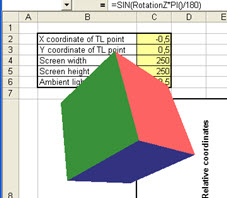
“I hope you will discover that Excel effectively and efficiently incorporates practicality, tons of features, the multi-platform portability and the high performance with the unique and futuristic 3D engine features.”
Making Games in Excel
Have you built any games in Excel, for your own entertainment, or to share with other people?
You’ll find several games to download, including a Concentration card game that Doug Glancy made. The goal is to turn over matching pairs of cards.
You can even choose the pattern you’d like for the back of the cards.
Excel Concentration Game
Print Bingo Cards in Excel
There are printable Excel games too, like my Bingo Card template.
This workbook has three printable Bingo cards on the main worksheet. Each bingo card has a set of 24 random numbers, with a FREE square in the centre of the card.
The random numbers are filled in by formulas, so you can print a large number or unique Bingo cards. There are no macros needed in this workbook.
In Moneyball: The Art of Winning an Unfair Game, author Michael Lewis details how Oakland A’s general manager, Billy Beane, used statistical data to create a winning team on a small payroll.
In 2007, NetSuite invited Billy Beane onto their board of directors, and have improved their sales process by using his data analysis techniques.
It’s Labour Day, and I’m doing as little labour as possible, so this posting will be very short.
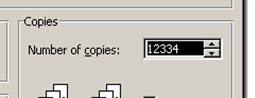
Solver Problem in Excel 97
In the OneNote Testing blog, John Guin describes why a bug in the Solver sample workbook (solvsamp.xls) wasn’t considered “ship stopping” in the Office 97 release.
Don’t worry, it’s fixed now, so you won’t accidentally print 12334 copies of the worksheet.
Obviously this is old news, but it’s interesting to see how the decision was made to postpone the fix.