How to Add Bullets in Excel

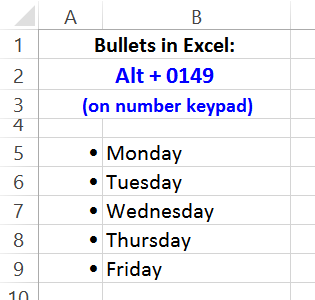
There’s no built-in feature for bullets in Excel, like there is in a Word document. Bullets are a handy feature when you’re making a list, so it would be nice to use them occasionally, in our Excel files. Even though they’re not built in, keep reading, to see how to add bullets in Excel.

Continue reading “How to Add Bullets in Excel”

Excel Macro Name Conflicts

Last week I ran into an interesting problem, when trying to fix a macro button in a client’s Excel file. I’ve created a simplified version of the workbook and button, to show you what happened.

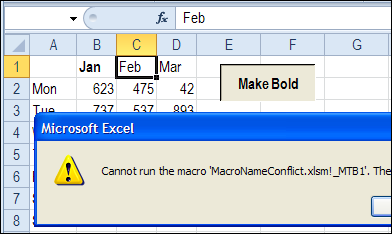
The workbook had been converted from Excel 2003 to Excel 2010, and when the macro button was clicked, it showed an error message.

  • Cannot run the macro…The macro may not be available in this workbook or all macros may be disabled.

macronameconflict01b

Other buttons in the workbook were working fine, so the macros were enabled – that wasn’t the problem.

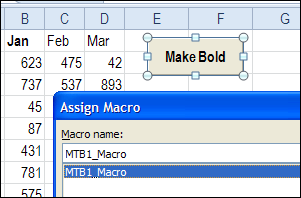
Assign a Macro to the Button

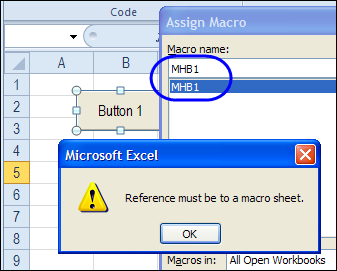
I tried to reconnect the button to the macro, but when I tried, another error message appeared.

  • Reference must be to a macro sheet.

macronameconflict02

Well, I haven’t used a macro sheet for about 10 years, so that was a bit confusing! Didn’t we get rid of macro sheets, several versions ago?

Cell Name Conflict

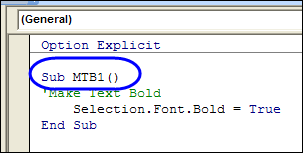
Finally, I realized what the problem was. The person who created the macro used a very short name – MBT1 – which was fine in Excel 2003, where the last column was IV.

When the file was converted to Excel 2010, the macro name became a problem, because there is a cell with the address MBT1.

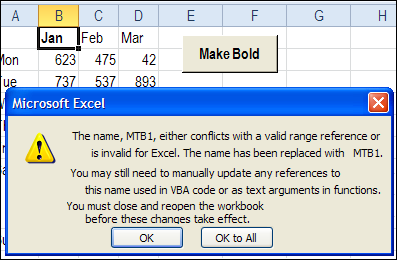
During the conversion, the button’s macro reference was automatically changed to _MBT1 to prevent a conflict with the cell reference.

macronameconflict04

However, the macro name wasn’t changed automatically – it was still named MTB1. So, the button couldn’t find a macro named _MTB1, and the error message appeared.

macronameconflict06

Fix the Macro Name Conflict

To fix the problem, I changed the macro name to MTB1_Macro, and connected the button to the renamed macro. Now, the button works correctly, and runs the macro without complaining.

macronameconflict07

Prevent the Problem

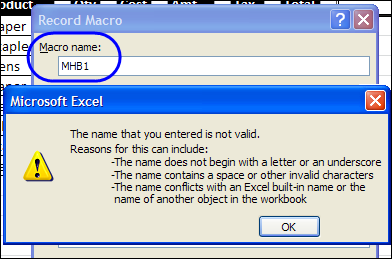
When you’re recording a macro, if you use a name that’s the same as a cell name in Excel 2010, you’ll see an error message, warning you about the name conflict.

  • The name conflicts with an Excel built-in name or the name of another object in the workbook.

macronameconflict01

Use longer names for your macros, or include an underscore, to avoid problems – now, and in the future. Who knows how many columns the next version of Excel will have?

Other Macro Naming Problems

You can also have problems running your macros if the procedures have the same name as a module in the workbook. To avoid that, start your module names with “mod”, such as modUpdate, and don’t use those names for any macros.

Have you run into any other problems with naming your macros?
____________

Words to Numbers in Excel

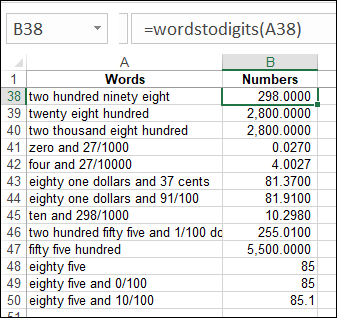
There are Excel formulas and User Defined Functions (UDF) that can change numbers into words. Those are handy if you’re typing a number into a workbook, and want the written amount to be shown, as it might appear in a cheque. Have you ever tried to do the opposite – change words to numbers in Excel?

Continue reading “Words to Numbers in Excel”

Spreadsheet Day 2011 Review

SpreadsheetDay82 Monday, October 17th, was Spreadsheet Day, and I hope you’ve recovered from all the festivities.
Thanks to everyone who tweeted about Spreadsheet Day, and a special thanks to those who made a Spreadsheet Day post on their blog. In case you missed any of the posts, here’s a list. If I omitted yours, please let me know.

Plan and Track Student Spending

Pivot tables summarize the key information in this student budget workbook, from Bob Ryan, of Simply Learning Excel.

Student Time Tracker

Keep tabs on class times and assignment workload, with my Student Time Tracker. Then, when you become a Microsoft Office consultant, you can use the same technique to track meetings and project work.

Happy Spreadsheet Day

A lesson in the perils of gambling, from Mike Alexander, of Bacon Bits blog. Using a spreadsheet to track your gambling losses doesn’t lessen the pain.

Automating Class Creation

Students attend classes, so Dick Kusleika, from Daily Dose of Excel, shows his technique for automating class creation in Excel VBA. The video demo is silent, so you can play the music of your choice, or add your own voice over.

Experiment With Excel

You don’t need extravagant plans to celebrate Spreadsheet Day. To quote The Science Goddess, “So, my advice for today is simply to go forth and double-click. Open Excel and play around.”

Celebrate Responsibly

Finally, wise words from Excel guru, and party pooper, John Walkenbach – celebrate Spreadsheet Day responsibly.
_______________

Excel Student Time Tracker: Spreadsheet Day 2011

SpreadsheetDay82 Happy Spreadsheet Day! I hope you’re making time to cell-ebrate this special day. October 17th was selected as Spreadsheet Day, because that is the date that VisiCalc was first shipped.
Student Spreadsheets

The theme for this year’s Spreadsheet Day is Student Spreadsheets. If you have uploaded a free, useful template or add-in for students, or posted a spreadsheet tip, please send me the link so that I can share it.

Or, post your links/tips on Twitter, using the hashtag — #spreadsheetday – so we can find them.

Student Time Tracker

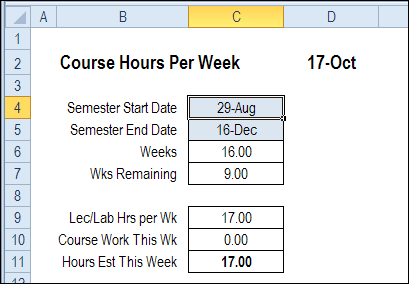
My contribution for Spreadsheet Day 2011 is a Student Time Tracker. You can keep track of your lecture hours, and course work hours, to see what the weekly totals are.

To start, you’ll enter the Semester start and end dates, in the blue cells.

studenttimetracker01

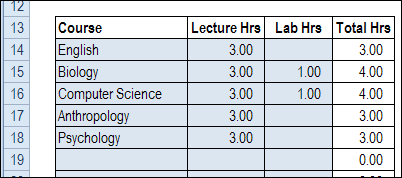
Next, enter your courses, and the scheduled lecture and lab hours per week.

studenttimetracker02

Add Your Assignments

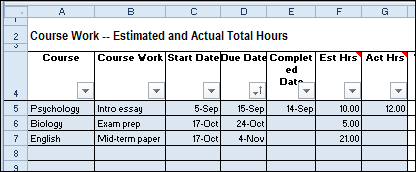
As the semester progresses, enter any assignments that you get, and other tasks, like preparing for tests and exams. As you finish your assignments, enter the completed date and actual task time. This will help you improve your time estimating skills.

studenttimetracker03

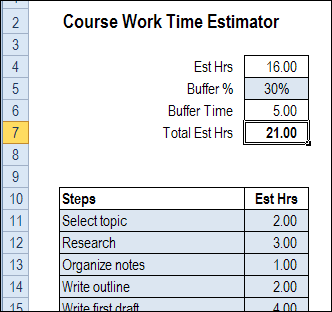
For large assignments, you can use the Course Work Time Estimator sheet, to enter all the steps, and the time each step should take. Then, add a buffer percentage, to include extra time in the estimate. This will cover all those little things that can go wrong along the way.

studenttimetracker04

Check the Weekly Hours

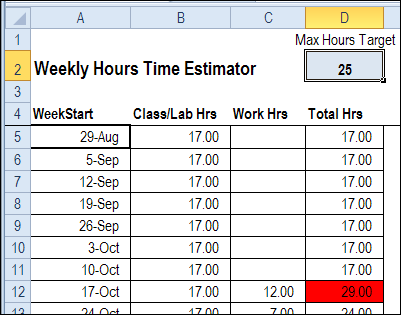
On the Weekly Hours Time Estimator sheet, you can see the total hours for each week in the semester. The Work Hours are calculated by using the SUMIF function to get the hours for each week.

At the top of the sheet, enter your target hours for each week – the maximum number of hours that you want to spend on classes and assignments.

In the screen shot below, the target is 25 hours (that’s pretty low!), and there is conditional formatting to highlight weeks that exceed that target.
If you see a heavy week coming up, you might be able to complete some assignments early, to ease the workload.

studenttimetracker05

Download the Student Time Tracker

Update 8/11/2025: For an updated Student Time Tracker, go to the Student Spreadsheets page on my Contextures site.

• To see how the time tracker works, you can download the Student Time Tracker template. Go to my Sample Files page, and in the Functions section, look for FN0037 Student Time Tracker

The file is in Excel 2007/2010 format, and zipped. There are no macros in the file.
___________________

Spreadsheet Day 2011 Preparations

SpreadsheetDay82Are you ready for Spreadsheet Day on Monday (October 17th)? I’m just back from a week of vacation, and will be working on my “Help a Student” template this weekend.

Yes, I crossed the border this week, and spent time shopping and relaxing in Rochester NY. I toured the home of George Eastman, founder of the Kodak company, and will post some photos next week.

He wasn’t a spreadsheet guy, but some of his ideas can be applied to spreadsheets.

Spreadsheet Day

I hope you’ll cell-ebrate Spreadsheet Day on Monday, and post a link to your free template, add-in or spreadsheet tip, that will help a student succeed.

The Science Goddess, on the Excel for Educators blog, has asked teachers to suggest spreadsheets that would be useful to their students. As she says to her readers, “if you don’t talk to your kids about spreadsheets…who will?”

If you need inspiration for the Spreadsheet Day challenge, wander over to the Science Goddess’ blog, and see if there are any template suggestions.

Spreadsheets Everywhere

Even on my vacation, I saw spreadsheet everywhere, like this table in the hotel. Maybe it’s just me, but those tiles look like the cells in a spreadsheet.

I’m sure that the Margaritas didn’t affect my interpretation of the table pattern. 😉

tablecells

Please Contribute

Please take a few minutes on Monday to contribute to the Spreadsheet Day cell-ebrations.

  • Post a spreadsheet tip on Twitter, with the #spreadsheetday hashtag.
  • Write an article with a spreadsheet tip for students
  • Create a student-themed spreadsheet template or add-in and post it on the internet

Remember to let me know about your post, so I can link to it on the Spreadsheet Day blog

I’m looking forward to seeing your contributions!
_______________

Plan Your Holiday Dinner in Excel

Mock me if you will, but I use Excel to plan the timing for our holiday dinners. Monday was our Canadian Thanksgiving, so it was the perfect occasion to dig the planner out again.

You know that it’s a delicate juggling act, trying to get everything cooked and on the table at the same time. Then, halfway through dinner you realize that the dinner rolls are still in the oven. Oops!

To prevent the senseless loss of dinner rolls, and help things go smoothly, I use my Excel Holiday Dinner Planner.

image

Yes, it takes a few minutes to set up, by entering all the dinner items, and the preparation steps, but it’s time well invested!

If you’re like me, and don’t vary the holiday menu too much, you can reuse the worksheet, for every holiday.

Calculate the Start Time

Once the sheet is set up, you simply select the time that you want to serve dinner, and the Excel dinner planner calculates the preparation start time.

image

Follow the List

With the planner, you’ll have a complete list of dinner items, with preparation start and end times. Follow the list, and you won’t be likely to forget those dinner rolls in the oven.

You can find more instructions, and download links, on the Excel Holiday Dinner Planner page on the Contextures website.
_________

Spreadsheet Day 2011 Challenge

spreadsheet dayIt’s hard to believe that a year has passed already, and it’s only a week until Spreadsheet Day — Monday, October 17th.

Don’t panic though, there’s still time to organize an office party, and order a spreadsheet cake.

If you have thousands of dollars in your celebration budget, you could buy a special bottle of Scotch, that is the “Excel” of the whisky world. That’s out of my league though – I’ll have a glass of Canadian wine instead.

And please keep reading, to see how you can contribute to the celebrations.

Before the Spreadsheet

Back in the old days, when I went to university, there were no laptops, or spreadsheet programs. Sad, I know. Fortunately, paper had been invented by then, so I was able to take notes, without a rock and chisel.

There was even a computer assignment in my Statistics class. No tapping on an iPad though – we ventured into the dark and dusty dungeons below the Science building, where we submitted punch cards, to run a program. Good times!

The Spreadsheet Day Challenge

Even now, with fancy gadgets and Google searches, it’s tough to manage things as a student. By mid-October, the new school year enthusiasm has worn off, and brutal reality has set in.

Students are running out of money, are tired of eating macaroni and cheese, and can’t find any clean socks. A spreadsheet can’t solve all their problems, but might help them keep organized, and stay on a budget.

Many students have Microsoft Excel, or Google Documents, or another spreadsheet, so let’s help them make good use of those tools.

To celebrate Spreadsheet Day 2011, could you create a free template or add-in, to help a student? What spreadsheet tools could a struggling student use?

  • Monthly student budget tracker
  • Course assignment checklist
  • Mark needed to pass this course calculator
  • Low cost meal planner
  • ???

If you don’t have time to make a template, you can drop by this blog next Monday, and leave a spreadsheet tip in the comments.

  • Share one of your favourite formulas
  • Post a time-saving shortcut
  • ???

Post Your Contributions

Next Monday, October 17th, post your Spreadsheet Day contribution on your blog, or Facebook, or Twitter (use hashtag #spreadsheetday), or create a public Google spreadsheet.

If you send me a link to your free and useful Spreadsheet Day tool, I’ll post it on the Spreadsheet Day Blog, to help students find your work.
Thanks! Looking forward to seeing your contributions. Will you join in?
_____________