Create Random Scenarios in Excel

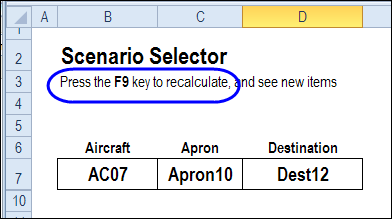
My son is in an Air Traffic Control course, and there’s lots of information to memorize. Directions have to be given in a very specific sequence, or the pilots don’t respond. Apparently, you can’t say, “Hey dude, just put it down anywhere.” No, you have to address the aircraft correctly, and specify an apron and refer to a valid destination. Or something like that!
Continue reading “Create Random Scenarios in Excel”

Excel Pivot Table Sorting Problems

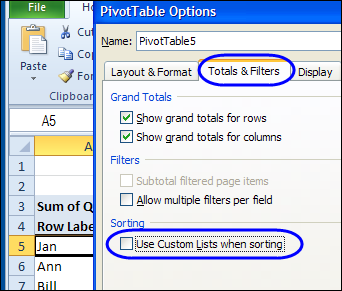
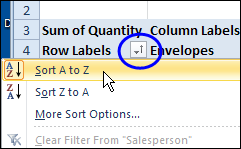
Usually, it’s easy to sort an Excel pivot table – just click the drop down arrow in a pivot table heading, and select one of the sort options. Occasionally though, you might run into pivot table sorting problems, where some items aren’t in A-Z order.

drop down arrow in a pivot table heading

Continue reading “Excel Pivot Table Sorting Problems”

Excel 2010 Print Preview Problems

Last week, you saw my macro for adding worksheet data to the Excel footer, and formatting a date in the Excel footer. In that example, you had to run the macro by going to the View tab, and clicking the Macro command.

To make the process easier, I decided to add event code to the workbook, so the macro would run automatically.

Continue reading “Excel 2010 Print Preview Problems”

Excel Footer with Formatted Date

It’s Fancy Footer Friday! Check with your boss – maybe you can leave early to celebrate.

This week, I’ve been working on Excel printed reports, and one of my clients wanted some fancy features in the footer. There are built-in footer options in Excel, but my client wanted to pull information from the worksheet, and format the date, so we needed some footer programming.
Continue reading “Excel Footer with Formatted Date”

Show Excel Comments in Centre of Window

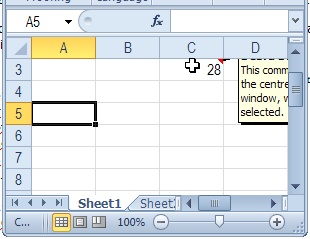
When you add comments to an Excel worksheet, they pop up to the top right of the cell, when you point to a cell with comments.

That’s fine most of the time, but if the cell is near the top or right of the window, you might not be able to read the comment.

commentcentre01

Move Comments with Macro

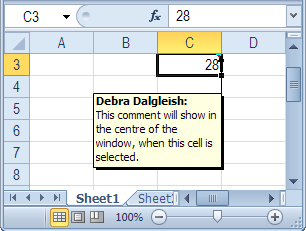
Unfortunately, you can’t control the comment’s popup position, but with a bit of programming, you can show the comment in the centre of the screen, when you click on the cell.

commentcentre02

Centre Excel Comments Code

Paste the following code onto a worksheet module. Then, when you click on a cell that contains a comment, that comment is shown in the centre of the active window’s visible range.

Private Sub Worksheet_SelectionChange(ByVal Target As Range)
 'www.contextures.com/xlcomments03.html
 Dim rng As Range
 Dim cTop As Long
 Dim cWidth As Long
 Dim cmt As Comment
 Dim sh As Shape
Application.DisplayCommentIndicator _
      = xlCommentIndicatorOnly
Set rng = ActiveWindow.VisibleRange
cTop = rng.Top + rng.Height / 2
cWidth = rng.Left + rng.Width / 2
If ActiveCell.Comment Is Nothing Then
  'do nothing
Else
   Set cmt = ActiveCell.Comment
   Set sh = cmt.Shape
   sh.Top = cTop - sh.Height / 2
   sh.Left = cWidth - sh.Width / 2
   cmt.Visible = True
End If
End Sub

More Excel Comment Macros

For more Excel comment macros, please visit the Excel Comment VBA page on the Contextures website.
______________

Calculate Distance in Excel

iconruler How do you calculate distance? In the small town where I grew up, distance was measured in blocks or travel time. For example, my school was about 5 blocks away (much further in the winter!) and my grandparents lived 5 minutes from our house – or 6 minutes during rush hour.

Longitude and Latitude

Sometimes you need more precise measurements, and Excel MVP, Jerry Latham, has an Excel user defined function that will help you. It’s designed to calculate accurate measurements, based on the longitude and latitude of your start and end points.

Why a user defined function? Unfortunately, an Excel worksheet formula isn’t accurate enough, if you need precise distances.

Jerry used to work in air traffic control, and he explains the problem with “almost” accurate worksheet formulas:

Typically they are short by some number of meters, typically about 20 to 30 feet per statute mile, and after flying just 30 or 40 miles, I wouldn’t care to land several hundred feet short of the approach end of a runway, much less be off by over 7 miles on a trip between Los Angeles and Honolulu.

Excel User Defined Function

On the Excel Latitude and Longitude Calculations page, Jerry outlines the problems with calculating distance in Excel, and describes his challenges in creating a solution.

You can read about Jerry’s journey to the final distance calculation solution, and copy Jerry’s Longitude and Latitude code to your own workbook.

Or, download Jerry’s sample file, and work with the code and worksheet examples there.
_____________