Building a Software Business

If you’re a software developer, you might be interested in this. Neil Davidson has created the Business of Software social network, “For anybody interested in building long term, sustainable, profitable software businesses.”

Getting Unstuck

Meanwhile, if you’re stuck on a project, whether it’s software or something else, the SCAMPER Random Question Tool might help dislodge your mental blocks.

To understand the theory behind the tool, you can read the SCAMPER guide.

Bring Your Laptop to Work

Last month, Dick Kusleika, at Daily Dose of Excel, said, “Get the same laptop at work that you have at home. I liked my D810 so much that when I started a new job I got a virtually identical machine. Now that my personal D810 is at Dell getting fixed, I can use my work laptop by just swapping hard drives.”
They’re using a similar idea at Citrix, where employees can buy their own laptop and maintenance plan, then use it at work, as well as home. The company provides $2100 for the purchase, but if employees leave within three years they’ll have to repay some of the money. Maintenance will be the employee’s responsibility.

What’s the advantage?

Why would you want to buy your own computer and use it at work?
I guess it’s a nice perk if you can’t afford your own computer at home, since you’d own this one after three years. Maybe the policies on what you can install are less strict than usual IT policies, so you can have games or other personal favourites on the machine.
What happens when it’s broken though? Do you use a sick day to take it to the repair shop?
Given the option, I’d leave the laptop in the company’s hands, assuming I could take it home when necessary. Life’s complicated enough, without having to be my own IT department.

What’s Your Backup Plan?

Last Thursday I asked if you use checklists, and if someone could cover for you if you were away.

Who knows enough about Excel do do those tasks?

Based on your comments, it looks like we could use some improvement in that area!

List of Excel tasks
List of Excel tasks

What About Excel Backups?

In the same vein, what about backups? What happens if you show up for work, but your key files don’t?

When I’m writing, or working on a client project, I upload all my Excel files to my online storage account at the end of the day.

That way, the current project files are available off-site, in case of fire, flood, tornado, can’t remember where I live, whatever.

At one of my clients, they have extra server disks, and the latest one is taken off site at the end of the day.

On-Site Storage

For on-site storage, the Excel files from my desktop computer are backed up overnight to an external hard drive, and the laptop files are backed up to its external hard drive.

The backup program doesn’t copy the files from the Program Files folder though, so I have to remember to do that myself, once a week(ish).

What’s Your Backup Plan?

It feels like there are holes in my backup bucket, so maybe I need to add some steps.

  • Do you have a backup routine in place?
  • Does yours copy everything, including the program files?

Where’s My Internet?

Last Friday I arrived in my office about 8:30 AM, ready to tackle several small projects, and get them sent off to clients. Full of motivation and caffeine, nothing could stop me. Nothing, that is, except a dead Internet connection. The first clue was MailWasher, lying on its back with its paws in the air. No email was coming in or going out.

Excellent! I couldn’t get to YouSendIt and upload or download client files. A client asked me to check some files on their network, but Citrix doesn’t work either, if you can’t connect to it.

So, the first hour of the workday was spent muttering, assuming the connection would be back up shortly. That didn’t happen, so I spent 1/2 hour on the phone with the ISP’s tech support, diagnosing and fixing the problem.

Apparently my static IP had become a little too static, and that was fixed by unplugging the modem for five minutes. I’ve made a note in my ISP manual, beside the tech support phone number, so I’ll remember to try that next time, before wasting my time on the phone.

Finally back in action, I managed to complete most of my to-do list. I’ll be travelling with my laptop this week, and hope it all goes smoothly. (What could possibly go wrong?)

Browser Tip

And speaking of the Internet, how have I been using the it for all these years, without knowing this trick?

  • In a web browser, press the space bar on your keyboard, to scroll down a page.
  • Shift and the space bar will scroll up a page.

Follow the List

Yesterday I compiled the Excel newsgroup statistics for September, a monthly task that entertains me, even if no one else reads them. Actually, the page gets a few hundred hits every month, so I guess a few other people find the numbers interesting too. Or maybe it’s one other person, with OCD.

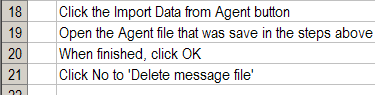
Pulling the report together isn’t too complicated, but there’s a long series of steps involved — export messages from Agent, import to Access using QDN Stats, export totals from Access as HTML files, publish in Dreamweaver.

Use a Checklist

I have a checklist in Excel, and I print that, and follow it every month. Without that list, the process would take at least twice as long, because I’d have to think about every step, and probably miss a few.

Maybe the list is too detailed, but I’d rather include the seemingly obvious items, just in case someone else had to cover for me one month. (If you’d like to volunteer, please leave your name at the front desk.)

I have a few other checklists for things that I do occasionally, and they’re real time savers. Most of the lists are stored in Excel, so they’re easy to sort and edit, and make nice little check boxes beside the items.

Check It Or Wing It?

Do you use checklists, or is your memory better than mine, and you just wing it?

Could someone cover for you, and get all your key tasks done, or is your business on hold if you’re away?

No Response

A few times a day I get email that asks for a response receipt, and it’s usually from someone I’ve never heard of, asking for help with an Excel problem. Don’t these people trust the Internet? Are they the same people who used to call to see if you got the fax they had just sent?

I always click No to the requests, because it’s nobody’s business what I’m receiving or reading. Today, I finally got annoyed enough to find out how to turn these requests off, once and for all. Annoyance>Inertia=Action.

Turn Off Response Receipt Requests

After poking around in Outlook 2003 for a couple of minutes, and clicking quite a few buttons, here’s how I did it.

  • In Outlook, click on the Tools menu, and click Options.
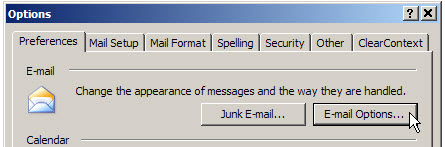
  • On the Preferences tab, in the E-mail section, click the E-mail Options button.


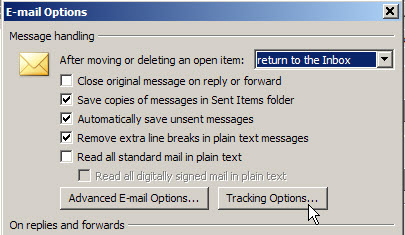
  • Under Message handling, click the Tracking Options button.

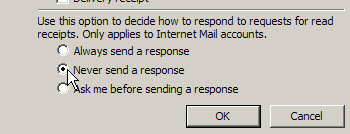
  • In the bottom section, click on Never send a response, then click OK.

  • Close all the dialog boxes, to return to Outlook.

So, if you send me an email, please don’t be concerned if you don’t receive a response receipt. Just assume that I got your email, and I’m busy writing a reply. 😉

Purging the Bookshelves

Do you have the inner strength to throw out old books?

I love computer books, and bring home way too many of them. Things were bad enough in the old days, when I had to leave my office and drive to a bookstore, in order to buy books.

Then the miracle of online shopping occurred, and now I can browse through the Amazon catalogue any time of night or day. A few mouse clicks, and there’s a pile of books headed to my front door.

The shelves in my office are crammed to capacity, and it’s time to purge some of the books, or buy new shelves. Since I’ve run out of wall space, additional shelving isn’t really an option, so purge it is.

The Toss Pile

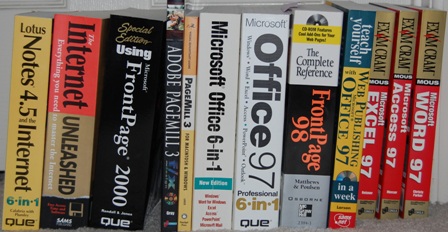
Here are some of the books I’m releasing into the wild today. The internet has changed a bit since I started using it, and I don’t use Office 97, Lotus Notes, FrontPage or PageMill these days. Judging by the publication dates, you can see that I don’t clear the shelves too often. It’s painful!

  • Teach Yourself Web Publishing with Microsoft Office 97; 1997 edition.
  • The Internet Unleashed; 1994 edition.
  • Lotus Notes 4.5 and the Internet; 1997 edition.
  • Adobe PageMill 3 f/x and design; 1998 edition
  • Special Edition Using Microsoft Front Page 2000; 1999 edition

There were several others, as you can see in the photo below. It cleared 18″ of shelf space, and reduced the load by about 30 pounds (my non-scientific estimate). Still lots that could be tossed, but this is a start.

The Keep Pile

I’m keeping this one though, because it’s an essential office reference guide:

  • The PreHistory of the Far Side; 1989 edition.

What’s in Your Toss Pile?

So, I’ve come clean. What’s on your bookshelf that’s ready for the toss pile?

Smell My Blog

According to an article in Neuromarketing, if things smell better, users assume they ARE better.

“In another study – a consumer test of shampoos – a shampoo which participants ranked last on general performance in an initial test, was ranked first in a second test after its fragrance had been altered. In the second test, participants said that the shampoo was easier to rinse out, foamed better and left the hair more glossy. Only the fragrance had been changed.”

Until I can get the smell-o-blog plugin working, please imagine the aroma of freshly baked chocolate chip cookies while you read this blog.

Maybe that’s the real reason for those annoying perfume strips in magazines.

Hmmm…should we add them to our Excel books too? Send an air freshener with every invoice? Food for thought.

I’m Not Perfect

I know — I’m more shocked than you are.

Yesterday I discovered a site where you can create quizzes and post them for others to try. So, I searched for Excel quizzes and found a few.

One quiz had the mysterious name, Excel 13-22, so I decided to try that one. I got off to a good start, and as I completed each question it told me that I had selected the correct answer. Woohoo!

I ignored minor problems, such as the misuse of Function in Question 1, and carried on.
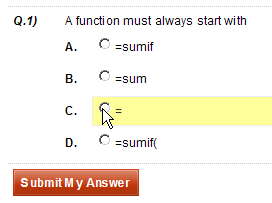

Then, things went horribly wrong. Question 18 was about chart backgrounds, but it was incomprehensible.

It was the only “fill in the blank” question, and I guessed wrong. However, the “correct” answer was in no way related to charts, so I was robbed.

Still in shock, I missed question 19 too, on how to end an argument. Since “yes, dear” wasn’t listed, I selected comma.

That was marked as wrong, but I still think I’m right. In my opinion, the question should have been “how do you end a formula?” Where do I get a refund?

Fortunately, things improved, and I got the remaining questions right. On the page where your final score appears, you can scroll down to see the correct answers, and a summary of how other participants have scored.

To my relief, not one person got the chart background question right.

If you pass, you can print out a certificate, and hang it proudly on your office wall. Here’s my certificate for a different quiz.

It had only one question, and I wrote the quiz myself, but I got it 100%!

Create Your Own Quiz

So, what questions would you put on an Excel quiz for a beginner class? I sure wouldn’t include the Natural Formula questions that were on the Excel 13-22 quiz.

You have to register for a free account if you want to create a quiz, but it was quick and easy. You can make the quiz public, or accessible only with a password. Later, you can edit the quiz, view individual results, or see a quiz summary.

If you create an Excel quiz at Quiz School and would like to share it, please post the link in the comments.

The Painful Process of Removing My Sharing Folders

When I installed Windows Live Messenger on my laptop, it also installed a folder named My Sharing Folders. Sometimes, when I try to drag a file to a different folder in Windows Explorer, it accidentally touches the My Sharing Folders, a message appears, and the copying freezes solid. Forever. Actually, I get tired of waiting after a few seconds, and use Ctrl+Alt+Delete to shut it down, and start over.

After it happened again today, I was determined to get rid of the annoying folder, but there’s no obvious way to delete it. It would make sense to right-click on the folder and select Delete from the list of commands, but it’s not available. So, the Googling started.

Failed Attempt #1

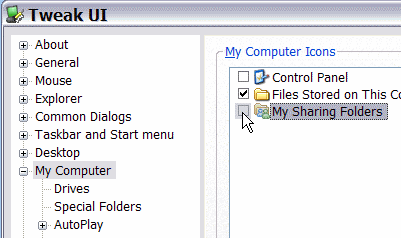
The first suggestion that I found said to install Tweak UI and uncheck the folder name in there.

No problem installing Tweak UI, or unchecking the box, but it had absolutely no effect on the folder, even after a reboot. Back to Google.

Failed Attempt #2

The next suggestion was to open Windows Live Messenger to determine its version number. I have Build 8.5.1302.1018 and of course there’s no way to copy that number onto the clipboard, so I typed it into a text file and copied from there.

Then, I closed the Help window, clicked the Windows Start button, and clicked Run.

I typed the long line below, pasting in my build number:
regsvr32 -u “%PROGRAMFILES%\MSN Messenger\fsshext.8.5.1302.1018.dll

I clicked OK, but unfortunately, that didn’t work either. All I got was an error message.

Failed Attempt #3

Back to Google, where I found a variation of attempt 2, but with a different path. I had to retype the ” which was slanted in the notes.

regsvr32 -u \”%programfiles%\\windows live\\messenger\\fsshext.8.5.1302.1018.dll

This line ran without problems, and removed the My Sharing Folders. The victory was short-lived though — the next time I restarted the laptop, it was installed again.

Success At Last

Finally, I found an article on the SuperWasp site. Their solution requires registry edits and file name changes, but it removed My Shared Folders and there was no re-installation when I restarted the laptop.

Woohoo! But why does it have to be so complicated?