Excel Backups While You Work

How do you save your file while working in Excel?

  • Do you click the Save button, and save over the previous version?
  • Do you use Excel’s AutoSave feature?
  • Or the AutoSafe utility by Jan Karel Pieterse?
  • Do you choose Save As, and save the file with a different name?
  • Something else?

Macro to SaveAsCopy

I like to have different versions of a file, so I can go back to a previous version if something goes horribly wrong.

So, I created a macro to save my files, and added a button to the Quick Access Toolbar (QAT).
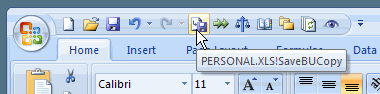
backup button on Quick Access Toolbar (QAT)

What the Macro Does

The macro saves a copy of the active file in a specified folder, adding the year, month, day, hour and minute to the file name.

For example, if the file I’m working on is named Budget2009.xls, the backup file would be named Budget2009_20081215_1008.xls if I saved it at 10:08 AM today.

NOTE: This macro does not make any changes to the active workbook, so it does NOT wipe out the Undo stack in my version of Excel. Test this on your own computer though, to make sure it’s the same for you!

The Backup Macro Code

Copy the macro below, and store it on a regular code module, in a workbook that is always open, such as the Personal Workbook.

In the code, you can change the Save directory to one that you prefer on your computer or network.

NOTE: I use C:\Backups\, but you could change that to another directory that you use.

Sub SaveBUCopy()
Dim strFile As String
Dim strName As String
Dim lExt As Long
Dim strDir As String
Dim strExt As String

strName = ActiveWorkbook.Name
strDir = "C:\Backups\"

If UCase(Right(strName, 4)) = ".XLS" Then
  lExt = 4
Else
  lExt = 5
End If

strFile = Left(strName, Len(strName) - lExt)
strExt = Right(strName, lExt)

ActiveWorkbook.SaveCopyAs strDir & strFile _
  & Format(Now, "_yyyymmdd_HhMm") & strExt
End Sub

Add Button to QAT

After you’ve added the SaveBUCopy macro to your workbook, and changed the directory name, make the macro easy to run.

To do that, follow the steps in this video, to add your macro to the Quick Access Toolbar.

There are written steps on my Contextures website — Add a Macro to the QAT.

______________________________
Why Excel Ignores Spelling Errors-Fix

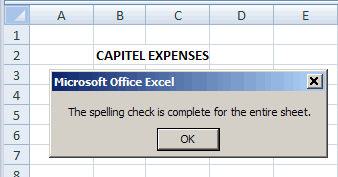
Why is Excel ignoring your spelling mistakes, like the one shown in the screen shot below? That’s not how you spell Capital!

However, the Excel message cheerfully says, “The spelling check is complete for the entire sheet.”

Spelling mistake in all caps is ignored

Upper Case Entries

If you use upper case for headings in Excel, or anywhere else on your worksheet, any spelling errors in them might go uncorrected.

That’s what happened with “CAPITEL “, in the example shown above.

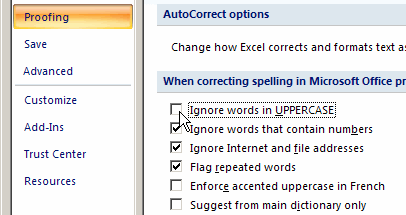
To make sure that any UPPER CASE text entries are included in a spelling check, you can change an option in Excel, as shown below.

Change the Spelling option in Excel 2007

  1. To get started, click the Office button, at the top left of the Excel window.
  2. Next, click the Excel Options button
  3. In the Excel Options window, at the left, click the Proofing category
  4. at the right, scroll down to the section, When correcting spelling in Microsoft Office programs…
  5. In that section, remove the check mark from ‘Ignore words in UPPERCASE’
  6. Finally, click the OK button, to close the Options window

IgnoreCaps

Change the Spelling option in Excel 2003

If you’re using Excel 2003, follow these steps to change the spelling setting:

  1. First, click the Tools menu, and then click Options
  2. Next, click the Spelling tab
  3. Remove the check mark from ‘Ignore words in UPPERCASE’ and then click OK

__________________

Avoiding Shared Workbooks in Excel

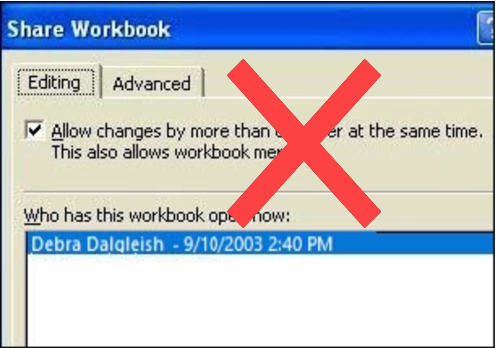
Occasionally a client asks me to create a shared workbook in Excel, so two or more employees can work in it at the same time. It sounds good in theory, but I always try to come up with a different solution.

There are many reasons for avoiding shared workbooks in Excel.

Note: See a newer version of this article: Shared Workbook Limits in Excel 2010

Continue reading “Avoiding Shared Workbooks in Excel”

David McRitchie’s Excel Pages

For many years, David McRitchie has been collecting and posting Excel information on his web site.

With over 200 pages, your can find the answer to almost any Excel question on David’s site.

There’s a list of Excel articles, and many links to other sites which have Excel tutorials, downloads and advanced Excel topics.

David’s interests have shifted over the past couple of years, and he’s now documenting Firefox features. You can find his Firefox Lessons in a new section on his web site.

Meeting for Lunch

Last week David was visiting relatives in Canada and we met for lunch on Friday. We had a great chat, and I learned quite a bit about his very interesting work history.

I had previously met David at a Microsoft MVP Summit in 2001. That was the first year I received the award, and David had been an Excel MVP since 1999.

It was good to see him again, and I hope he enjoys the rest of his visit.

Excel expert, and former Microsoft MVP, David McRitchie

=============================

Go To Special Sections of an Excel Worksheet

From what I’ve seen during visits to my business clients, Excel reports often have blank rows that separate the sections.

Those blank rows make a printed report easier to read, but they make extra work if you’re trying to work with the data!

One example of the extra work that blank rows can cause is shown below.

Adding a Formula Column

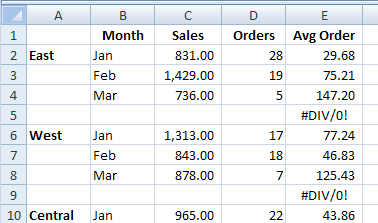
While working on a client’s Excel report, I needed a new formula in each row, to calculate the average price per order.

Here are the steps that I followed:

  • First, I entered this formula in cell E2, to calculate the average price per order:
    • =C2/D2
  • Next, I selected cell E2, and formatted it as a number, with 2 decimal places
  • Then, I selected cell E2, and copied it down to the last row in the report.
    • That was quicker than pasting the formula into each little section in a long report.

Formula Error in Blank Rows

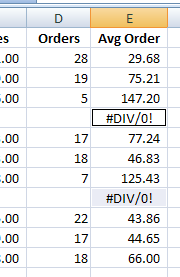
Now all the blank rows have a #DIV/0! error in the new column, because Excel doesn’t like to divide by zero.

I didn’t want the formula in those rows, so I used Excel’s Go To feature to quickly clear the cells that contain errors. (steps in next section)

Formula Error in Blank Rows

Excel Go To Special

Here are the steps to select all the cells with formula errors.

  • First, select column E, where the average order formula was added.
  • On the Excel Ribbon, click the Home tab.
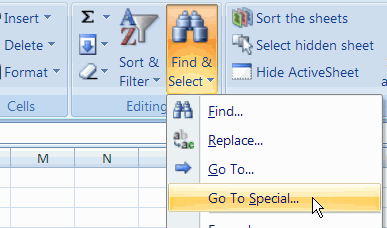
  • Next, in the Editing group, click Find & Select
  • In the drop-down menu, click Go To Special.
    • In Excel 2003 and earlier versions, click Edit►Go To, and click the Special button. The keyboard shortcut for Go To is F5.
Go To Special command on Excel Ribbon

Go To Special Dialog Box

When the Go To Special dialog box opens, follow these steps:

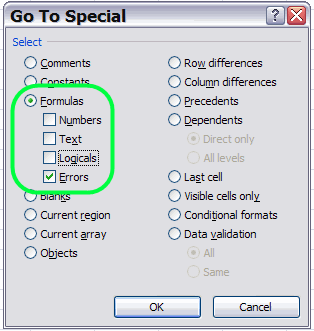
  • In the Select section, click the radio button for Formulas.
    • You want to go to the cells that contain a formula, where the formula results in an error.
  • Under Formulas, remove all the check marks except for Errors
  • Next, click the OK button.
Go To Special Dialog Box - Formula Errors
Go To Special Dialog Box – Formula Errors

Clear Selected Error Cells

When you go back to the Excel worksheet, only the formula error cells are now selected.

  • To clear the selected cells, press the Delete key on your keyboard.
formula error cells selected on worksheet

Other Uses for Go To Special

As you can saw in the Go To Special dialog box above, there are many types of special cells you can select on a worksheet.

The video below shows one “Got To Special” technique that I use frequently – finding blank cells in a column, and filling them in.

For the written steps, and an Excel workbook, go to the Fill Blank Cells page on my Contextures site.

________________________________
Excel Most Recently Used Files Add-In

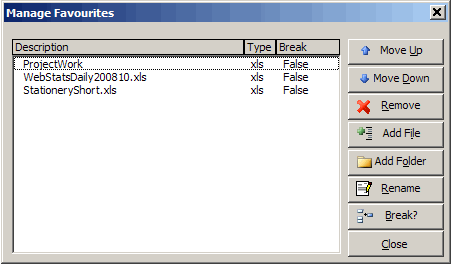
As you work in Excel, the files that you’ve used most recently appear at the bottom of the File menu — Mort Recently Used Files (MRU).

  • The default number of files that appear in the MRU list is 4
  • You can increase the MRU number to 9, if you follow the steps below.

If you’d like to see even more recently used Excel files, take a look at the free Excel add-in, described below
Continue reading “Excel Most Recently Used Files Add-In”

Your Customized Excel Toolbars

Yesterday I posted a tip for adding the Refresh All button to the PivotTable toolbar, so you can quickly update all the pivot tables and queries in a workbook.

Move Toolbar Buttons

In the comments, Jan Karel Pieterse mentioned that he can press Ctrl+Shift, or hold the Alt key, then drag toolbar buttons to a different toolbar. I can’t get that Ctrl+Shift shortcut to work, but often use the Alt key to adjust toolbars on the fly.

In another comment, AlexJ described how he moves well-hidden menu commands, such as Show Formula Auditing Toolbar, to a toolbar, so they’re easier to use. Great idea!

See What Is Locked

Besides the Refresh All button, there are a few others that I add to my Excel toolbars.

For instance, when I’m creating data entry forms it helps to know if a cell is locked or unlocked.

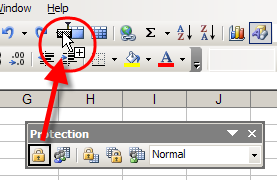
I copy the Lock Cell button from the Protection toolbar to my Standard toolbar (Ctrl+Alt, then drag the button).

When I click on a cell, the Lock Cell button shows the cell’s current setting, and I can click that button to lock or unlock the cell. Very handy!

Move Lock Cell button to Different Toolbar

More Buttons for Toolbars

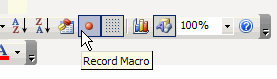
I also add the Record Macro and Visual Basic Editor buttons.

Those are copied from the Visual Basic toolbar, and Toggle Grid from the Forms toolbar.

Record Macro and Visual Basic Editor buttons

What Buttons Do You Add or Remove?

  • Are there any standard command buttons that you always add to your toolbars when you install Excel?
  • Any standard command buttons that you always remove, because you never use them?

If you’d like to share a screen shot of your toolbars, upload it somewhere like TinyPic.com, and paste a link in your comment.

Or, if you’re feeling adventurous, you can open this Google Spreadsheet, choose Insert>Picture, and paste the picture link in there. I have no idea how well this will work, but it might be an interesting experiment!

[Update] Bryony’s Excel Toolbars

Thanks to Bryony who uploaded a screen shot of her Excel toolbars. Here’s how she described them:

  • The colourful ones at the bottom in the middle are a few little macros, the toolbar to the left is my custom one. I have taken a load off the standard bars as I absolutely never use so many of those features. I have my screen resolution set quite high, so I have quite a bit of space left!

Wow, Bryony, that is amazing — the sign of a dedicated Excel expert!

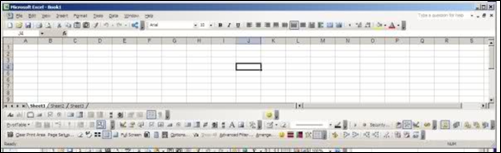
Bryony's customized Excel toolbars
Bryony’s customized Excel toolbars

Quickly Customize an Excel Toolbar

In one of the Excel newsgroups last week, someone asked how they could update several pivot tables at the same time. They were tired of selecting each pivot table separately, and clicking the Refresh button.

Refresh All Button for Pivot Tables

In an Excel workbook you can refresh all the pivot tables and queries if you click the Refresh All button.

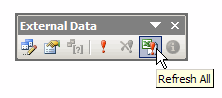
That button is on the External Data button, which appears automatically if you click in a cell that’s part of an external data range.

Refresh All Button External Data Toolbar

Add to PivotTable Toolbar

However, if you don’t have any external ranges in your workbook, you can add the Refresh All button to the PivotTable toolbar, so it’s easy to find and click.

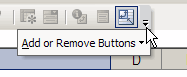
The quickest way to add this button is to click the Toolbar Options button at the end of the PivotTable toolbar.

Floating Toolbar

If the toolbar is floating, you’ll see a large triangle to the left of the Close button.

  • Click that triangle, then click the Add or Remove Buttons command
  • In the pop-up menu, click on PivotTable
ToolbarAddButtonsDocked Toolbar

If the toolbar is docked, there’s a small triangle in the bar at the end of the toolbar.

  • Click that triangle, then click the Add or Remove Buttons command
  • In the pop-up menu, click on PivotTable

ToolbarOptionsAdd the Button

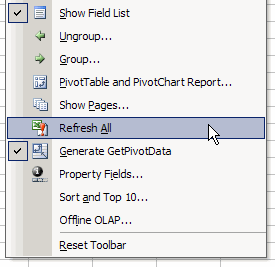
After you click the PivotTable command, you’ll see a list of all the standard commands that can be added to the PivotTable toolbar.

  • Click on Refresh All, to add it to the toolbar.

ToolbarRefAll
Now, when you want to update all the pivot tables, just click the Refresh All button.

Change UserName in Excel Comments

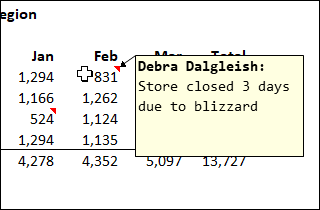
When you insert a comment in Microsoft Excel, your user name is shown in bold at the top of the comment.

Perhaps your name has changed, or you’ve inherited a computer that has someone else’s name in it.

How can you change the name that appears when you add new Excel comments on a worksheet?

User Name in Excel Comment

Change the User Information

NOTE: The User Name is common to all the Office applications, so if you change it in one program, all the others will be automatically updates.

I like to change the user information in Word or PowerPoint, because those programs store the user’s initials as well as the user name.

Excel just stores the user name, but you can change the name there, if you prefer.

  1. Open Microsoft Word
  2. Click on the Tools menu, then click Options.
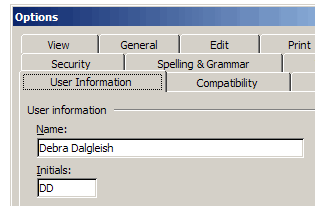
  3. Click the User Information tab.
  4. Change the User Name and Initials
  5. Click the OK button, to close the dialog box.

Note: The revised information will be used in all of the Microsoft Office applications on your computer

Change the User Name and Initials

Updating Old Comments In Excel

In Excel a comment shows the user name by default, at the top of the comment.

After the comment is created you can edit the comment, to change or delete that name.

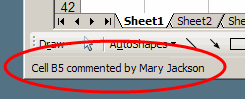
Comment Name in Status Bar

The status bar also shows the user name when you point to a cell that contains a comment.

If you edit a comment or change a user name, the name in the status bar does NOT change.

The status bar continues to show the user name from the time that the comment was inserted.

Excel Macro to Replace Name

To change the name in the status bar, you can run an Excel VBA  macro, like the ChangeCommentName macro shown below.

  • NOTE: In the ChangeCommentName code, replace the text strings “New Name” and “Old Name” with the new and old user names on your computer.
strNew = "New Name"
strOld = "Old Name"

ChangeCommentName Macro Code

Store the following code in a regular code module in your Excel workbook. Run the macro when you need to change comment names.

Sub ChangeCommentName()
'replaces old names in comments
'deletes and reinserts comments
'  so new name appears in status bar
'www.contextures.com/xlcomments03.html
Dim ws As Worksheet
Dim cmt As Comment
Dim strOld As String
Dim strNew As String
Dim strComment As String
strNew = "New Name"
strOld = "Old Name"
Application.UserName = strNew
For Each ws In ActiveWorkbook.Worksheets
  For Each cmt In ws.Comments
    strComment = Replace(cmt.text, strOld, strNew)
    cmt.Delete
    cmt.Parent.AddComment text:=strComment
  Next cmt
Next ws

End Sub

Get the Excel Comment Workbook

To get the Excel sample file with several macros for working with Excel comments, go to the Excel Comment Macros page on my Contextures site.

Insert or Delete Cells with AutoFill

Here are a couple of quick Microsoft Excel tips for you . Try these tips a few times today, and maybe you’ll still remember them by Monday.

Insert Cells With Toolbar

I often have to insert a few cells in a list, so here’s how I would do that, using the Excel Toolbar commands:

  • First, select a range of cells
  • Next, on the Excel toolbar, choose Insert►Cells
  • In the list, click Shift cells down
  • Finally, click OK.

That method works very nicely, but it’s four clicks. I don’t have time for four clicks!

Insert Cells With Mouse

Recently I learned that you can quickly insert cells with a mouse shortcut!

Here are the steps:

  • First, select a range of cells, in a single row or column
  • Next, press the Shift key on the keyboard
  • Then, on the worksheet, point to the AutoFill handle, at the bottom right corner of the active cell
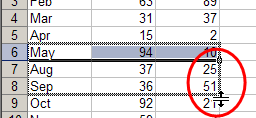
  • Next, drag the AutoFill handle in any direction, to insert cells.
    • You can drag up, down, left or right, to insert cells in any direction.

Blank cells are inserted, and the other cells shift, to make room for the new cells

Insert Cells With Mouse Shortcut

Delete Cells With Mouse

You can use a similar technique to delete cells too.

Here are the steps:

  • First, select the range of cells that you want to delete
  • Next, press the Shift key on the keyboard
  • Then, on the worksheet, point to the AutoFill handle, at the bottom right corner of the active cell
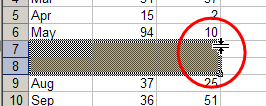
  • Next, drag the AutoFill handle up, over the selected cells, to grey out the cells..

The cells are deleted, and the cells below shift up

Delete Cells With Mouse