
Here are a couple of quick Microsoft Excel tips for you . Try these tips a few times today, and maybe you’ll still remember them by Monday.
Insert Cells With Toolbar
I often have to insert a few cells in a list, so here’s how I would do that, using the Excel Toolbar commands:
- First, select a range of cells
- Next, on the Excel toolbar, choose Insert►Cells
- In the list, click Shift cells down
- Finally, click OK.
That method works very nicely, but it’s four clicks. I don’t have time for four clicks!
Insert Cells With Mouse
Recently I learned that you can quickly insert cells with a mouse shortcut!
Here are the steps:
- First, select a range of cells, in a single row or column
- Next, press the Shift key on the keyboard
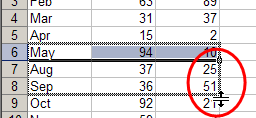
- Then, on the worksheet, point to the AutoFill handle, at the bottom right corner of the active cell
- Next, drag the AutoFill handle in any direction, to insert cells.
- You can drag up, down, left or right, to insert cells in any direction.
Blank cells are inserted, and the other cells shift, to make room for the new cells
Delete Cells With Mouse
You can use a similar technique to delete cells too.
Here are the steps:
- First, select the range of cells that you want to delete
- Next, press the Shift key on the keyboard
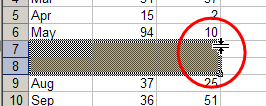
- Then, on the worksheet, point to the AutoFill handle, at the bottom right corner of the active cell
- Next, drag the AutoFill handle up, over the selected cells, to grey out the cells..
The cells are deleted, and the cells below shift up
Is there a way to create a program that inserts cells automatically? For example I am working on a 4×4 matrix for names and adresses. Below that I have another 9×9 matrix for a different application.
When I am working with the 4×4 matrix and get to the fourth row, can I have a program that inserts a cell automaticallly? Help!!!!!!!!!!!!!