
Happy Spreadsheet Day 2017! You’ve been waiting all year for this special day to arrive, I’m sure, so what will you do to celebrate today?
How to Fix Excel Data Bars
To make a chart right in the worksheet cells, use Excel Data Bars, built with conditional formatting. See how to add a standard set of Data Bars (Excel 2007 and later), and adjust their settings to make the bars look better.
And remember to mark your calendars – next Tuesday, October 17th, is Spreadsheet Day – alert your family and friends!
Multiple Copies of Pivot Table Sheet
If you need to make a quick report, Excel has a built-in command that makes multiple copies of a pivot table – one for each item in a Report Filter. See how that feature works, its limitations, and a macro that will copy the entire sheet, not just the pivot table.
Compare Pivot Table Values As Percentages
As you know, pivot tables are a quick and easy way to summarize a huge table of data in Excel. With just a few clicks, you can create totals for thousands of rows of data, without writing a single formula. Then, with filters and Slicers, zero in on specific parts of the data. But there’s an underused feature that you might be missing – do you know how to compare pivot table values as percentages?
Continue reading “Compare Pivot Table Values As Percentages”
Excel Hyperlinks Run Command Files
You can use Excel hyperlinks to navigate through a workbook, go to web pages, open other Excel files, and even open PDF files. However, if you try to use an Excel hyperlink to run command files, you’ll run into problems. Until now! Here’s how J.Woolley uses hyperlinks, with a background macro, to avoid those problems – and a other problems too. He also found a strange hyperlink bug.
Looking Back -Early Versions of Excel
While clearing some of the boxes in the basement, I found a stack of old MacUser and MacWorld magazines. A couple of issues had articles on early versions of Excel (it started on the Mac) , so that was a good excuse to stop working, and flip through the magazines. I wasn’t resting, I was researching! Here are some pro tips from Excel 1.0, and a review of the exciting new features in Excel 2.2, and new feature lists from Excel 2007 and beyond.
Excel CONVERT Function With Drop Down Lists
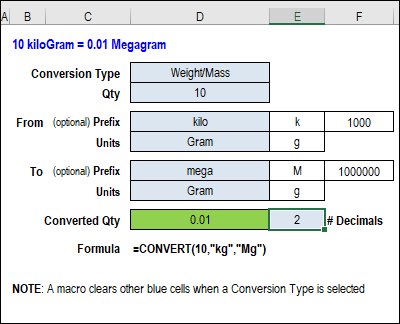
With the Excel CONVERT function, you can change quantities from one measurement type to another. For example, a hot day in Celsius looks even worse in Fahrenheit! Get my updated workbook for the CONVERT function, with drop down lists for category, units and prefixes.
Continue reading “Excel CONVERT Function With Drop Down Lists”
Save Space With Excel On Demand Slicers
In one of my sample files, you can select criteria for an Advanced Filter with Slicers. There are 3 Slicers at the top of the sheet, and an output range below that. And now, AlexJ has created a compact version of that technique, with the Slicers hidden until you need them. (He’s on a mission to rid the world of space-hogging Slicers.)
Excel Pop Up Selector Tool With Slicer
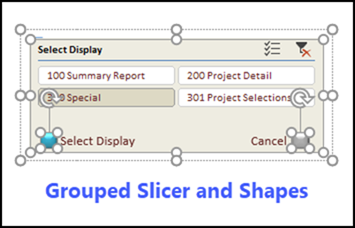
Slicers make it easy to select from a list of items, but they take up valuable space on your worksheet. To get the benefits of a Slicer, without the real estate cost, AlexJ made this Excel Pop Up Selector – it’s hidden until you click the small button on the sheet, and disappears again, after you use it.
Learn More About Power BI and Excel
If you’ve been using Excel since the Stone Age (like me!), you might be avoiding Power Query, Power BI, and all those other “Power-y” tools that the kids are using now. However, those tools aren’t going away, and pretty soon your employer, or your clients, will expect you to know something about them. Here’s how you can learn more about Power BI, to see what all the fuss is about.