While working on an Excel 2003 worksheet, you might want to colour a few of the cells, change the font colour for the text, or add borders to a range of cells.
Select a Fill Colour
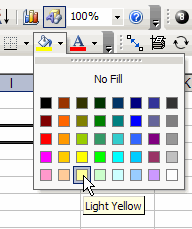
To add colour, you select a cell, click on the drop-down arrow at the right side of the colour button on the toolbar, and click on a colour.
This process is simple enough, but all those trips up and down from the toolbar can get a bit tiring, and take extra time.
To Save Time, Move the Palettes
If you have lots of formatting to do, it will be easier if the palettes are closer to the area where you’re working.
You can detach the palettes from the toolbar, and move them onto the worksheet.
- Note: This feature is not available in Excel 2007, or later versions.
Move Excel Palette
To move one of the “tear away” palettes (Font Color, Fill Color, or Borders), follow these steps:
- On the toolbar, click the drop-down arrow, to open the palette.
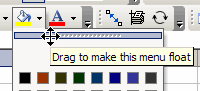
- At the top of the palette, point to the thin grey bar.
- When your pointer changes to a four-headed arrow, drag the palette down onto the worksheet.
Close a Floating Palette
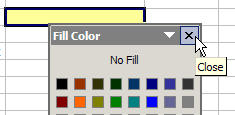
When you’ve finished working with the palette, click the X at its top right, to close it.
Video: Move Excel Toolbar Colour Palettes
And here’s a short video, if you’d like to see the steps for moving one of the Excel 2003 palettes.