
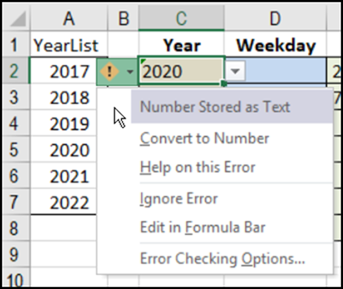
Let’s file today’s blog’s post under “Obscure Excel Problems”. I heard from Y.B., who was using my Data Validation Combo Box, and numbers were being entered as text. The code is supposed to fix them, so why was it failing?
Split Address With Excel Formulas
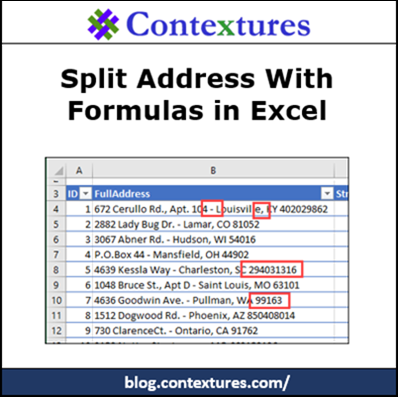
If a cell contains a full address, what formulas would you use to show the street address, city, state and zip code in separate cells? That was the challenge that I gave to my weekly newsletter readers. A few rows of the sample data are show below, and you can download the “Split Address with Excel Formulas” sample file, to see all the data.
Excel Skills for Specialists
What are the key Excel skills for specialists in your profession? Are there specific functions or features that you use all the time? If someone wanted to improve their Excel skills to prepare for a job in your area, what would you tell them?
Excel Roundup 20170601
In this month’s Excel roundup, you’ll find links to a few of the interesting articles that I’ve read recently, and links to new or updated Excel resources. Shortcuts, favourite functions, a sing-along, and many more tips.
Hide Used Items in Excel Drop Down List
You can add a drop down list in a cell, to make it easy for people to enter data. It’s really easy to make a simple drop down. Then, after you’ve made a basic list, experiment with fancier features, like hiding items that have been previously selected.
Excel Filter to Match List of Items
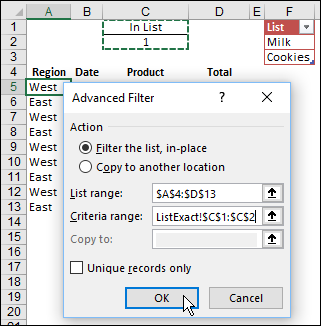
To make it easy to filter for several different items, you create a list of those items on a worksheet. Then, filter your data based on that list, so you don’t have to check all the items manually each time.
Compare Weekdays in Fiscal Year Summary
In the retail businesses, some days of the week are busier than others. So, if you’re looking at year over year sales, it’s not too helpful to compare sales for a specific calendar date, because they’ll fall on different weekdays. With a few calculations, you can set up a summary that lines up the weekdays, so you can get a better comparison.
Excel Roundup 20170504
There’s always something new and interesting to learn in Excel. Here are some of the articles that I’ve read recently, and links to new and updated Excel resources.
Excel Price Lookup Date Product Name
If there’s just one price per product in an Excel lookup table, you could use the INDEX and MATCH functions to to get that price. But what if the price changes occasionally, and your pricing list has multiple dates and prices for each product? How can you do a product price lookup based on invoice date and product name?
7 Ways to Round in Excel
It’s not usually as obvious as the error in the screen shot below, but have you ever seen Excel adding things up incorrectly? No wonder some people take out a calculator, to check the totals! Your trusty old calculator wouldn’t tell you that 2+2=5.