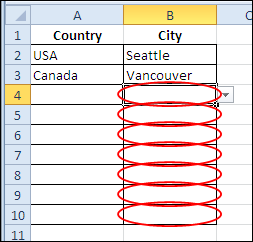
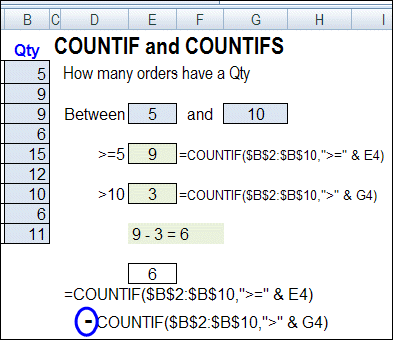
In Monday’s blog, you saw how to make simple dependent data validation drop down lists. After creating the drop downs, you added some flexibility by using the IF function in the data validation formula. See a couple of problems that can occur when you refer to other cells in your data validation, and those cells are blank.
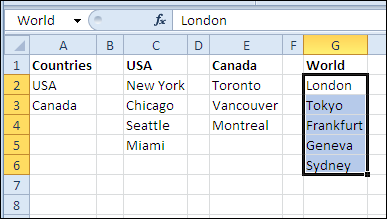
You can use data validation to create drop down lists in Excel. With a bit of Excel magic, you can create dependent drop down lists, so the selection in one drop down controls what appears in the next drop down. You’ll see different drop down lists in the same cell!
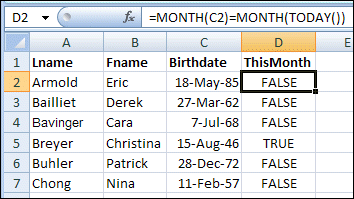
August seems to be a very popular birthday month among my Excel friends. I won’t mention any names here, because most of them are quite elderly, and the shock might upset them. 😉 Anyway, to all of them, and you, if you’re celebrating this month — happy birthday!
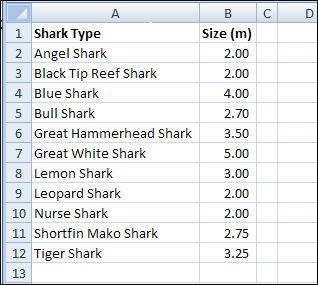
It’s Shark Week on the Discovery Channel, so here are a couple of handy Excel functions you can use in case of a shark attack. Of course, if you stay home and watch television, you should be safe. The infamous land shark rarely attacks.
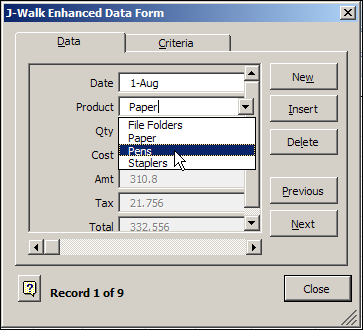
Someone emailed me last week about problems with a range named Database. For reasons known only to the hamsters that operate my brain wheels, that reminded me of Excel’s Data Form.
It’s a built-in data entry tool, that lists all the fields in a table, with entry boxes for some fields, and the formula results showing. You can scroll through the records, or find specific records, based on criteria. Continue reading “Built-In Excel Data Form Tips and Quirks”
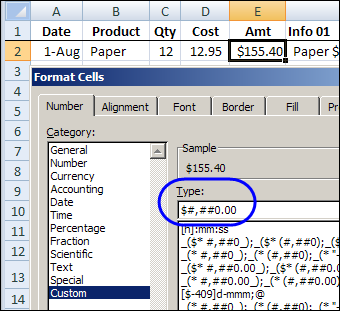
Good news, if you’re spelling challenged — or too lazy to type long words. You can combine cells in Excel, without CONCATENATE function. Keep reading, to learn the easy way to combine cells, and add some fancy formatting to the dates and numbers.
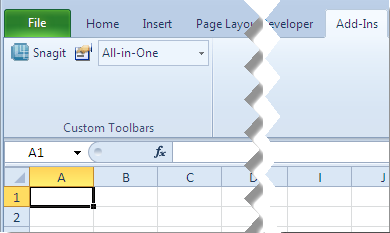
In Excel 2003, you could create a custom toolbar, and attach it to a specific workbook. I didn’t use that feature, but occasionally I receive a workbook where someone has attached a toolbar.
Keep reading, to see how you can delete a custom toolbar from the Excel Ribbon, if you don’t want to see it.
Mike Alexander, Microsoft Excel MVP, and madcap owner of DataPig Technologies, is interviewing Excel people this summer, and posting the interviews on his Bacon Bits blog. Lots of fun!
Here’s the only picture that I have of Mike, and apparently John Walkenbach has a photo of me.
Scene Stealing Squirrel
It’s funny, that picture reminds me of something, but I can’t quite remember what it is.
Hint: In case you haven’t seen online photos with that squirrel added, it was a popular Internet Meme for a few months. You can read about “Crasher Squirrel” on the Know Your Meme website.
John Walkenbach with Crasher Squirrel
The Interview Questions
Mike sent each of us a list of thought-provoking questions, then published our answers, along with his astute comments and career-enhancing photos.
This week it was my turn, and you can read the results here: DataPig’s Interview with Debra Dalgleish
Update: Mike’s website is no longer online, so I’ve found the interview on the WayBack machine, and posted at the end of this page.
Interview Photo
The first picture in Mike’s article was from a Microsoft conference that I attended in 2008.
As you can see below, I’ve already given the poor guy beside me a headache.
I’m surprised that my lightning-fast throat chop was captured on film. Or, it might not have been a throat chop. I might have been telling someone how much frosty beverage to put in my glass.
Who Plays You in the Excel Movie?
One of Mike’s interview questions was “Who plays your role in a movie about Excel?” You’ll have to read Mike’s article to see my answer.
And what about you? When they make “Excel: The Movie”, who will play your role?
____________
Mike Alexander’s Interview with Debra Dalgleish
Update: Mike’s website is no longer online, so I’ve found the interview on the WayBack machine, and posted it below, for historical reference (and a bit of humour).
It’s summer time and blog readership will be down. So I’m saving my good Excel and Access tricks for later. Right now, I m continuing a series called ‘Road of the Excel Bastards’.
This is my take on a series called Road of the Excel Masters started a long time ago by Excel MVP, Colo. In his series, he would interview Excel gurus, asking them Excel related questions.
In my version, I’m asking questions that have nothing to do with Excel. Let’s get to know our Excel gurus through the prism of 10 stupid questions.
Today’s Excel Bastard is Debra Dalgleish!
Here is Debra about to throat chop an unsuspecting victim.
Debra is the Canadian purveyor of one of the most outstanding Excel sites out there, Contextures.com, and a published author of several Excel books. What can I say about Debra? On the surface, she looks like a very serious person, but she is really just a kid at heart, up for anything fun and interesting. I bet I could talk her into ringing on doorbells then running away.
Here is my ground-breaking interview with Debra Dalgleish, Excel Guru.
DataPig: What’s your favorite thing in your refrigerator right now?
Debra: Beef tenderloin and champagne. Oh, never mind, they’re gone now.
It’s late – so Debra just whipped up a quick tenderloin and champagne meal…nothing fancy.
DataPig: Red Shirt or Blue?
Debra: No preference – please send either colour.
DataPig: How many hats do you have?
Debra: Author, blogger, consultant, mom, annoying friend….too many hats to count.
Good news – there IS a hat made specifically for annoying book-writing moms who own their own consulting business.
Here it is.
DataPig: Who plays your role in a movie about Excel?
Debra: Chuck Norris
Yeah…that makes sense.
DataPig: Which Superpower do you want: Invisibility, Flight, Strength, or Mind Reading?
Debra: Afraid of heights, no point in lifting things, can already read minds, so that leaves invisibility. Could be fun.
DataPig: What’s the title of your autobiography?
Debra: Of Mice and Men
DataPig: Who do you like better, Tom or Jerry?
Debra: Ben.
DataPig: What’s the most important part of the sandwich?
Debra: The right amount of salt
DataPig: What’s the Best thing you ever ate?
Debra: A tossed salad. I know – I’m surprised too.
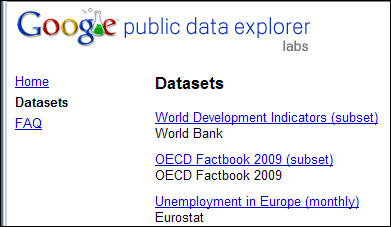
If you’re doing Excel training, or writing blog posts, or creating sample files, you might need to find some public sample data to use in Excel files. Here are a few sources to check.

 Mike Alexander, Microsoft Excel MVP, and madcap owner of DataPig Technologies, is interviewing Excel people this summer, and posting the interviews on his Bacon Bits blog. Lots of fun!