Show Full Menus in Excel

On my own computer, I like to see the full menus in Excel, so I selected that setting:

  1. On the Tools menu, click Customize
  2. On the Options tab, add a check mark to Always Show Full Menus

However, when visiting a client, I sometimes have to use another person’s machine, and I don’t like to change their settings.

Temporary Full Menus

If the full menus option has not been turned on, here’s what happens:

  • When you click on an Excel menu, a double chevron may appear at the bottom of the menu.

Then, to see the full Excel menu, you can:

  • click on that chevron
  • OR, wait a few seconds, and the full menu will appear.
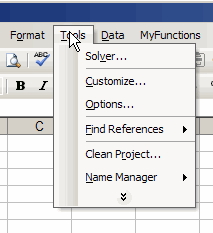
Compact menu with 2 chevrons at bottom

Quick Trick for Full Menus

And here’s a way to avoid waiting to see those full menus.

I like to do this, if I’m on someone else’s computer, and not sure if full menus are enabled:

  • To quickly view the full menus, double-click on the menu name
Add a Border Line

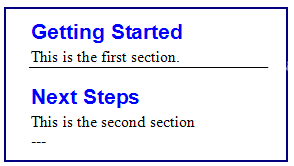
While typing a document in Microsoft Word, you usually have your hands on the keyboard. To add a line border, you can reach for the mouse, click on the border tool drop-down, then click on a border.

A quicker way to add the line is to type three hyphens (—), then press Enter.

To add a thick border, use three underscores (___) and to add a double border tpe three equal signs (===).


If this technique doesn’t work, choose Tools ► AutoCorrect Options. On the AutoFormat As You Type tab, add a check mark to Border Lines, in the Apply As You Type section.

Change a Comment’s Shape

To add some visual interest to a worksheet, change a comment’s shape from its default rectangle.

Here are the steps to change a comment shape in Excel 2003:

  1. Right-click the cell which contains the comment.
  2. Click on Edit Comment
  3. Click on the border of the comment, to select it.
  4. On the Drawing toolbar, click the Draw button
  5. Click on Change AutoShape, and click on a category.
  6. Click on a shape to select it.
  7. When finished, click outside the comment.

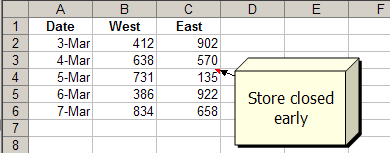
In this example, the Cube shape was selected from Basic Shapes. It looks a bit like a “big box” store!

changed comment shape to 3-d box

Don’t Change Too Many!

I wouldn’t change the shape of too many comments on a worksheet, or it could be very distracting and possibly confusing.

Just do this for one or two comments, that you want to stand out from the others.

__________________

Clean Up Your Excel Dictionaries

While rushing through a spell check in Excel, you accidentally added an incorrect word to your custom dictionary. Now that it’s in there, how do you get it out?

If you’re adventurous, you can use a text editor, such as NotePad, to modify the dictionaries, which are found in:

C:\Documents and Settings\YOUR_NAME\Application Data\Microsoft\Proof

Or, you can modify the list in Microsoft Word, which I find easier:

  • In Word, choose Tools ► Options
  • On the Spelling & Grammar tab, click Custom Dictionaries
  • Select a dictionary in the list, and click Modify
  • Scroll through the list, and click on the word you want to remove
    (to select multiple words, press Ctrl and click)

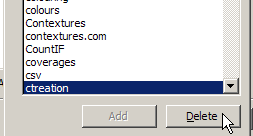
  • Click the Delete button
  • When finished, click OK
  • Close the dialog boxes

Free Consumer Publications

The Federal Citizen Information Center (FCIC) web site offers a wide variety of consumer and business publications that you can order for a nominal fee, or view many of the publications online.

You can find tips on everything from computers to tree pruning to international travel. The web site also lists scams and recalls, and has links to other consumer and business resources.

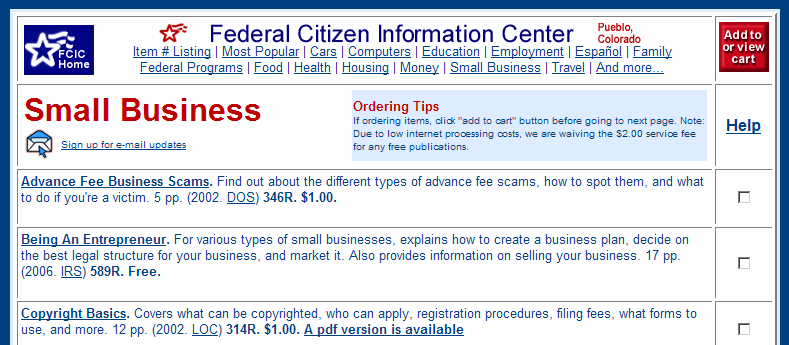
It’s a good place to start if you’re researching a new topic. For example, here’s the page on small business publications.

Contact a Human in Customer Service

When you have to contact customer service at a large company, you might end up in an endless voice mail loop.

To contact a human, you can check the database at the GetHuman web site, and follow the instructions listed there.

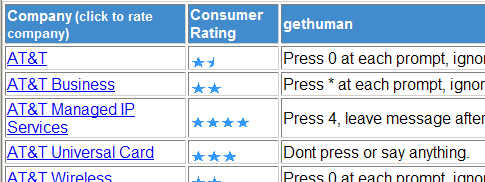
For example, I typed AT&T as the company name, and a list of phone numbers and contact instructions appeared.

Free Backup Software

From June 2-8, the full version of NTI Shadow 3 backup software is available free. Regularly $29.99, this software makes backups as you work, so you can save important documents onto a removable drive, such as a thumb drive, for safekeeping.

The program has received fairly good reviews, with some complaints of slow copying, and it may need to be started manually if you restart your computer.

However, at this price you can afford to test it for yourself, and see if it meets your needs.

Move Quickly With Excel Shortcuts

In an Excel worksheet, you can use the keyboard navigation keys (Home, End, arrow keys) to move up down or sideways. There are mouse shortcuts too!

Keyboard Navigation Shortcuts

Here are a few keyboard shortcuts, to help you move through the worksheet cells, quickly:

  • Right ………. Tab
  • Start of worksheet …… Ctrl + Home
  • End of worksheet  …… Ctrl + End
  • Start of row ………. Home
  • Up/ down screen … Page Up/ Down

Work in Excel List

The following keyboard shortcuts help you make smaller movements through a range of cells on an Excel sheet:

  • Select current range …… Ctrl + *
  • Move to range border ……. Ctrl + arrow
  • Move down ………. Enter
  • Move up ………. Shift + Enter
  • Move right ………. Tab
  • Move left ………. Shift + Tab

Mouse Navigation Shortcuts

If you’re a mouse user, like I am, a quick way to navigate is to:

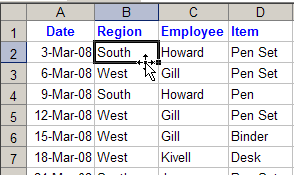
  • point to the border of the active cell
  • when the pointer changes to a 4-headed arrow, double-click.

That will take you to the end of the list in that direction, stopping just before the first blank cell.

point to the border of the active cell

More Excel Shortcuts

For more time-saving Excel shortcuts, go to the Microsoft Excel Shortcuts List page on my Contextures site.

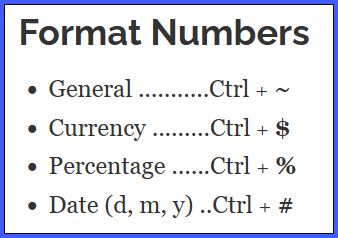
Excel Keyboard Shortcuts - Number Format
Excel Keyboard Shortcuts – Number Format

Clean Up Your Browser Bookmarks

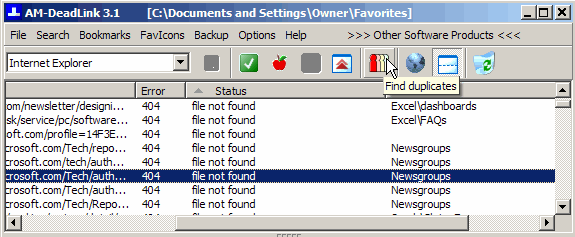
The free utility AM-Deadlink can find dead links and duplicates in your list of browser bookmarks.

I run it on my machine every couple of months, to clean things up and save me from wasting time in following dead links. You can download the utility here: AM-Deadlink

It’s easy to install and use, and takes only a couple of minutes to check my 1600 bookmarks. Then I sort the list by error number, and delete any 404 pages.

Effective Financial Reports

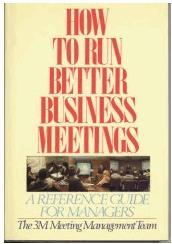
Although the book is out of print, the advice from the 3M Meeting Management Team, in How to Run Better Business Meetings, is still pertinent.

  • “The controller is the diagnostician who determines when and where the company is ill.
  • The manager is the surgeon who operates on that ailment.
  • The surgeons need a diagnosis, and not a course in anatomy. The simpler and more focused the [financial] presentation, the better.
  • The most creative job the financial presenter can do is select the meaningful data and present them in sharp focus.
  • This makes for shorter, more lively presentation, and does a better job of preparing the managers for their work as surgeons.”