Find Office Files with Keywords

When you save a Microsoft Office file, you can store keywords to help you find that file later.

For example, when you’re creating an estimate for a client’s Excel project:

  • In Excel, click on the File menu, and click on Properties
  • On the Summary tab, enter Estimate, Excel in the Keywords box, then click OK.
add keywords in Excel properties

Later, you can use one or more keywords to find relevant files:

  • In Excel, click the Open button on the toolbar.
  • At the top right of the Open dialog box, click the arrow on the Tools button
  • Click Search

  • In the Search dialog box, click the Advanced tab.
  • From the first drop down, select Keywords
  • Enter a keyword in the third box, and click Add

  • Enter more keywords, or any other search criteria, including location.
  • Click the Go button, to start the search.

Tidy Up Your Excel Charts

If you’ve created several reports in an Excel workbook, you might want to line them up and make them all the same size before printing.

Instead of doing this manually, you can download and install Jon Peltier’s free Align Chart Dimensions utility.

There are installation instructions on Jon’s site.

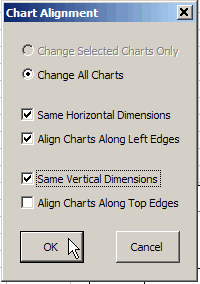
After you install the add-in, you can select specific charts, or let the utility align all the charts on the sheet.

Check the options to align and resize the charts, then click OK, and your report is ready.

Repair an Excel File

If you’re having problems with an Excel file, using the built-in repair feature might fix the problem.

For example, doing this repair procedure can help when:

  • data validation drop down arrows don’t appear
  • there are other signs of corruption, such as frequent crashes, or Excel freezes

Repair Excel Workbook

To repair an Excel workbook, follow the steps below:

  • First, close the problem file, but leave the Excel application open
  • Next, in Excel, choose File►Open
  • Locate and select the file
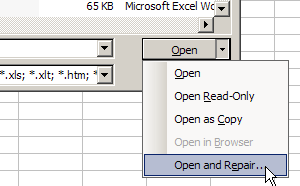
  • In the Open window, at the bottom right corner, click the arrow at the right side of the Open button
  • In the drop-down list, click on the Open and Repair command
click on the Open and Repair command

Complete the Repair

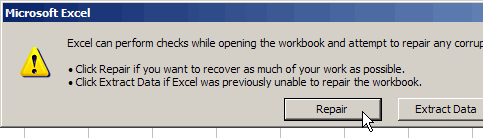
  • When prompted, click the Repair button.
  • Then, open the Excel file again, to see if it looks okay
Excel message - click the Repair button
Excel message – click the Repair button

Make a Backup!

I hope the repair was successful, and your Excel file is working correctly now. If so, be sure to make backup copies of your work!

If the repair was not successful, you can follow the same steps, but click Extract Data instead.

You might be able to retrieve all of the data, at least, or parts of the data.

And again, remember to make frequent backup copies of your work!

Find the Mouse Pointer

When working on my laptop, especially with a second monitor plugged in, it’s sometimes hard to find the mouse pointer. Too often, this happens in the middle of a meeting, while I’m trying to demonstrate something to a client.

To make the pointer easier to find, you can use one of the built in features:

  • Click the Start button on the Windows taskbar, and click on Control Panel
  • Double-click on the Mousecontrol, to open the Mouse Properties dialog box
  • Click on the Pointer Options tab
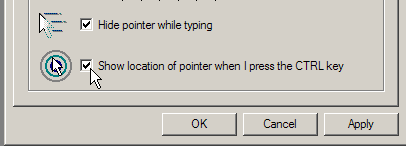
  • Add a check mark to Show Location of Pointer When I Press the CTRL Key

  • Click OK
  • Close the Control Panel window.

The next time you lose the pointer, press the Ctrl key, and circles will flash on the screen, showing its location.

Email Response Templates

If you frequently type the same responses to email questions, you can use an email response template to make things easier.

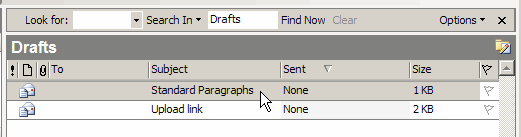
  1. In Outlook, create a new email, with the Subject “Standard Paragraphs”
  2. Leave the To and From boxes blank
  3. Paste in your most frequently used paragraphs.
  4. Save the message, and close it.

Next time you need one of the standard responses, open the Standard Paragraphs draft message, copy a paragraph from there, and paste it into your current email.

Make Meetings Productive

Some great advice is found in Getting Real, by 37signals. For example, they advise against holding meetings, whenever possible, but…

“For those times when you absolutely must have a meeting (this should be a rare event), stick to these simple rules:

  • Set a 30 minute timer. When it rings, meeting’s over. Period.
  • Invite as few people as possible.
  • Never have a meeting without a clear agenda. “