Excel Timetable for Your Holiday Dinner

Happy Thanksgiving, if you’re celebrating today! Our Canadian Thanksgiving was last month, so I don’t have to worry about organizing a big dinner today.

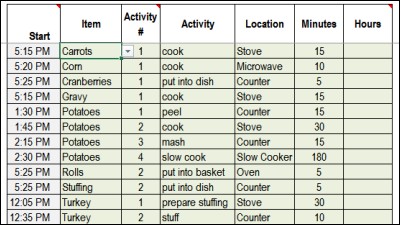
If you’re responsible for getting the family meal on the table today, you can use my Excel Holiday Dinner Planner.

Excel holiday dinner timetable template

Yes, it takes a few minutes to set up, by entering all the food items, and the preparation steps, but it will be worth the effort! You probably don’t vary the holiday menu too much, so you can reuse the worksheet, year after year.

Calculate the Start Time

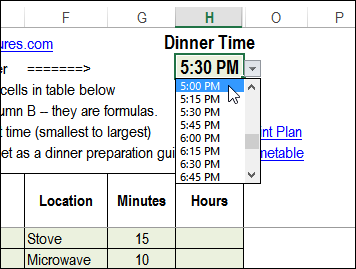
After you enter all the dinner items, go to the top of the worksheet, and select the time that you want to serve dinner. Automatically, the Excel dinner planner calculates the preparation start time for each item.

Select the dinner start time

Follow the List

With the planner, you’ll have a complete list of dinner items, with preparation start and end times. Follow the list, and you won’t be likely to forget those dinner rolls in the oven, or leave the cranberry sauce in the fridge.

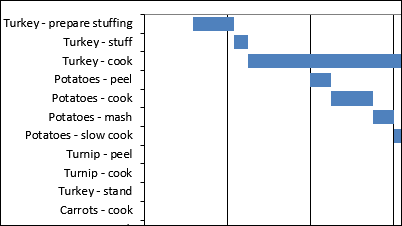
You can print a list, or a Gantt chart version, to show the preparation schedule.

Gantt chart to show dinner preparation schedule

You can find more instructions, and download links, on the Excel Holiday Dinner Planner page on the Contextures website.

Enjoy your Thanksgiving dinner!

Happy Thanksgiving!
Happy Thanksgiving!

_________________

Remove Duplicates in Excel 2013 List

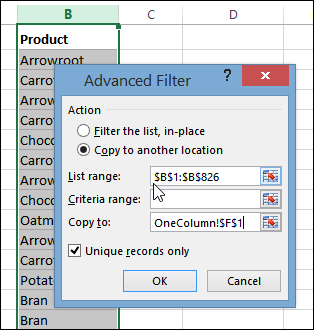
If I need a list of unique items from a long list, I usually use an Advanced Filter, because it leaves the original list alone, and extracts a list of unique records.

The filter can be done in place, or sent to another range, on the same sheet, or a different sheet. It’s easier in newer versions of Excel though – here’s how to quickly remove duplicates in Excel 2013.

Continue reading “Remove Duplicates in Excel 2013 List”

Excel Roundup 20131125

Forget that old-fashioned mouse! Now you can control Excel during a presentation, by using your phone. Well, assuming that you have Excel 2013, and a Windows phone.

There is a link to the Office Remote app download page in the Excel Articles section below.

Contextures Posts

Here’s what I posted last week:

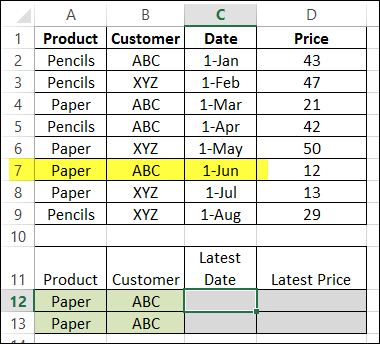
  1. Use MAX and IF with multiple criteria, to find the latest date that a product price was changed, for a specific customer.
  2. Set up a pivot table so it shows missing items, and add temporary data, if necessary.
  3. No, it’s not the best way to present data, but if you have to make a pie chart, keep it simple and easy to read.
  4. Finally, for a humorous peek at what other people are saying about Excel, read this week’s collection of Excel tweets, on my Excel Theatre blog.

Other Excel Articles

Here are a few of the Excel articles that I read last week, that you might find useful:

  1. The IT Faculty of the Institute of Chartered Accountants in England & Wales has posted a draft version of their Twenty Principles for Good Spreadsheet Practice, and they would like your feedback.
  2. Microsoft Research just released its Office Remote application, which lets you use your Windows phone to navigate through an Excel 2013 workbook during a presentation.
  3. On the Visual.ly blog, someone shared their map of Australia and a column chart, both created by colouring worksheet cells.
  4. It doesn’t have to be complicated! Learn an easy way to make bullet charts and boxplots in Excel, on the Excel Charts Blog
  5. If you’re using APIs to pull data for Excel apps, be sure to format the numbers correctly. The Office Developer Team shares some sample code.
  6. Instead of using macros, add a hyperlink to a shape, for workbook navigation. Mynda Treacy shows the steps.
  7. When you’re programming an Excel file, it’s nice to have a quick way to open the workbook, with everything unlocked and ready to edit. Scott Lyerly shares his trick for adding a back door to your Excel files
  8. Do you love pivot tables? Data journalist, Nassos Stylianou loves them too, and shares a few tips on the Digitally Focused blog.
  9. If you need to calculate the last day of any month, you can use Chandoo’s simple formula.

What Did You Read?

If you read any other interesting Excel articles last week, that you’d like to share, please add a comment below.

Please include a brief description, and a link to the article.

___________________

Using MAX IF With Multiple Criteria

Excel doesn’t have a MAXIF function, but we’re able to create our own version, by combining the MAX and IF functions. But how about a bigger dream – MAX IF with multiple criteria? Could we create our own MAXIFS function too, with multiple IFs?

Continue reading “Using MAX IF With Multiple Criteria”

Excel Roundup 20131118

There’s always something new to learn about Excel, and it’s good to be reminded of a few old tricks.

For example, I’m sure you know that you can’t make a holiday meal without a spreadsheet, as this video shows. The spreadsheet section starts at the 1:57 mark, and continues a little later.

Contextures Posts

Here’s what I posted last week:

  1. Use MAX and IF to find the latest date that a product’s price was changed. Then, using the product name and that date, we can find the latest price for the product – even if it isn’t the highest price.
  2. After you create a pivot table, select one or more fields, and run this macro to change all the selected fields to SUM. Other fields are left unchanged.
  3. To look for external links in an Excel file, you can use a free add-in – FindLinks. Or, follow a few steps, and try to fix the links.
  4. Finally, for a humorous peek at what other people are saying about Excel, read this week’s collection of Excel tweets, on my Excel Theatre blog.

Other Excel Articles

Here are a few of the Excel articles that I read last week, that you might find useful:

  1. Do you ever use the Window key on your computer keyboard? Chandoo shows how to use it as a quick way to paste as values
  2. For the perfect Christmas (or Thanksgiving) meal, be sure to use a spreadsheet! Read about the spreadsheet man in Sainsbury’s Christmas commercial, and you can download my holiday meal planner here.
  3. Do formulas that refer to their own sheet calculate faster than formulas that refer to other sheets? Charles Williams runs a few tests, and is surprised by the results.
  4. Even if you aren’t a cricket fan, take a look at the Excel dashboard that Chandoo created as a tribute to retiring player, Sachin Tendulkar.
  5. If you ever get a list of dates and tasks in Excel, Jimmy Pena (JP) show how to create Outlook tasks from that list, by using Excel VBA.
  6. If your data isn’t set up correctly, you can’t build a flexible pivot table. Microsoft’s Power Query add-in makes it easy to “unpivot” your data, and Ken Puls shows the steps on his Excel Guru blog.

What Did You Read?

If you read any other interesting Excel articles last week, that you’d like to share, please add a comment below.

Please include a brief description, and a link to the article.

_________________

Get Latest Price for Specific Product

In a previous article, we combined the MAX and IF functions, to find the highest price for a specific product. Today we’ll use that technique to find the latest date that a product’s price was changed. Then, using the product name and that date, we can find the latest price for specific product – even if it isn’t the highest price.

Continue reading “Get Latest Price for Specific Product”

Excel Roundup 20131111

Here are a few of the Excel articles that I read last week, that you might find useful:

Microsoft has improved the Office Web Apps, and you can read the details on the Excel Team’s blog. The feature that looks most interesting to me is the real-time collaboration in Excel files — you can’t do that in the desktop version.

If you use the MOD operator in Excel VBA, you could run into problems with large numbers. Chip Pearson suggests some alternative formulas and code that you can use.

Dick Kusleika ran into some problems while running code on a pivot table that has calculated items. Lots of problems are caused by pivot table calculated items, in my experience!

If you read any other interesting Excel articles last week, that you’d like to share, please add a comment below.

Please include a brief description, and a link to the article.

________________________