How to Count in Excel

There are lots of different ways to count things in Excel – maybe you need to count the numbers in a column, or all the data, or just the blank cells. Fortunately, there is a function for each of those:

  • COUNT
  • COUNTA
  • COUNTBLANK

For example, to count the blank cells in the range A1:A5, use the following formula in cell A7:

=COUNTBLANK(A1:A5)
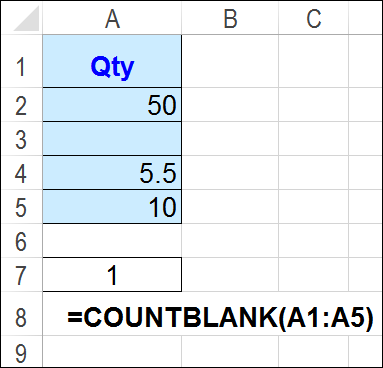
count blank cells www.contextures.com

More Complicated Counting

If you have more complicated things that you need to count, there are other functions to do the job:

  • COUNTIF
  • COUNTIFS
  • SUBTOTAL
  • AGGREGATE

For example, to count only the visible numbers, after filtering and/or manually hiding rows in a list, use a SUBTOTAL formula. This example uses 102 as the second argument, so it counts numbers only, in the visible rows (filtered or manually hidden).

=SUBTOTAL(102,B2:B10)

In the screen shot below, there are 5 visible numbers in cells B2:B10, and that is the result in cell B15, where the SUBTOTAL function is used.

The COUNT function, used in cell B12 in the screen shot below, returns 8 – it counts numbers in the hidden rows too.
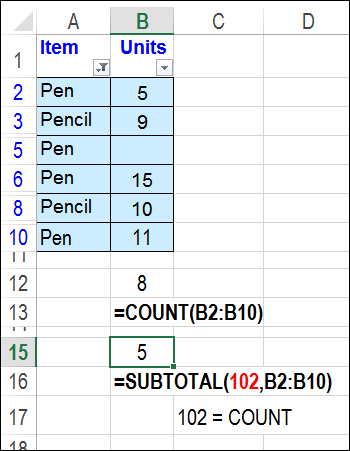
count visible numbers www.contextures.com

Watch the Slide Show

To see a quick overview of 7 ways to count in Excel, you can watch this short slide show. It also contains a video on using the COUNTIFS function. You can see more examples on my Excel Count Functions page, and download the sample file.

Count Specific Items With COUNTIF Function

This video shows how to use the COUNTIF function to count cells that
contain a specific string of text, such as “Pen”.

_____________________________

Find and Fix Pivot Table Source Data

After you create a pivot table, you might add or change records in the source data. Sometimes the pivot table does not update correctly, to show the new data. Or if you’ve inherited the pivot table file from someone else, you might not even be able to find the source data, in a large workbook.

To help with these problems, I’ve added a new page on my Contextures site, with tips for finding and fixing the source data for a pivot table.

Continue reading “Find and Fix Pivot Table Source Data”

Excel Roundup 20150316

In this short video, Sara Silverstein shows how to analyze several years of NCAA revenue data, by using a pivot table. Can you predict which sport brings in the biggest revenues?

Or watch on YouTube: Use Excel pivot tables to analyze massive data sets

Contextures Posts

Here’s what I posted recently:

  • For a humorous peek at what other people are saying about spreadsheets, read the latest collection of Excel tweets, on my Excel Theatre blog.

Other Excel Articles

Here are a few of the Excel related articles that I read recently, that you might find useful.

  • Aaron Souppouris takes a look at the new Office 2016 for Mac preview. He suggests that you try it, and warns you to “keep Office 2011 around for the important stuff.”
  • Which would you choose to have in your workbook – an Excel Table, or Custom Views? Gašper Kamenšek would like to have both!
  • In last week’s roundup, Doug Glancy suggested a great story about data interpretation, in an excerpt from the book, How Not to be Wrong. Scroll down to the section titled, Abraham Wald And The Missing Bullet Holes.
  • Is your budget spreadsheet a bully? Kathleen Elkins, at Business Insider, found a way to conquer hers, and find a bit of happiness.

Excel Announcements

Here are some upcoming events, courses, recently published books, and other new items, related to Excel.

Excel Summit

  • Amsterdam Excel Summit, April 13-15, 2015. Mark your calendar for April 13-15, so you can attend this amazing Excel event. Last year’s summit was an outstanding success, and this year should be even better! You can click here to register.

Share Your Events and Articles

If you read or wrote any other interesting Excel articles recently, or have upcoming Excel events, please let me know. Thanks!

Weekly Excel Roundup http://blog.contextures.com/

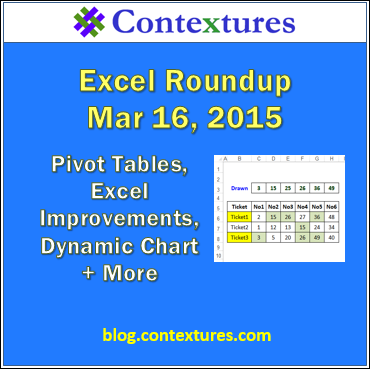
Highlight Winning Lottery Numbers

No, I’ve never won the lottery, but that’s probably because I don’t buy lottery tickets! Your odds of winning improve (slightly) if you actually have a ticket for the draw.

However, there are many workplaces where someone has organized a weekly lottery pool, and they have a batch of ticket numbers to check.

Instead of checking those numbers manually (and missing one or two!), you can use Excel to check them for you. It won’t even ask for a percentage of your prize money, if you are lucky enough to win a prize.

Continue reading “Highlight Winning Lottery Numbers”

Excel Roundup 20150309

Last week, we saw a preview of Tableau’s Elastic app for spreadsheets. This week, you can see another beta add-in – BigPicture, from Palisade. It looks like Visio combined with Excel’s built-in drawing tools and SmartArt graphics.

Currently, you can download a free copy of the beta, to try it out (Windows only, Excel 2007 or later).

Watch this short video, to see how it works — the demo starts at the 1:30 mark.

Continue reading “Excel Roundup 20150309”

Excel Roundup 20150302

Spreadsheets are already fun, but Tableau wants to make them even more exciting, with its newest smartphone app, Elastic. In this video, Tableau’s VP of Mobile & Strategic Growth, Dave Story, opens a spreadsheet file (csv format) from his inbox, and shows how Elastic works.

I don’t see any information about the expected release date or pricing.

Continue reading “Excel Roundup 20150302”

Excel Roundup 20150223

The cover slide in this presentation, with its 3-D column and pie charts, led me to believe that the content wouldn’t be too useful. However, a different person must have prepared the remaining slides, because they have some useful tips.

The last slide shows that the content is from Mike Alexander’s book, Excel Dashboards & Reports for Dummies, which was published last year.

Continue reading “Excel Roundup 20150223”