What Business Can Learn From Baseball

In Moneyball: The Art of Winning an Unfair Game, author Michael Lewis details how Oakland A’s general manager, Billy Beane, used statistical data to create a winning team on a small payroll.

In 2007, NetSuite invited Billy Beane onto their board of directors, and have improved their sales process by using his data analysis techniques.

In the GigaOM blog, Carleen Hawn outlines their five tips for “managing by the numbers.”

  1. Just start measuring it.
  2. Reduce the number of systems you use.
  3. No such thing as a wrong metric.
  4. Consistency is king.
  5. Trust your data.

Back To School

In my neighbourhood, the kids head back to school next week, and the fall session has already started in other school districts. Maybe you’ve thought about taking a few courses yourself, but don’t have the time or energy to get to evening classes, or there’s no school nearby.

If it’s just the experience that you’re looking for, and not the credits, you can attend courses online at a few major universities. There are no fees, and courses are stored online so you can listen to them on demand.

For example, Berkeley has a broad range of courses, with podcasts and webcasts that you can access. To help you remember to attend, you can subscribe to the RSS feed of any event or course.

Maybe I’ll do the Introduction to Statistics, to brush up on those long forgotten skills.

Or the Modern Poetry course at Open Yale Courses might be an easier place to start.

Office 2007 Bulk File Conversion

There are many tools available to help you prepare for migration to Office 2007. The 2007 Office Resource Kit has white papers, books and other tools that you can download, such as the Migrating to Excel 2007 white paper.

One of the tools is the Migration Planning Manager kit, which contains an Office File Converter that will do a bulk conversion of your Office XP or Office 2003 files.

By converting the files to the newer version, you’ll be able to use all the new features, without individually converting each file as you open it.

The Migration Planning Manager utility and release notes are available for download on the Microsoft website. Also, Doug Mahugh describes the process in detail on his Office Interoperability blog.

Batch Resize Graphics With Shrink O’Matic

How many times has this happened to you? You have a graphic. You’re trying to find an exciting new way to prepare it for your blog or website.

You could scale the graphic, remove the graphic’s tail, head and bones, and serve the graphic as you would any other graphic dinner. But why bother, now that you can use Rovco’s amazing new computer tool, the Super Shrink O’Matic ’08.

Yes, graphic user, the days of troublesome scaling, cutting and gutting are over, because Super Shrink O’Matic ’08 is the tool that lets you use the graphic with no gif waste, and without scaling, cutting or gutting.

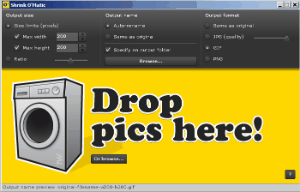
Here’s how it works: Catch a graphic, remove the hook, and drop the graphic – that’s the whole graphic – into the Super Shrink O’Matic ’08. Now, adjust the control dial so that the graphic is blended just the way you like it.

Yes, it’s that simple!


With apologies to fellow Canadian, Dan Aykroyd, and the legendary Bass-O-Matic.

The Business Side of Twitter

Sure, you can use Twitter to let everyone know what you had for lunch, or all about football practice, or what you fished out of the swimming pool, and plenty of people do just that.

However, you can also use Twitter to ask for feedback, share links, or give quick updates on your business or industry. If you listen, you might pick up some ideas that you can turn into blog posts, or apply in your business.

Find and follow a few people in your industry, and a few others with interests in a different area. Stick with them for a little while, and if they’re boring, or too chatty, move on, and find a couple of new people.

I follow some Excel colleagues, business associates, friends, and a few people in marketing, which is an area that I want to learn more about. If you’re looking for someone fascinating to follow, you’ll find me here. 😉

A couple of days ago I found TwitterFeed, which sends your blog feed to Twitter. This might help a few more people find your blog and become subscribers.

It requires an OpenID login, so I had to set that up, but the rest was very easy. Now, once a day, my new blog posts appear as Twitters.


For everything you ever wanted to know about Twitter, check the Twitter Fan Wiki. It has lists of users, groups, related applications, and tons of other tips and ideas.

Catalogue Your Books at LibraryThing

Use the free web application, LibraryThing, to catalogue your books, see what people with similar tastes are reading, and share reviews.

There’s also an Early Reviewers program in which publishers provide free advance copies of books, for members to review. However, there are many more requests than copies available for most books, so your chances for a free book are slim.

Sign up is quick and easy — just enter a user name, password, and optional email address. With the free membership you can catalogue up to 200 of your books. For a $10 annual or $25 lifetime membership you can catalogue an unlimited number.

Update: 2020-03-29 — Library Thing is now free for everyone.

To add a book to your catalogue, just enter a few words from the title, or other info.
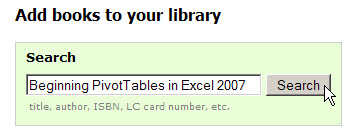

Click Search, and LibraryThing will return a list of matching items. Click on a book in the list, and it’s added to your library. You’ll see how many other members have added the book, and any reviews they’ve written.

There are over 480,000 members, and 30 million books catalogued, so you’re bound to find a few people whose collections are similar to yours.

Other features include special interest groups and a Local Connection page, that shows events, libraries and bookstores in your area.

If you’re an author, you can connect with your readers, and participate in an Author Chat. You can import a wish list from Amazon, or other sources, and export your library as a CSV or tab-delimited text file.


Learn Languages Online from the BBC

If you’ll be travelling soon, you might want to learn a few key phrases of another language before you go. Free language lessons are available online, at the BBC website.

It’s good to see Nick’s tax dollars hard at work.


It’s too late to learn much Mandarin before the Olympics are over, but you can study French, Urdu, Welsh, Japanese, and many other languages.

The Quick Fix page has a list of essential holiday phrases that you can print or download as an mp3 file.

Take these along on your travels and you’ll be able to say “Sorry, I don’t speak Albanian,” “We were robbed,” or “Danger! Avalanche!”

Excel Fashion Statement

This Saturday, when you’re relaxing at home after working with Excel files all week, what will you wear?

This Equations t-shirt looks like the perfect choice.


And next week, when you head back to the office, you might find this Calculator Belt Buckle useful.

The ad claims that it’s “Great for accountants, cheaters or math geeks alike.” And what could possibly be wrong with that?

Back Up Your RSS Feed

Every day, I skim through a long list of blog posts, in Google Reader. I’ve accumulated the items in my list over a few years, and would hate to lose it.

Now I’m sure that the fine people at Google take very good care of my feed, and I don’t have to worry about it. However, just to be on the safe side, I make a backup copy of the feed every couple of weeks or so.

Then, it’s on my computer, and gets backed up onto the external drive too. Belts and suspenders might not be fashionable, but they can prevent embarrassing situations.

Here are the steps for exporting a backup file from Google Reader. Other RSS readers should have something similar. This technique is also useful if you decide to change to a different RSS reader.

You can export from the old one, and import in the new one. If Google ever disappears in the middle of the night, and I have to go back to Bloglines, I’ll be ready.

Export an RSS Feed

  • Log in to Google Reader, and click the Settings link.

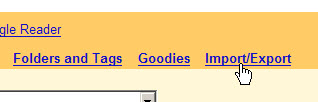
  • Click on the Import/Export link

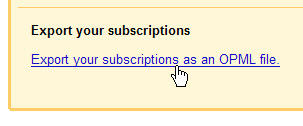
  • Click the Export button

  • Select a folder, and save the file. That’s it!