Technogeek Dream Coat

Why have I been making do with three pockets, when I could have 19? Or 39? Who knew there were special clothes for technology lovers?

Here’s the rodeo coat, which has 39 pockets. Might come in handy, even if you don’t plan to attend a rodeo.

As you can see, it’s a final close out, so act fast! Remember, this blog is dedicated to helping you save time and money.


The SCOTTEVEST people realize that women are technology lovers too. I need this vest, with its 21 handy pockets.

I’ll pass on the Hidden Cargo Pants though, thanks anyway.

Find WiFi While Travelling

When you’re travelling, you probably bring your laptop, so you can do some work and keep up with your email. Some of the ritziest hotels that I’ve stayed in charge for daily access to their wireless network, or you can trudge down to the lobby for free access.

At other, mid-priced hotels, the access is sometimes free. If you’re paying an exorbitant rate for the room, can’t they throw in a couple of dollars worth of wifi?

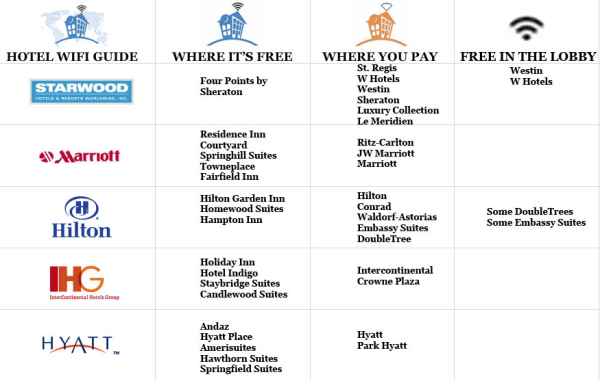
If you’re planning a trip, the following chart, from Book of Joe, shows which hotel chains have free access, and which chains charge for it, or make you balance your laptop on your knees in the lobby.


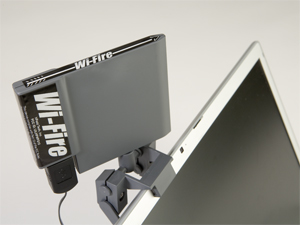
If you have trouble finding a nearby wireless network, the Wi-Fire might help you find something a bit further away.

I haven’t tried it, but there have been many times that it would have been very useful.

Are You Ready for Metered Internet?

If you had asked me a few days ago, how much I download and upload each day, I’d have had no idea. Apparently some cable companies in the USA are testing metered internet service.

I haven’t seen this mentioned for Canadian companies, but if it works in Texas, it will probably arrive here soon enough. If you know your current usage, you’ll be able to select the best plan for your needs.

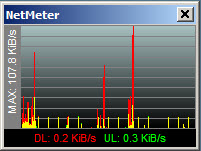
To measure your daily transfer rates, you can download the free utility, NetMeter. I installed it last week, which went very smoothly. The icon sits in the system tray, and you can click on it to see a graph of your current usage.


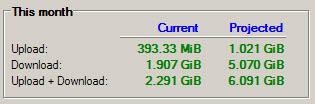
Right-click on the system tray icon, to change the options, or to view your totals and projected totals.


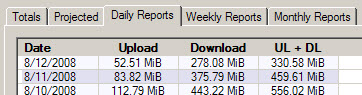
You can also view Daily, Weekly and Monthly reports, and export them as csv files. Open the exported files in Excel, and you can create your own chart, reports and pivot tables from the data.

Send Google Search Results to Your Newsreader

If you’re trying to stay on top of the news in Excel or another area of interest, you can create Google Alerts to update you automatically.

After you create an Alert, you can add it to your newsreader, and read it with the rest of your feeds every day. I prefer this, instead of getting Alerts by email.

Create a Google Alert

  • Log in to your Google account, and click on Google Alerts
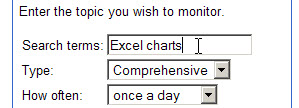
  • Enter your search topic, and set the other options for the alert.

  • Click Create Alert, to open the list of Alerts

Add the Alert to a Newsreader

These steps will vary, depending on your browser and newsreader. In this example, I used Firefox and Google Reader.

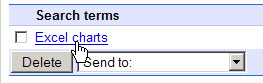
  • In the list, click on the search term link


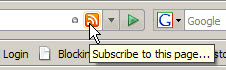
  • In the toolbar of your browser, click the RSS Feed icon.


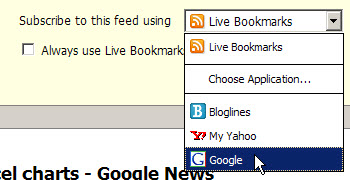
  • On the Feed page, select a newsreader from the drop down list

  • Click the Subscribe Now button
  • Click the Add to Google Reader button, or complete the steps in your newsreader.

Delete the Google Alert

  1. Go back to the list of Google Alerts
  2. Add a check mark to your Alert, then click the Delete button.

Straight Talk from IT

Whether you’re the CIO of a large company, or working in a small IT department, or a self-employed consultant, do you hide behind words like “anomoly”, “specifications” and “process”?

I’ve been guilty of a few of those, when a user has a problem with a spreadsheet or database that I’ve created.

In The Naked CIO: Tech’s Weasel Words, the article’s author says, “We need to keep reducing the technical jargon that is so divisive and replace it with meaningful communication.”

My favourite point in the article is a communication tip that I learned long ago — avoiding the use of “but”.

“In my team I have outlawed people saying ‘but’. As in, “I understand what you are saying but…” or “That is a great idea but…”. It has no value and only harms attempts to build consensus.”

I try to replace “but” with “and”. It makes me think a bit harder before I reply, and the results are worth the effort.

Simplify Your Writing With Thsrs

If you’re writing an article or presentation, in many cases it’s better to use smaller words, that more readers will easily understand, than to fill your articles with five syllable tongue-twisters. Eschew obfuscation, as they say.

Now there’s Thsrs, an online thesaurus to help you simplify your writing.

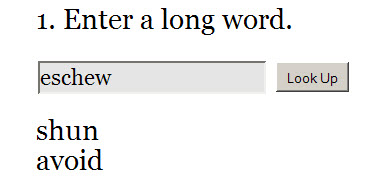
Enter a long word in the input box, and Thsrs will return a list of suggested replacements.

One of the words in the list might be a good replacement for your longer word, and will spare your readers from confusion.

Free Online Calculators

If you’re trying to solve those IBM problems from yesterday’s post, you might need the help of a calculator. Luckily, there are free online calculators that you can use.

The first one is a scientific calculator, Calculator Tab, with long-term memory that allows you describe and retrieve saved numbers.

Click the tabs on the calculator to see the hidden functions, to save and retrieve the results, or to clear the calculator.

There are buttons on the page, above the calculator, to view the calculator in a popup window, and to use the keyboard for input.


Another free calculator is calc5, a graphing calculator. There’s not much on the page when you arrive, but click the samples listed at the right, or enter your own data in the input box.

Ponder This

When you’re stuck working on a tough Excel problem, it may help if you set that aside and work on something else for a while.

The people at IBM research apparently do this, and have a monthly problem, Ponder This, that you can tackle when your brain needs a change of scenery. The problem is posted at the beginning of the month, and the solution is posted near the end of the month.

The first challenge was posted in May 1998, with this introduction:
“Here’s what happened… Business Week recently ran an item about a “little book of big ideas” we published for the people here at IBM Research. “Sort of like the Tao for people who think about computers all day,” they wrote. Seemed harmless enough.

The story highlighted some of the simple things our researchers do to get a new perspective on things, ending with this one:

Ponder something else. For example: If a belt were placed around the Earth’s equator, and then had six meters of length added to it, and you grabbed it at a point and lifted it until all the slack was gone, how high above Earth’s surface would you be?

Now Do This

Those of you with a short attention span, and a list of things you need to do, might like the Now Do This web site.

It certainly isn’t filled with distracting shiny things.


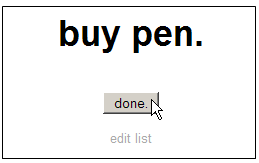
Click the ‘edit list’ link, enter the items you need to do, then click Save
As you complete each item, click the ‘done’ button, and the next item appears on the screen.

When all the items are completed, the web site is almost as happy as you’ll be.

Focus on the Business Basics

At The Business Brickyard site, you can download a free copy of president Howard Mann’s book, Your Business Brickyard (download link is at the bottom of the page).

[Update: The free ebook is now available if you subscribe to their newsletter.]

The book is short, and to the point, with no fluffy filler. It covers twelve points that will help you focus your business on the basics, rather than following all the latest trends, and wandering in different directions.

I read it in under an hour, and found several ideas that I can implement in my business.

One of the points that Excel users might relate to is, “Fit your business on a single page.” As the book describes it, “At the end of every day, you should be able to scan a simple 8½ × 11–inch piece of paper and know exactly how your business is doing.”

There is a practice drill for each point, and a summary at the end of the book, for quick reference and review.

After reading the free downloaded copy, you might find it valuable enough to buy a printed version.