Fill Blank Cells in Excel With Value from Above

I’m updating some of the pages on my website, and found an old video that shows how to fill blank cell in Excel 2003. Wow, that version came out 10 years ago! So, it’s time to do an update.

You can see the new video below, and I show the steps in Excel 2013. The same instructions will work in Excel 2010 or 2007.
[Update] I’ve also added a newer video, that shows the steps in Excel 365.

Blank Cells on the Worksheet

It’s a solution to a common problem – you get data from someone, and some columns have blank cells, so headings are easier to read. If you want to sort or filter the list, you need to fill in the blanks, by copying the value from above.
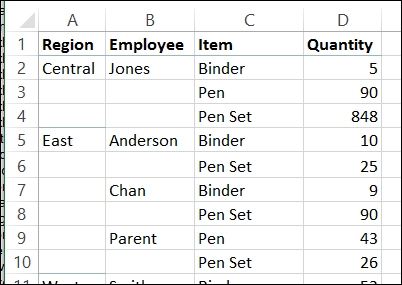
Blank cells on worksheet

With a few simple steps, you can fill all the cells, using the first value shown above the blank cells.

Video: Fill Blank Cells – Excel 365

This video shows a quick way to select and fill all the blanks, and use a mouse shortcut to change the formulas to values. I used Excel 365for this video.
The steps are the same in other versions of Excel.

Video: Fill Blank Cells – Excel 2013

This video shows a quick way to select and fill all the blanks, and use a mouse shortcut to change the formulas to values. I used Excel 2013 for this video.

Get the Sample File

To download the sample file, please visit my Contextures website: Fill Blank Cells

The file is zipped, and in xlsm format – it also contains a macro that you can use to fill blank cells.

________________
Spreadsheet Day 2013

Happy Spreadsheet Day! Yes, October 17th is Spreadsheet Day, in honour of the date that VisiCalc was first shipped, way back in 1979.

I might be the only person who celebrates, but spreadsheets do need some love, and it’s a good excuse to leave work early.

spreadsheetdaylogo2013

Top 5 Spreadsheet Articles for 2013

To mark this auspicious occasion, here are five of my favourite spreadsheet articles from the past year.

I post a few links each week in my Excel newsletter, and these 5 articles show the broad range of things you can do in a spreadsheet, and why you should be careful while working in one!

Here they are, in no particular order:

  1. In his Not Just Numbers blog, Glen Feechan offers his Ten Principles for Excel Good Practice. You’ll find some sound advice in this list, and check the comments too.
  2. See a few creative uses for Excel on Microsoft’s Excel team blog. One of the examples — the Think Maths website — lets you create art in Excel. Just upload a small photo, and they’ll send you an Excel workbook with each pixel in a separate cell.
  3. One of the early spreadsheet programs was Trapeze, and Andrew Wulf talks about developing it, and other programs, in his blog post: How I Did Agile Long Before It Was A Thing
  4. Over at the Daily Dose of Excel blog, there’s an interesting discussion on How to Be Great at Excel. Read Dick Kusleika’s short article, and add your opinion in the comments section.
  5. The BBC listed five embarrassing spreadsheet snafus, including oversold Olympic tickets, and a cut and paste error that cost $24 million.

What are Your Favourites?

If you have a favourite article from the past year, please share a link in the comments below, and mention why you like the article.

Now get back to your Spreadsheet Day celebrations!
_____________________

Remove Text in Excel Without Macros

One of the benefits to having an Excel website is the interesting questions that I get in my email. I can’t help with every request, but some lead to blog posts or articles on my Contextures website. Like today’s tip – how to remove text in Excel without macros.

Continue reading “Remove Text in Excel Without Macros”

Was Your Career Helped by Excel?

Last week someone sent me a lovely email, describing a young woman’s career beginnings. They said I could share the story with you, but asked to remain anonymous.

Maybe your career began in a similar way.

  • Did you start out with an Excel career in mind?
  • Did you struggle at first, and did Excel help you move forward?
  • Did you help someone else get ahead, by giving them a few Excel pointers?

The Story

Here’s the story from the email:

My daughter had a very rough first year of work after completing a marketing degree, basically having to act as a receptionist and assistant dogsbody to lots of people.
Then she landed a job at a small firm where she found they were doing things extremely manually. I introduced her to pivot tables, and with a bit of help, she has completely transformed their spreadsheets so they can do in minutes what took them days and weeks, without any errors.
The best part is that her new skills and spreadsheets have, for the first time, given her something she can call her own, and respect from her colleagues. She is fiercely proud of her work, and keen to learn more. What a transformation!
It’s hard to imagine that pivots could be girl power, but here they were.
Go pivots!

Did you know what a dogsbody was? I’d never heard that before, but Wikipedia explained that it’s someone who does grunt work.

It’s great to see that people are getting recognition for their Excel skills, and saving time, and reducing errors in their work.

Excel Resources

If you’re trying to learn more about Excel, but don’t have a free consultant at home, you’ll find lots of free tutorials here on this blog, on my pivot table blog, and on my Contextures website.

And for the latest Excel courses, Excel books and Excel tools, go to the Debra’s Excel Picks page, on my Contextures website

Excel Courses, Books & Tools

____________