Excel Roundup 20131223

What happened in the world of spreadsheets last week? Here’s the latest roundup.

Contextures Posts

Here’s what I posted last week:

To narrow down the choices for data entry worksheets, you can remove used items from a data validation drop down list. That’s a big help in some sheets, where you shouldn’t choose the same item twice.

An updated version of my data validation combo box technique, that lets you add new items on the fly.

Finally, for a humorous peek at what other people are saying about Excel, read this week’s collection of Excel tweets, on my Excel Theatre blog.

Other Excel Articles

Here are a few of the Excel articles that I read last week, that you might find useful:

Excel Card: If you haven’t sent your Christmas cards yet, you could use this Excel greeting card, from Jordan Goldmeier.

Totals: Apparently it was sporadic totals week, and nobody told me! To see how to achieve this, you can watch videos by Chandoo, Mr. Excel and Kevin Lehrbass. Pick just one, or watch all three! There is a screen shot of sporadic totals below, if you’re not sure what they are.

REST API: Microsoft’s Excel team shows how you can get started using the Excel Services REST API in the cloud.

Excel Books: Simon Murphy wonders if he should write a book about Excel development. What do you think? Maybe he could start with a chapter or two, sold as a mini-book on his website, and see how that goes.

Excel Bug: Charles Williams has found a Status Bar Calculate bug in Excel 2013, and he hopes it’s fixed soon.

Excel Front End: Scott Lyerly is looking for your input on his Excel as a front end solution. What do you think about his idea of keeping SQL statements in a database table, and using those to update the code in an Excel file?
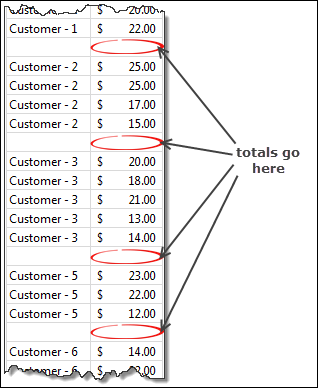
sporadictotals01

What Did You Read?

If you read any other interesting Excel articles last week, that you’d like to share, please add a comment below.

Please include a brief description, and a link to the article.

__________________________________
Excel Roundup 20131216

It’s almost Christmas, so here’s an Excel-themed version of Santa Baby for your entertainment, sung by Santa Monica Excel Consultant Szilvia Juhasz.

Contextures Posts

Here’s what I posted last week, on my Contextures site and blogs:

Grouping: Instead of seeing dates grouped by year and month in a filter drop down, you can change a setting to ungroup them. I understand the benefits of that automatic grouping, but I’d rather see the individual dates most times.

Pivot Settings: When you add new items to a pivot table, change a setting to make them appear in alphabetical order, and show them even if a filter is applied.

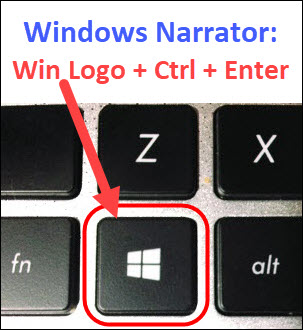
I Hear Voices: If you accidentally turn on the Voice Narrator in Excel, here’s how to turn it off, so Excel stops talking to you.

  1. Tweets: Finally, for a humorous peek at what other people are saying about Excel, read this week’s collection of Excel tweets, on my Excel Theatre blog.

Other Excel Articles

Here are a few of the Excel articles that I read last week, that you might find useful:

Excel Tricks: Did you learn any cool Excel tricks this year? Chandoo shares his favourite new trick, and read the comments to see what other people have learned.

Books: I’ve used Excel for all kinds of things, including keeping track of chapters when writing a non-fiction book. Lisa Alber explains how she uses Excel to connect the chapters in her novel.

Pivot Tables: Doug Glancy shares his technique and VBA code for using conditional formatting on a pivot table.

Excel Reports: If you’re creating reports in Excel, Charley Kyd shows how the SUMIFS, INDEX and MATCH functions can help you pull the data for the report.

Risks: Simon Murphy asks the interesting question, “Has EuroSpRIG increased spreadsheet risk?”

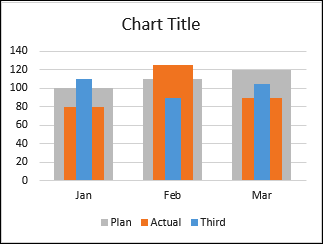
Excel Charts: Jon Peltier gives step by step instructions for building a multiple width overlapping column chart. You can see the final result in the screen shot below.

AndyErrBar4

What Excel News Did You Read?

If you read any other interesting Excel articles last week, that you’d like to share, please add a comment below.

Please include a brief description, and a link to the article.

__________________________________
Excel Roundup 20131209

In this week’s video, you can see that Gwyneth Paltrow uses Excel to plan her holiday spending, just like the rest of us. Her budget might be a bit bigger than ours though! She mentions Excel around the 1:00 mark.

Contextures Posts

Here’s what I posted last week, on my Contextures site and blogs:

Instead of using several clicks to clear pivot table or Excel table filters, add a button that clears them all with one click.

Make it easier for people to enter data in your worksheet, by showing input and error messages on data validation cells.

Finally, for a humorous peek at what other people are saying about Excel, read this week’s collection of Excel tweets, on my Excel Theatre blog.

Other Excel Articles

Here are a few of the Excel articles that I read last week, that you might find useful:

Excel Tricks: On the Ask a Manager blog, someone asked, “What’s the coolest Excel trick you know?” Read the comments to see the tips — and there are lots!

Power Pivot: Rob Collie shows a simple, and useful, trick for combating “stale” Slicers in PowerPivot.

Health: On his Freewheel Burning blog, Pete Larson is dismayed to learn that the fancy new heart risk calculator he heard about is just an Excel workbook. Can Excel really help save lives?

Sparklines: This sparkline tip was in a Tableau article, but could apply to your Excel sparklines too.

Excel Crashes: Ryan Kelly had a problem with Excel crashing when he used VBA on his MacBook, and explains how he fixed it.

Excel Help: Has your department stopped calling IT for help with Excel projects, because Excel gurus like you are doing the work, as Simon Murphy found?

What Did You Read?

Did you read any other Excel articles this week? Please share a link in the comments, with a brief description of the article.

_____________________

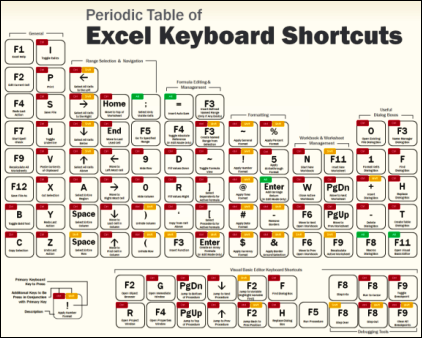
Periodic Table of Excel Keyboard Shortcuts

Excel Roundup 20131202

Excel websites have been around for a long time, answering your spreadsheet questions. Last week, Bill Jelen celebrated the 15th anniversary of his Mr. Excel website, and posted this video. In it, Bill gives an updated answer to the first question that he received.

Were you using Excel way back then?

Contextures Posts

Here’s what I posted last week:

  1. It’s easy to remove duplicates in an Excel worksheet list. Just remember to make a backup before you start.
  2. To get a count of distinct (unique) items in a pivot table, use the free Excel add-in – PowerPivot. It’s available in some versions of Excel 2010 and 2013.
  3. If you’re planning a dinner, use Excel to figure out when everything has to go into the oven.
  4. Finally, for a humorous peek at what other people are saying about Excel, read this week’s collection of Excel tweets, on my Excel Theatre blog.

Other Excel Articles

Here are a few of the Excel articles that I read last week, that you might find useful:

  1. This could cause problems — Cameron Lackpour shows how multiple workbooks with links to the same source update each other.
  2. On a lighter note, Charles Williams went to the MVP Summit at Microsoft’s Seattle headquarters, and shared a few pictures from that event.
  3. If you haven’t used Microsoft’s Power Query add-in yet, Arshad Ali shows how to get started
  4. It’s too late for Thanksgiving, but you could use this next year. Stephen shows how to cook a turkey with Excel, by calculating the time to thaw and cook the bird. You’ll have to use an oven though – you can’t actually cook the turkey with Excel.
  5. On the MSDN blog, Lukas Steindl uses Power Map in Excel, to analyze tropical storm activity from 1945 to 2012. It also shows the recent Haiyan typhoon

What Did You Read?

If you read any other interesting Excel articles last week, that you’d like to share, please add a comment below.

Please include a brief description, and a link to the article.

__________________________________
Excel Roundup 20131125

Forget that old-fashioned mouse! Now you can control Excel during a presentation, by using your phone. Well, assuming that you have Excel 2013, and a Windows phone.

There is a link to the Office Remote app download page in the Excel Articles section below.

Contextures Posts

Here’s what I posted last week:

  1. Use MAX and IF with multiple criteria, to find the latest date that a product price was changed, for a specific customer.
  2. Set up a pivot table so it shows missing items, and add temporary data, if necessary.
  3. No, it’s not the best way to present data, but if you have to make a pie chart, keep it simple and easy to read.
  4. Finally, for a humorous peek at what other people are saying about Excel, read this week’s collection of Excel tweets, on my Excel Theatre blog.

Other Excel Articles

Here are a few of the Excel articles that I read last week, that you might find useful:

  1. The IT Faculty of the Institute of Chartered Accountants in England & Wales has posted a draft version of their Twenty Principles for Good Spreadsheet Practice, and they would like your feedback.
  2. Microsoft Research just released its Office Remote application, which lets you use your Windows phone to navigate through an Excel 2013 workbook during a presentation.
  3. On the Visual.ly blog, someone shared their map of Australia and a column chart, both created by colouring worksheet cells.
  4. It doesn’t have to be complicated! Learn an easy way to make bullet charts and boxplots in Excel, on the Excel Charts Blog
  5. If you’re using APIs to pull data for Excel apps, be sure to format the numbers correctly. The Office Developer Team shares some sample code.
  6. Instead of using macros, add a hyperlink to a shape, for workbook navigation. Mynda Treacy shows the steps.
  7. When you’re programming an Excel file, it’s nice to have a quick way to open the workbook, with everything unlocked and ready to edit. Scott Lyerly shares his trick for adding a back door to your Excel files
  8. Do you love pivot tables? Data journalist, Nassos Stylianou loves them too, and shares a few tips on the Digitally Focused blog.
  9. If you need to calculate the last day of any month, you can use Chandoo’s simple formula.

What Did You Read?

If you read any other interesting Excel articles last week, that you’d like to share, please add a comment below.

Please include a brief description, and a link to the article.

___________________

Excel Roundup 20131118

There’s always something new to learn about Excel, and it’s good to be reminded of a few old tricks.

For example, I’m sure you know that you can’t make a holiday meal without a spreadsheet, as this video shows. The spreadsheet section starts at the 1:57 mark, and continues a little later.

Contextures Posts

Here’s what I posted last week:

  1. Use MAX and IF to find the latest date that a product’s price was changed. Then, using the product name and that date, we can find the latest price for the product – even if it isn’t the highest price.
  2. After you create a pivot table, select one or more fields, and run this macro to change all the selected fields to SUM. Other fields are left unchanged.
  3. To look for external links in an Excel file, you can use a free add-in – FindLinks. Or, follow a few steps, and try to fix the links.
  4. Finally, for a humorous peek at what other people are saying about Excel, read this week’s collection of Excel tweets, on my Excel Theatre blog.

Other Excel Articles

Here are a few of the Excel articles that I read last week, that you might find useful:

  1. Do you ever use the Window key on your computer keyboard? Chandoo shows how to use it as a quick way to paste as values
  2. For the perfect Christmas (or Thanksgiving) meal, be sure to use a spreadsheet! Read about the spreadsheet man in Sainsbury’s Christmas commercial, and you can download my holiday meal planner here.
  3. Do formulas that refer to their own sheet calculate faster than formulas that refer to other sheets? Charles Williams runs a few tests, and is surprised by the results.
  4. Even if you aren’t a cricket fan, take a look at the Excel dashboard that Chandoo created as a tribute to retiring player, Sachin Tendulkar.
  5. If you ever get a list of dates and tasks in Excel, Jimmy Pena (JP) show how to create Outlook tasks from that list, by using Excel VBA.
  6. If your data isn’t set up correctly, you can’t build a flexible pivot table. Microsoft’s Power Query add-in makes it easy to “unpivot” your data, and Ken Puls shows the steps on his Excel Guru blog.

What Did You Read?

If you read any other interesting Excel articles last week, that you’d like to share, please add a comment below.

Please include a brief description, and a link to the article.

_________________

Excel Roundup 20131111

Here are a few of the Excel articles that I read last week, that you might find useful:

Microsoft has improved the Office Web Apps, and you can read the details on the Excel Team’s blog. The feature that looks most interesting to me is the real-time collaboration in Excel files — you can’t do that in the desktop version.

If you use the MOD operator in Excel VBA, you could run into problems with large numbers. Chip Pearson suggests some alternative formulas and code that you can use.

Dick Kusleika ran into some problems while running code on a pivot table that has calculated items. Lots of problems are caused by pivot table calculated items, in my experience!

If you read any other interesting Excel articles last week, that you’d like to share, please add a comment below.

Please include a brief description, and a link to the article.

________________________