Excel Roundup 20140217

On the Power BI blog, Microsoft Finance Director, Marc Reguera, explains how his department is using the new Power BI tools in Excel. Will you be using them too?

You can read more at the Power BI blog, or watch the video below.

The video is also on YouTube: Interview with Marc Reguera

Contextures Posts

Here’s what I posted last week:

  • The heading text was filling in when I typed an “A” code in a column. See how I fixed the AutoComplete problem, and what caused it.
  • Select multiple items for a cell, by clicking the check boxes in a popup form. It opens when you select a cell with a drop down list.
  • Finally, for a humorous peek at what other people are saying about Excel, read this week’s collection of Excel tweets, on my Excel Theatre blog.

Other Excel Articles

Here are a few of the Excel articles that I read last week, that you might find useful:

  • Mitali Pattnaik wonders what kind of software could take Excel’s place. You can add your opinion in the comments on her Disrupting Excel article.
  • Recently, I shared a formula for finding the last item in a category, in a sorted list. Oscar created a formula that works with an unsorted list.
  • If you’re not sure what linear regression is, or how it works, read Mike Alexander’s excellent, and easy to understand, explanation.
  • You can select numbers on a worksheet, and see a Sum, Count, or other summaries in the Status bar. There’s no Subtraction option, so Dick Kusleika created one of his own.

Excel Resources

Here are some upcoming events, courses and new books, related to Excel.

  • If you’re near Tennessee, Rob Collie, from PowerPivot Pro, will be speaking at the first meeting of the Nashville Modern Excel User Group, on Thursday, Feb. 20th. The registration information is here, and there’s free admission to the meeting.
  • Bill Jelen is presenting at the Orlando Florida Power Excel seminar, Saturday Feb 22 2014
  • Chandoo has re-opened his Power Pivot online course, and you can get the course info and registration details here: Power Pivot Course
  • Registration open today for the Amsterdam Excel Summit. The one-day event runs on May 14, 2014, and features sessions by several Excel MVPs, such as Bill Jelen (Mr. Excel), Ken Puls and Charles Williams.

Marketing Analytics: Data-Driven Techniques with Microsoft Excel by Wayne L. Winston

“This practical resource shows you how to tap a simple and cost-effective tool, Microsoft Excel, to solve specific business problems using powerful analytic techniques—and achieve optimum results. Practical exercises in each chapter help you apply and reinforce techniques as you learn.”

What Did You Read?

If you read any other interesting Excel articles last week, that you’d like to share, please add a comment below.

Please include a brief description, and a link to the article.

__________________________________

Stop Unwanted AutoComplete in Cells

Like almost every other program, Excel comes with a few (?) annoyances, along with its great features. I butted heads with AutoComplete feature last week, and after a few attempts, we reached an agreement on how to work together nicely. Here’s how you can stop unwanted AutoComplete in cells.

Continue reading “Stop Unwanted AutoComplete in Cells”

Excel Roundup 20140210

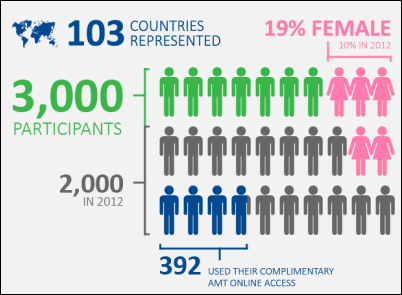
The ModelOff Live Final for the 2013 Financial Modeling World Championships were held last December, in New York City, and Hilary Smart, from London, was the winner.

The organizer have just published an infographic about the competition, and you can see the full image on their blog.

modeloff2013

Contextures Posts

Here’s what I posted last week:

  • Finally, for a humorous peek at what other people are saying about Excel, read this week’s collection of Excel tweets, on my Excel Theatre blog.

Other Excel Articles

Here are a few of the Excel articles that I read last week, that you might find useful:

  • Ken Puls is in the design stage of a new reporting system for his company. He’d like to know how you start designing software, so leave a comment on his blog post.
  • On the Daily Dose of Excel blog, Jeff Weir shows how you can add leader lines to non-pie charts, in Excel 2010 and earlier. If you have Excel 2013, this feature is now built-in.
  • It’s not just Excel that changes its format occasionally, causing compatibility problems with older versions. John Thysell explains the pain of maintaining spreadsheets in OpenOffice / LibreOffice.
  • Do you have a favourite Excel book? Chandoo shared his top picks, and you can see other people’s choices in the comments. Add your own list of favourites to the discussion.
  • Mike Alexander shows how to use Power Query to combine data from multiple Excel files into one table. It’s an amazing way to clean up your data, and you can see a demo in the End-to-End Power BI webinar (see the 24 Hour PASS Replays link below)

Online Courses

  • Last week, there were free Business Analytics courses online, in promotion of the upcoming PASS conference. If you missed them, the replays are available: 24 Hour PASS Replays
  • Chandoo has just re-opened his Power Pivot online course, and you can get the course info and registration details here: Power Pivot Course

What Did You Read?

If you read any other interesting Excel articles last week, that you’d like to share, please add a comment below.
Please include a brief description, and a link to the article.
__________________________________
Excel Roundup 20140203

I’ve seen Excel used to create art, and it can also be use to make bingo cards. This week, I read about a teacher who combines those techniques – she makes art history bingo cards in Excel.

Here’s a picture from her blog post, and you can download the sample file from her site.

excelartbingocard

Contextures Posts

Here’s what I posted last week:

  • In addition to sorting a pivot table’s values from top to bottom, you can also sort the values or grand totals, from left to right.
  • If you import data into Excel, the dates might not format or sort correctly, and you can take a couple of steps to fix them.
  • Finally, for a humorous peek at what other people are saying about Excel, read this week’s collection of Excel tweets, on my Excel Theatre blog.

Other Excel Articles

Here are a few of the Excel articles that I read last week, that you might find useful:

  • Even if you don’t like statistics, or it makes your head hurt, take a look at Mike Alexander’s article on identifying outliers in your Excel data. You’ll feel smarter by the end of the article!
  • If you’d like feedback on a chart or other data visualization that you’re working on, check out the new forum – HelpMeViz. Even if you don’t submit your own work, you’ll benefit from reading the comments there.
  • If you need to compile data from several Excel files into one, you can use the sample code that Winston Snyder shared on his Data Prose blog.
  • There was traffic chaos in some parts of the southeastern USA last week, when snow and ice coated the roads. To help out, volunteers set up a spreadsheet, to organize a rescue of stranded motorists.
  • How do you like to learn new computer topics? Video? Books? Dive right in? Videos put Simon to sleep, and he wonders if you feel the same.

What Did You Read?

If you read any other interesting Excel articles last week, that you’d like to share, please add a comment below.
Please include a brief description, and a link to the article.
__________________________________
Project Tracking with Excel Web App

When I’m working with a client on an Excel or Access project, it’s easy to lose track of everything that has to be done, as the emails fly back and forth. There are initial requirements, then things get added or changed, as we go along.

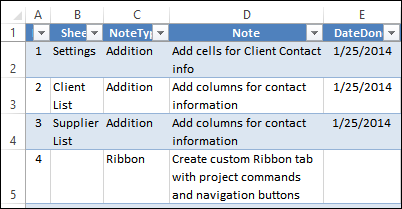
To stay on top of things, I usually make a list in Excel, showing all the steps, and marking them off when completed. Notes can be added too, in columns to the right.Later, if new items are mentioned in an email, I copy and paste those details into the master list.

excelwebapp05

Share the Project List by Email

Most of the time, I keep this file on my computer, and my clients don’t worry about the steps – they just want the completed work. Sometimes I’ll send an update, so they can see what’s done, and what’s still outstanding.

Sometimes, during revisions, the list goes back and forth between a client and me, and that can create confusion. Who has the latest version of the To Do list? The tracking list should help us save time, not add extra time to the project, in sorting out who added what to the list.

If we were at the same location, it might be possible to both use the same Excel file, in a shared drive. I wouldn’t make it a shared workbook though! However, my clients are usually far away from my location, so sharing the file is not an option.

Share the Project List Online

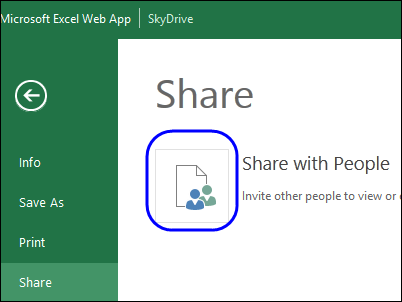
A recent project was getting complicated, so I decided to try the Excel Web App, to see if it would work well for sharing the project tracking information. I had already created the file in the desktop version of Excel, so I uploaded it to my Skydrive account, and sent my client a link to the file, with editing permission. We’re the only two people who have access to the file.

excelwebapp06

Once you have the link, you don’t need to log in – just go to the web page where the file is. My client doesn’t need a SkyDrive account, and I’ve saved a bookmark in Firefox, so I can go to that page quickly. It’s easier than opening a desktop Excel file!

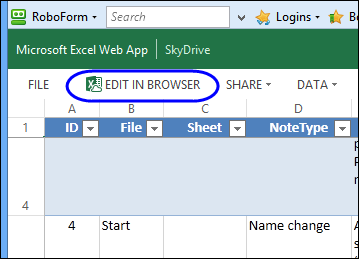
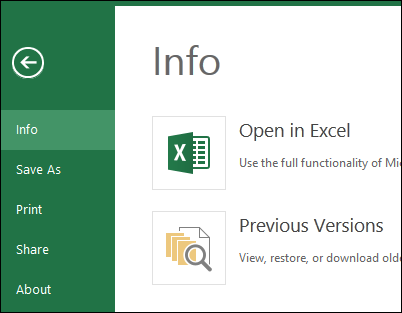
Once you’re on the page, you can click the Edit in Web Browser button, if you want to make any changes. Or, instead of editing, you can just look through the file, to see if anyone else has made changes, that you have to address.

excelwebapp01

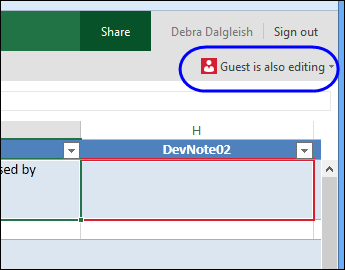
If someone else is using the file at the same time, you can see which cell they’re currently editing. That will help you avoid conflicts.

excelwebapp07

Work in the Desktop Version

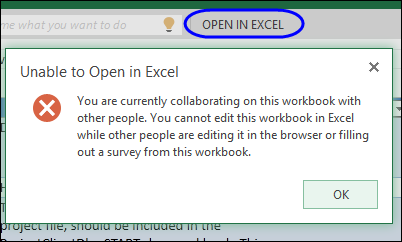
There is also an option to edit the file in the desktop version of Excel, but I haven’t used that. I have Excel 2003, 2010 and 2013 installed, and when I click the button, it opens Excel 2003 – even if Excel 2013 is already open.

This option doesn’t work if someone else is also editing the file – you’ll see this warning message in that case.

excelwebapp08

Save Your Work

When you’re editing, there’s no Save button – all your changes are saved automatically. That’s a bit disconcerting, but I’ve become used to it now.

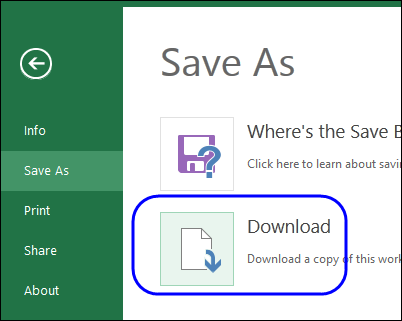
There is an option to download the file, and I do that once a day, to keep my own archive. Those backup files have come in handy a couple of times, when I accidentally overwrote cells. while trying to drag down a column. (The interface is a little clunkier than the desktop version – that’s my excuse!)

excelwebapp02

There is also an online option to view, restore or download old versions, but you need to be logged in if you want to do that.

excelwebapp03

Web App Features

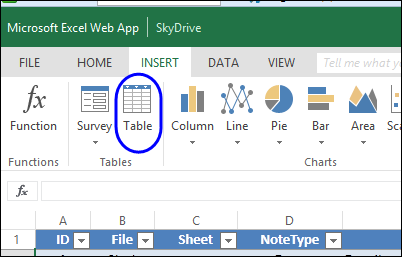
The Web App is a limited version of the Excel desktop program, so some of your favourite features might not be available. However, it does have the Table feature, so that makes it ideal for sharing a simple list like this project tracking file.

excelwebapp04

As you can see in the screen shot above, you can insert charts too, even though other shapes aren’t allowed. (See the Shapes survey link at the end of this article.)

Room For Improvement

The Excel Web App has been working well for sharing this simple file, but I wouldn’t want to use it for anything too complicated. Many shortcuts and features are missing (or I haven’t found them), and that can slow you down!

For example, in the project tracking table, I enter the date when I’ve completed a step, and sometimes add new items at the bottom of the list. So, I’d like to get down there quickly, and often want to copy data from the previous row.

Unfortunately, some of my favourite keyboard shortcuts don’t work, so these steps take a little longer.

  • Ctrl + ; – Enter the current date
  • Ctrl + ” – copy from the cell above
  • End + Down Arrow – move to the bottom of the range

On the Microsoft website, there’s a list of keyboard shortcuts that you can use: Excel Web App Keyboard shortcuts

The good news is that the Copy and Paste shortcuts work, and the cells autocomplete based on p
revious entries in the column.

Your Experience With the Web App

  • Have you used the Web App to share a file this someone else?
  • Did it work well?
  • What desktop features would you like added to the Web App?
  • Would you like to see Shapes in the Web App? Click here to vote in the Excel team’s Web App Shapes Survey

_____________________

Excel Roundup 20140127

We got a Mac in April 1984, when they were first released in Canada – 30 years ago! It’s still in the computer museum in our basement (that’s a fancy term for junk pile).

At an October 1983 sales conference, Fred Gibbons (Software Publishing Corp.), Bill Gates (Microsoft) and Mitch Kapor (Lotus Development) participated in the Macintosh Software Dating Game, hosted by Steve Jobs.

In his introduction, Bill Gates said, “In 1984, Microsoft expects to get half of its revenues from Macintosh software.” I wonder what the percentage is today.

Contextures Posts

Here’s what I posted last week:

  • Finally, for a humorous peek at what other people are saying about Excel, read this week’s collection of Excel tweets, on my Excel Theatre blog.

Other Excel Articles

Here are a few of the Excel articles that I read last week, that you might find useful:

  • If you thought that Excel was only for business, Sophie explains how she found romance in a spreadsheet.
  • It’s a pain to program Winzip from Excel, and Scott Lyerly shares his Class Wrapper for Winzip, to make the task easier.

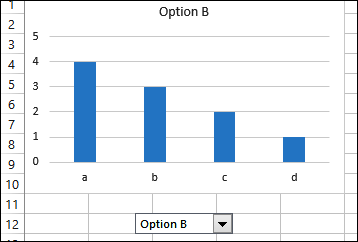
Interactive chart peltiertech.com

Upcoming Courses

No matter how long you’ve been using Excel, there’s always something new to learn.

  • Sign up for one or more of the free Business Analytics webinars offered in the 24 Hour PASS series, sponsored by Microsoft, Cisco and Dell. Topics inlclude: “Advanced Analytics in Excel 2013”, “Querying in DAX”, and”Predictive Analytics for Absolute Beginners”. The online sessions run on Feb 5th and 6th, and you can see the schedule here: 24 Hour PASS Schedule
  • Mynda Treacy’s Excel Dashboard course is open for registration, and I highly recommend this online course, which has excellent content, and great student support from Mynda. Click the banner below, for more information.

Excel Dasboard Course

What Did You Read?

If you read any other interesting Excel articles last week, that you’d like to share, please add a comment below.

Please include a brief description, and a link to the article.

__________________________________

Learn Excel Dashboard Course

Excel Roundup 20140120

If you’ve ever been disgruntled with your bank, you might enjoy Ben Orlin’s vision of how he would run a bank, on his Math With Bad Drawings blog. Instead of annual compounding, he’ll offer other options, such as:

  • Compounded Madoff-ly: After years of dubiously high interest, it will come out that I’m just typing random numbers into the spreadsheet.
  • Compounded sporadically: Your balance grows whenever I remember to update the spreadsheet.

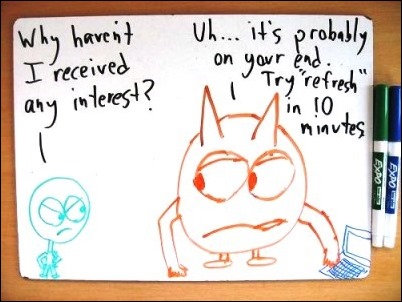
Each option is illustrated with a bad drawing, like this one.

Your balance grows whenever I remember to update the spreadsheet. https://mathwithbaddrawings.com

Contextures Posts

Here’s what I posted last week:

  • Finally, for a humorous peek at what other people are saying about Excel, read this week’s collection of Excel tweets, on my Excel Theatre blog.

Other Excel Articles

Here are a few of the Excel articles that I read last week, that you might find useful:

  • Alex Roe, in the Italy Chronicles blog, wonders if Excel can save Italy, as one of their political leaders suggested.
  • Winston Snyder couldn’t find a pivot table style that he liked, so he wrote a macro to format specific ranges in the table.

Upcoming Courses

No matter how long you’ve been using Excel, there’s always something new to learn.

  • Sign up for one or more of the free Business Analytics webinars offered in the 24 Hour PASS series, sponsored by Microsoft, Cisco and Dell. Topics inlclude: “Advanced Analytics in Excel 2013”, “Querying in DAX”, and”Predictive Analytics for Absolute Beginners”. The online sessions run on Feb 5th and 6th, and you can see the schedule here: 24 Hour PASS Schedule
  • Mynda Treacy’s Excel Dashboard course is open for registraion, and I highly recommend this online course, which has excellent content, and great student support from Mynda. Click the banner below, for more information.

Excel Dasboard Course

What Did You Read?

If you read any other interesting Excel articles last week, that you’d like to share, please add a comment below.

Please include a brief description, and a link to the article.

__________________________________
Learn Excel Dashboard Course

Excel Roundup 2014013

In The Guardian’s Data Blog column, where the tagline is “Facts are Sacred”, things took a less lofty turn last week. You can go back to the good old days in math class, where you entertained your friends by writing words on your calculator.

In the screen shot below, you can see the cheerful greeting from our Sharp Compet CS-1130 financial calculator. I’m not sure how old it is, but it’s probably from the 1980s, and still working well. Are you still using an old school calculator?

calculatorhello

Contextures Posts

Here’s what I posted last week:

  • Calculate upcoming anniversaries for employee hire dates, and highlight them with Excel conditional formatting.
  • Dynamic date range filters aren’t available in pivot table Report Filters — only in Row and Column filters. Use this workaround show a date range, without the date details.
  • There’s a new sample file in my Excel UserForm course, with search boxes that let you find specific records, then update or delete them.
  • Finally, for a humorous peek at what other people are saying about Excel, read this week’s collection of Excel tweets, on my Excel Theatre blog.

More Excel Articles

Here are a few of the Excel articles that I read last week, that you might find useful:

  • Apparently there is a problem with promiscuous spreadsheet headings, especially in the government. Were you aware of this? Are you guilty of this bad behaviour?
  • On the Data Scopic blog, Oz du Soleil asks a few spreadsheet experts, where are Excel & Google Spreadsheet Headed? You can read Part 1 and Part 2

Power BI Articles

It was a busy week for articles about Microsoft’s Power BI tools, so I’ve given them a separate section. Also, see the 24 Hour PASS webinars in the Upcoming Courses section, below.

  • Maybe this is what prompted all the articles — Microsoft announced its Power BI pricing last week, and you can see the plans and prices here.
  • Dick Moffatt describes the challenges and satisfaction of moving a high-maintenance Excel solution to a zero-maintenance PowerPivot model. Take a minute and leave a comment, to let Dick know what you think.

Upcoming Courses

No matter how long you’ve been using Excel, there’s always something new to learn.

  • Sign up for one or more of the free Business Analytics webinars offered in the 24 Hour PASS series, sponsored by Microsoft, Cisco and Dell. Topics inlclude: “Advanced Analytics in Excel 2013”, “Querying in DAX”, and”Predictive Analytics for Absolute Beginners”. The online sessions run on Feb 5th and 6th, and you can see the schedule here: 24 Hour PASS Schedule
  • Mynda Treacy’s Excel Dashboard course opens for registration tomorrow, Jan 14th. I highly recommend this online course, which has excellent content, and great student support from Mynda. Click the banner below, for more information.

Excel Dasboard Course

What Did You Read?

If you read any other interesting Excel articles last week, that you’d like to share, please add a comment below.
Please include a brief description, and a link to the article.
__________________________________
Learn Excel Dashboard Course

Excel Roundup 20140106

Happy New Year! I hope you had time to relax over the holidays, and didn’t have to endure too much cold weather and snow.

It’s a little late for a holiday poem, but I enjoyed this one on the Code? Boom. blog. – I’m an Excelebrity, get me out of here. The poem is a variation on Night Before Christmas, and ends with:

And I heard them exclaim, as they walked out of sight—
“Excel’s not that bad” “Yeah, I think it’s alright.

There are also some downloadable files, with Excel activities for grade school students.

codeboom_excelebrity

Contextures Posts

I took some time off blogging, to enjoy the holidays, and just made a few posts since the last roundup:

My old mouse started acting up, so I had to get a new one. Which do you prefer, wireless mouse or wired? The wired one has the advantage of never needing batteries, but that long tail can get in the road sometimes!

For a humorous peek at what other people are saying about Excel, read the December 27th collection of Excel tweets, on my Excel Theatre blog.

And here is a link to the January 3rd edition: Excel Tweets collection. There’s usually a tweet or two that sounds like something I’d comment on! How about you?

Other Excel Articles

Here are a few of the Excel articles that I read last week, that you might find useful:

Excel Errors: Good news – the Daily Dose of Excel blog is up and running again, after some server problems. Dick Kusleika takes a look at error handling via an error class.

Sports: If you like soccer (football), you might enjoy Jough Donakowski’s article on keeping sports statistics in a spreadsheet.

Charts: The always informative and entertaining Science Goddess finds quick ways to improve the appearance of Excel charts. In another post, she tackles line charts.

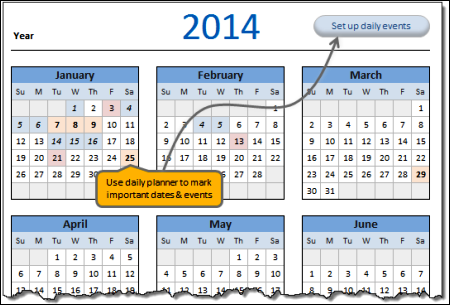
Calendar: If you’re planning your activities for 2014, you can download a free Excel calendar template from Chandoo’s website. You can see a screen shot of the calendar below

Tables: For more details on Excel’s named tables, you can read the Customizable Spreadsheet Table Styles patent application that was published last week.

Power Query: Chris Webb shows how to use local groups in Power Query, with an example of grouping by time ranges.

chandoocalendar2014

What Did You Read?

If you read any other interesting Excel articles last week, that you’d like to share, please add a comment below.

Please include a brief description, and a link to the article.

__________________________________