
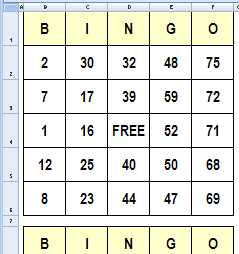
It’s Friday, and things are slow at the office. To liven things up, you could create bingo cards in Excel, and organize a game during the lunch hour.
In this example, there are three cards, each with a set of random numbers. You’ll need one of those numbered ball popper machines though, or create a number selector in Excel.
Make Lists of Random Numbers
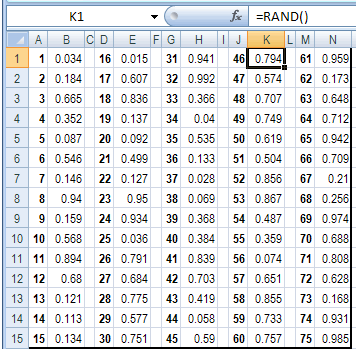
To generate the random numbers, there are three sets of lists on the Numbers sheet. In each set, there are typed numbers 1-75, with the formula =RAND() in the adjacent column.
- Tip: You can get the completed Excel file on the Excel Bingo Cards page on my Contextures site.
When you press the F9 key, the sheet recalculates, and those random numbers change.
Add Random Numbers On Cards
On the three bingo cards, an INDEX/MATCH formula pulls the numbers from the random number tables.You can read more about the INDEX and MATCH functions on my website.
For example, this formula is used in cell E2:
=INDEX(Numbers!$M$1:$M$15,MATCH(LARGE(
Numbers!$N$1:$N$15,ROW()-1),Numbers!$N$1:$N$15,0))
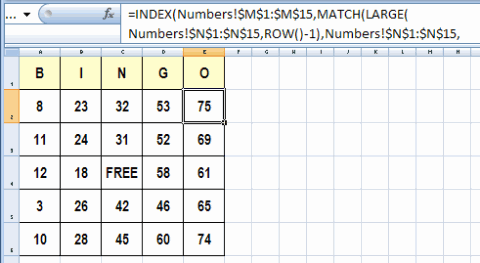
The same number might appear on all three cards, but each card uses a separate lookup table of random numbers. With all that randomness (is that a word?), the 3 cards should never be exactly the same.
Print the Bingo Cards in Excel
The cards are formatted to print three per sheet, on letter sized paper.
After you print each set of three cards, press the F9 key to generate a new set of numbered cards.
Download the Sample File
You can get the completed bingo card creator file on the Excel Bingo Cards page on my Contextures site.
On that page, there are other types of bingo cards too, including:
- Bingo Cards With Pictures
- Bingo Card with numbers 1 to 100.
- Vision Board Bingo
_____________________
Please show me how to create in a 3X9 card with only 15 numbers in a card and the numbers 1to 90 number bas
Thank you for sharing this. I am using this for a community party I am helping to plan. It was so much easier to use this and add pictures to it then trying to create it on my own. I appreciate you sharing this for everyone to use.
This is a great idea! I have a question which might throw a monkey wrench in the works. I would like to use the bingo cards for a classroom activity. I am using a random number generator and have all my words in (so far, so good), but I also want to associate picture with each word, so I can play the game with kindergarten classes, but I am at a loss as to how to go about it! Any suggestions? Thanks for any advice you can give.
@Karen, I uploaded a new version of the the bingo cards, using pictures from the Webdings font.
The link is at the end of the article above, in the Download section.
We play Safety Bingo at work and I have used this for years to generate my cards. I had originally setup the sheet to print 4 to a page. I recently added 4 more cards to the sheet so I could print 8 cards to a page. But on my new cards I sometimes get duplicate numbers on the same cards. I thought I had adjusted all the formulas correctly. Any ideas on why I could get duplicate numbers on the same cards?
Hi there,
Thanks for this! I’m using this in my classroom. Is it possible to change the bingo from 1-75 to 1-100. My excell skills are not that great, I’ve tried to understand but no luck. This would be awesome if this would be possible.
Big thanks!
Filip
Thanks, Filip, and I’ve added a new sample file, that uses the numbers 1 to 100. It’s sample file #3 in the “Download the Sample File” section above.