
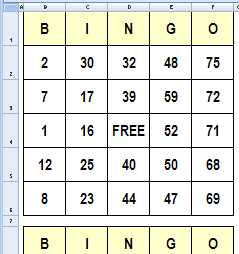
It’s Friday, and things are slow at the office. To liven things up, you could create bingo cards in Excel, and organize a game during the lunch hour.
In this example, there are three cards, each with a set of random numbers. You’ll need one of those numbered ball popper machines though, or create a number selector in Excel.
Make Lists of Random Numbers
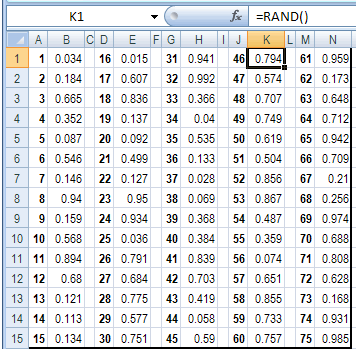
To generate the random numbers, there are three sets of lists on the Numbers sheet. In each set, there are typed numbers 1-75, with the formula =RAND() in the adjacent column.
- Tip: You can get the completed Excel file on the Excel Bingo Cards page on my Contextures site.
When you press the F9 key, the sheet recalculates, and those random numbers change.
Add Random Numbers On Cards
On the three bingo cards, an INDEX/MATCH formula pulls the numbers from the random number tables.You can read more about the INDEX and MATCH functions on my website.
For example, this formula is used in cell E2:
=INDEX(Numbers!$M$1:$M$15,MATCH(LARGE(
Numbers!$N$1:$N$15,ROW()-1),Numbers!$N$1:$N$15,0))
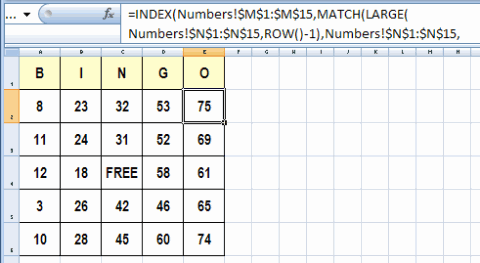
The same number might appear on all three cards, but each card uses a separate lookup table of random numbers. With all that randomness (is that a word?), the 3 cards should never be exactly the same.
Print the Bingo Cards in Excel
The cards are formatted to print three per sheet, on letter sized paper.
After you print each set of three cards, press the F9 key to generate a new set of numbered cards.
Download the Sample File
You can get the completed bingo card creator file on the Excel Bingo Cards page on my Contextures site.
On that page, there are other types of bingo cards too, including:
- Bingo Cards With Pictures
- Bingo Card with numbers 1 to 100.
- Vision Board Bingo
_____________________
Excellent! Thank you very much for your help!
Because I want to print 240 cards for my wedding used, will the number repeat? Because I only wanted 20 people who can have the prize I prepared. Please can help me?
Thanks!
Thank you! Thank you! Thank you! so very much. Just what I needed for our event. You saved the day!
This is so helpful! Thanks! I’m a librarian and we want to do a Banned Books Week Bingo program and you just made me job a whole lot easier. Thanks again!
Good Day,
This is great. Can you help me, how to create a 4th bingo card? I want to minimize paper use.
Thank you
Thank you this is so helpful – making Bingo cards for a Fundraiser!!!
hi
I would like to use your Bingo Card Excel file to make vocabulary bingo game cards.