
With a bit of programming, you can make it easy for users to enter data in an Excel workbook, and keep them away from the stored data.
Sample Data Entry Form
Dave Peterson created a sample workbook with a worksheet data entry form.
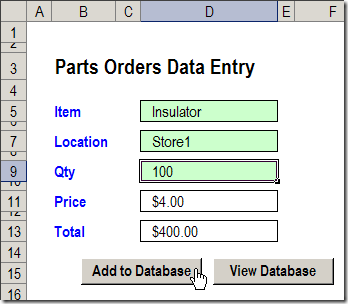
Data Entry Features
In the worksheet Data Entry form, there are data validation drop down lists in cells D5 and D7.
The quantity number is typed in cell D9.
After you fill those 3 cells, click the Add to Database button.
A macro runs, and your new record is added at the end of the database, which is a list stored on a different sheet.
View the Stored Records
In Dave’s workbook, you could click the View Database button to go to the database sheet, and review or edit the existing order records.
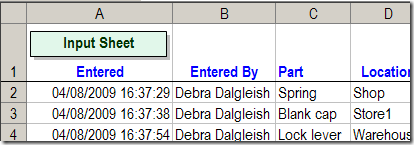
Worksheet Scroll Buttons
In some cases you might prefer to hide the database sheet, to protect the records, but still allow users to view the existing data.
I’ve added a few buttons to Dave’s workbook, to allow users to scroll through the existing records.
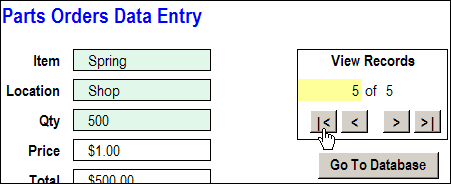
Navigation Buttons
The navigation buttons take you to the first, previous, next or last record.
Or, you can type a record number in the yellow cell, to go to a specific record.
Go To Database Button
In the updated workbook, I left the “Go To Database” button on the data entry worksheet.
You could remove that button, and hide the PartsData sheet, if you prefer, so users are less likely to change the data.
Download the Sample File
The zipped sample workbook can be downloaded from the Data Entry Worksheet Form page on my website.
In the Download section, look for Version 2 – Navigation Arrows.
More Articles on the Worksheet Data Entry Forms
New Improved Excel Data Entry Form
How to Customize the Excel Data Entry Form
Delete Orders with Excel Data Entry Form
Check Excel Database Before Adding New Item
___________________________
Hi Debra ,
Great piece of work… this is simpled our life too much.. Want to ask an small question. In database does the records will be sorted out as we want…??
Regards,
Anju
Gday Your example and solution are great…..I have a question though about amending data once it has been entered without the user going to the database (dangerous).
thanks
Mal
I have a question of how to insert more than one set (order). What do I need to change in the code to loop it through 10-15 rows of data.
sir,
thanks for the useful code. please mail me code for edit/amend the entered using data entry worksheet form.
thanks
[…] year, I posted a Worksheet Data Entry Form in Excel, where users could enter and view Excel data. It was based on a worksheet data entry form that Dave […]
Hi,
I am using the above database for my working purpose. I actually added a DELETE button(Worksheet not cmd button)and it seems didn’t work. The purpose of the DELETE is to delete the unwanted data when it is displayed in the entry form and in the database as well. My command only works for the entry form. The unwanted data is still remain in the database. Please help me on this..
– Is that possible to include the password if the person wants to delete the data? and the delete record will be stored in another worksheet.
This is to allow the authorized person only. Since it involves costing, that is why it is needed to store the deleted data somewhere.
Thank U very Much.
Masz