
With a bit of programming, you can make it easy for users to enter data in an Excel workbook, and keep them away from the stored data.
Sample Data Entry Form
Dave Peterson created a sample workbook with a worksheet data entry form.
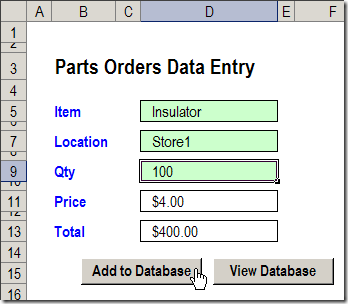
Data Entry Features
In the worksheet Data Entry form, there are data validation drop down lists in cells D5 and D7.
The quantity number is typed in cell D9.
After you fill those 3 cells, click the Add to Database button.
A macro runs, and your new record is added at the end of the database, which is a list stored on a different sheet.
View the Stored Records
In Dave’s workbook, you could click the View Database button to go to the database sheet, and review or edit the existing order records.
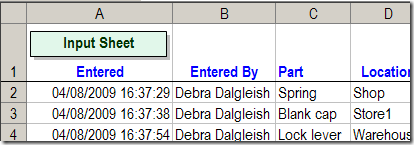
Worksheet Scroll Buttons
In some cases you might prefer to hide the database sheet, to protect the records, but still allow users to view the existing data.
I’ve added a few buttons to Dave’s workbook, to allow users to scroll through the existing records.
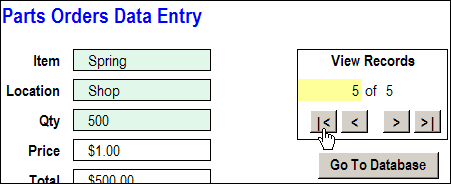
Navigation Buttons
The navigation buttons take you to the first, previous, next or last record.
Or, you can type a record number in the yellow cell, to go to a specific record.
Go To Database Button
In the updated workbook, I left the “Go To Database” button on the data entry worksheet.
You could remove that button, and hide the PartsData sheet, if you prefer, so users are less likely to change the data.
Download the Sample File
The zipped sample workbook can be downloaded from the Data Entry Worksheet Form page on my website.
In the Download section, look for Version 2 – Navigation Arrows.
More Articles on the Worksheet Data Entry Forms
New Improved Excel Data Entry Form
How to Customize the Excel Data Entry Form
Delete Orders with Excel Data Entry Form
Check Excel Database Before Adding New Item
___________________________
Hello! Love this form it has really helped me out, I thank you for that. One question, is it possible to change the target worksheet beased on the value of one of the cells? For example I would like to be able to hit “add to database” and the record be sent to a worksheet called “week16” if week16 is the value of one of the completed cells on the form, would be fantastic if the record could be sent to the original sheet and also the sheet based on the value so i would have a worksheet of all records and also seperate sheets (week16, week17, week18). Is this possible? Your response would be very much appreciated 🙂
Hi there,
I’m trying to modofy the code to enter the same information in different spreadsheets but I just can’t find the part that I have to modify..im totally new with macros…
I’d appreciate your help.
Hi,
I really like the the option of viewing records and update records. I would like to get some more understanding behind the Input range and the rearrangement of input field which would tied to the database worksheet.
Hello,
I have a question. I am extremely inexperienced in creating databases. I am a children’s pastor and I need to simplify my recording process of my children’s weekly accomplishments in order to reward them quarterly. I currently record their last name, first name, grade level, phone number, Date, Bible, Offering, Lesson Home Wk, Memory verse, Mission $ and Visitors. Each except for name, grade, date and phone is currently recorded with a numerical value of 1 being completed and 0 being not completed and then added to the right in a column.
I am wanting to create a data entry page that will allow me to enter/search current names and enter their weekly service totals that add it to the spread sheet and keep a running total that I can view to see how each child is progressing.
If you could email me and point me in the right direction or if you have further questions I would greatly appreciate any help given. Thanks and God Bless,
Donnie