See Formula Results in an Excel Data Table

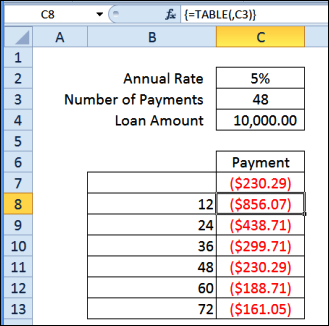
Do you ever use the Data Table feature in Excel? It’s one of the “What-if Analysis” tools, found on the Ribbon’s Data tab, along with Scenario Manager, and Goal Seek.

You can experiment with one or two variables in a formula, and see formula results in an Excel Data Table, in a compact layout.

Continue reading “See Formula Results in an Excel Data Table”

Getting Started With Excel UserForms

With some VBA programming, you can create an Excel UserForm, to use for data entry. Click a button, and the data is stored on a hidden worksheet, and the form is cleared out, so you can start a new entry.

If you’re just getting started with Excel UserForms, the short video below shows how a completed form works.

Continue reading “Getting Started With Excel UserForms”