
If you’re working in an Excel file with lots of worksheets, it can take a while to scroll to the ones that you need. Sometimes you can’t even remember where the sheets are, and that takes even longer! To make it easier for myself, I created an add-in with a popup list of Excel sheets. See the details below, and there’s a link to my site where you can download it.
Impressive Dashboards with Google Sheets
Over the years, I’ve used Google Sheets a few times, and usually for basic tasks. Yesterday, I was surprised and impressed to see what it can do, thanks to Ben Collins. He builds interactive dashboards with Google Sheets, complete with pivot tables and maps, using the built-in features. Who knew that all this was possible, in a free, online spreadsheet application?
Pivot Table Subtotal Problem in Excel 2016
If you using grouping, you might run into a pivot table subtotal problem in Excel 2016. There was a change in a recent update, so you might see this problem if you have an Office 365 subscription. I just learned about this issue, and will show you how to fix the problem if it affects your workbooks.
Continue reading “Pivot Table Subtotal Problem in Excel 2016”
Excel VLOOKUP Problem Numbers
Recently, someone asked me for help with VLOOKUP problem numbers:
- He had a list of 8-digit numbers.
- In the next column, there was a formula to get the first 3 numbers: =LEFT(A2,3)
- Based on that number, a VLOOKUP formula should find the category in a lookup table
- Problem – Instead of a category name, the result is an #N/A error.
The VLOOKUP formula looks okay, so why doesn’t it work?
Excel Form Control Button Quirks
If you’re building an Excel workbook for other people to use, you can add form control buttons, so it’s easy for them to run macros. One of my sample files has Navigation Buttons on each sheet, so you can quickly go to the previous or next sheet. There are a few form control button quirks though – maybe you’ve run into some of them. Today, we’ll take a look at one of the button name quirks – a hidden name that Excel fiercely protects.
Excel Dashboard Course Giveaway Winners

Last week we had a giveaway, with the grand prize of Excel TV’s online course – Excel Dashboard Pro. To enter, you had to add a comment to the blog post, with the hashtag that you might use, if you needed help with a dashboard. There were prizes for runners up too, and you can see all the winners below.
Excel Dashboard Course Giveaway
Are you an Excel Dashboard pro? If not, here’s a great opportunity to improve your skills. I’m having a giveaway, and a terrific new Excel dashboard course is the top prize. There are runner up prizes too, and a free video series.
How to Prevent Grouped Dates in Excel
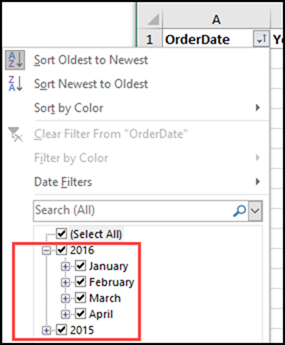
As a teenager, group dates can be fun. If you have strict parents, that might be the only kind of dates they allow! But, in your Excel worksheets, it can be annoying when dates are automatically grouped. This happens in AutoFilters, and in pivot tables too (in newer versions). Here’s how you can undo or prevent grouped dates in Excel AutoFilters and Pivot Tables.
Analyze Food Tracker Data in Excel
To keep track of what I’m eating, I use the LoseIt food tracker app on my iPhone and iPad. It’s easy to use, and creates nice summaries for each day and week. To see how things are going, I’d like to analyze that food tracker data in Excel, instead of being limited to the preset options in LoseIt.
Highlight Cells Based on Two Conditions
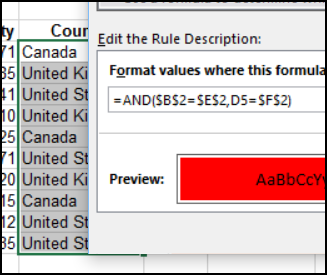
Happy New Year! I hope you had time to relax over the holidays, and you stepped away from the computer for a while. Unless you were using the computer as excuse to hide away from all the holiday chaos! Now we’re back to work, and one of the first questions I got this year was how to highlight cells based on two conditions.