The Federal Citizen Information Center (FCIC) web site offers a wide variety of consumer and business publications that you can order for a nominal fee, or view many of the publications online.
You can find tips on everything from computers to tree pruning to international travel. The web site also lists scams and recalls, and has links to other consumer and business resources.
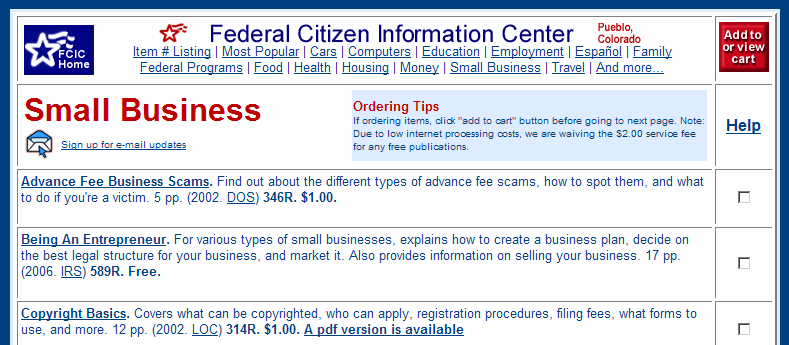
It’s a good place to start if you’re researching a new topic. For example, here’s the page on small business publications.
From June 2-8, the full version of NTI Shadow 3 backup software is available free. Regularly $29.99, this software makes backups as you work, so you can save important documents onto a removable drive, such as a thumb drive, for safekeeping.
The program has received fairly good reviews, with some complaints of slow copying, and it may need to be started manually if you restart your computer.
However, at this price you can afford to test it for yourself, and see if it meets your needs.
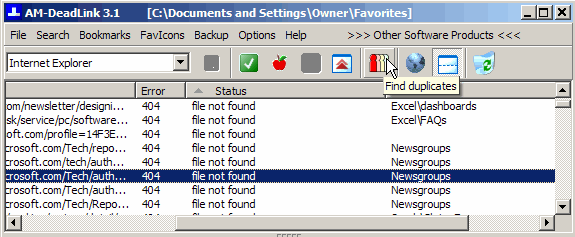
The free utility AM-Deadlink can find dead links and duplicates in your list of browser bookmarks.
I run it on my machine every couple of months, to clean things up and save me from wasting time in following dead links. You can download the utility here: AM-Deadlink
It’s easy to install and use, and takes only a couple of minutes to check my 1600 bookmarks. Then I sort the list by error number, and delete any 404 pages.
Don’t waste time comparing shipping rates at individual carrier sites. Enter your starting point and destination, and let ShipGooder calculate the rates for you.
This free service compares major courier and postal services, and local carriers.
You can also find US or Canadian postal codes, by address or city.
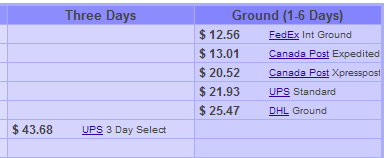
For example, if I want to ship one of my books to a client in Chicago, here are some of the rates available.
As you work on your computer, you probably have several windows open most of the time. Even with multiple monitors, it can be difficult to arrange the windows so you can see the ones you need, and get the others out of the road temporarily.
FreeSnap is a free utility that lets you use keyboard shortcuts to control the windows’ size and position.
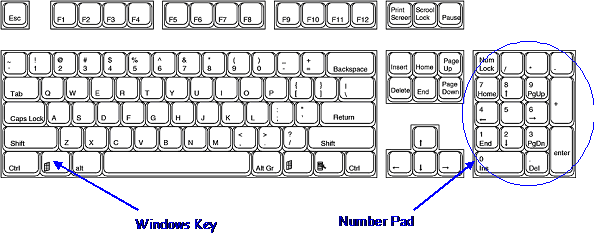
You can read about FreeSnap and download it at the Blue Onion Software site. It works with the Window key on the keyboard, and the number keypad and navigation keys.
One feature that I like is the shortcut to resize windows to a specific dimension, such as 800×600. This helps when I’m creating forms in Access or Excel, and want them to fit my client’s screen.