Excel Roundup 20140324

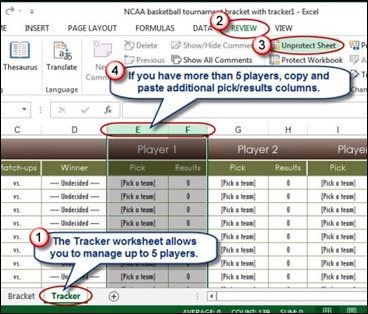
You might have heard a thing or two about March Madness, even in you don’t live in the USA, and follow college basketball. David Ringstrom explains how to use Excel to manage March Madness.
marchmadness_ringstom

Contextures Posts

Here’s what I posted last week:

  • Finally, for a humorous peek at what other people are saying about Excel, read this week’s collection of Excel tweets, on my Excel Theatre blog.

Other Excel Articles

Here are a few of the Excel articles that I read last week, that you might find useful:

  • Jan Karel Pieterse has updated the Startup Problems page on his site, to include the new tool from Microsoft – Office Configuration Analyzer Tool (OffCAT)
  • The IT Portal shares 14 tips for intermediate Excel users. Do you know all of these? Good thing they saved those pie charts for the last tip, or I might not have made it to the end of the article
  • If you’re an Excel power user, you already know the 11 Excel tricks that PC World posted.

Excel Resources

Here are some upcoming events, courses and new books, related to Excel.

  • Registration is open for the Amsterdam Excel Summit. The one-day event runs on May 14, 2014, and features sessions by several Excel MVPs, such as Bill Jelen (Mr. Excel), Ken Puls and Charles Williams. All the sessions are in English, and the limit is 100 participants, so sign up now, if you’re interested.

What Did You Read or Write?

If you read or wrote any other interesting Excel articles recently, that you’d like to share, please add a comment below, or send me an email.

Please include a brief description, and a link to the article.

__________________________________
Excel Roundup 20140317

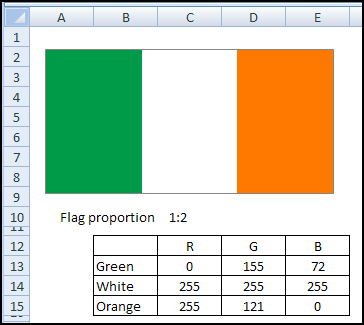
imageHappy St. Patrick’s Day! Four years ago, we celebrated by creating Ireland’s flag in Excel.

The flag is a simple column chart, with the 3 columns coloured to match the flag’s design. It’s an easy project, so you’ll be done in time to go out to celebrate.

Irish flag in Excel blog.contextures.com/

The blog post also has a video of some festive Canadian Irish music, featuring Great Big Sea, playing with The Chieftains.

I’ve linked to it again this year, at the end of this post. The music will get your toes tapping, while you work on Excel projects today.

Contextures Posts

Here’s what I posted last week:

  • If the items in a pivot table Report Filter drop down are out of order, here’s how to sort them.
  • Finally, for a humorous peek at what other people are saying about Excel, read this week’s collection of Excel tweets, on my Excel Theatre blog.

Other Excel Articles

Here are a few of the Excel articles that I read last week, that you might find useful:

  • Did you read any of the articles that explained how Steve Ballmer, Microsoft’s former CEO, used Excel to balance his work and family time? He said “a spreadsheet”, but I’m sure he meant Excel. Or could he still be using MultiPlan?
  • Jon Acampora recommends the best keyboards if you like to use Excel’s keyboard shortcuts. My laptop looks like most of the “bad” pictures in the article.

Excel Resources

Here are some upcoming events, courses and new books, related to Excel.

  • Registration is open for the Amsterdam Excel Summit. The one-day event runs on May 14, 2014, and features sessions by several Excel MVPs, such as Bill Jelen (Mr. Excel), Ken Puls and Charles Williams. All the sessions are in English, and the limit is 100 participants, so sign up now, if you’re interested.

What Did You Read?

If you read (or wrote) any other interesting Excel articles recently, that you’d like to share, please add a comment below, or send me an email.
Please include a brief description, and a link to the article.

Toe Tapping Music

Here’s the video, to put you in the St. Patrick’s Day mood – Lukey, by Great Big Sea, with The Chieftains.


__________________________________
Make an Irish flag in Excel blog.contextures.com/

Dependent Drop Down Lists With Tables

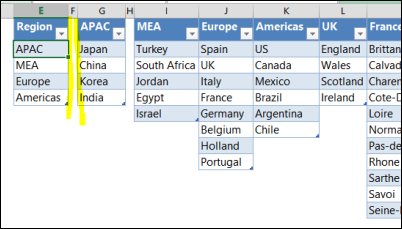
With dependent drop down lists, you can control what appears in a drop down, based on what was entered in the previous cell. In this example, you select a region, then a country in that region, then an area, and finally a city. See how to set up dependent drop down lists, with tables that make this easy to maintain.

Continue reading “Dependent Drop Down Lists With Tables”

Top Ten Values in Filtered Rows

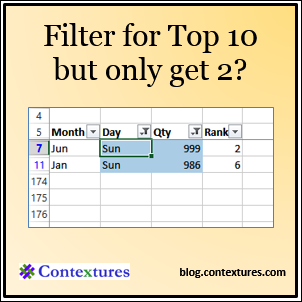
If I apply an AutoFilter to see the Top 10 Sunday sales in a list, why does Excel just show me the Top 2? Here’s how the Top Ten values in filtered rows feature works.

Update 9/29/2025: In the new video below, I show how to use the AGGREGATE function, for a top ten filter with an already filtered list.

Continue reading “Top Ten Values in Filtered Rows”

Excel Roundup 20140310

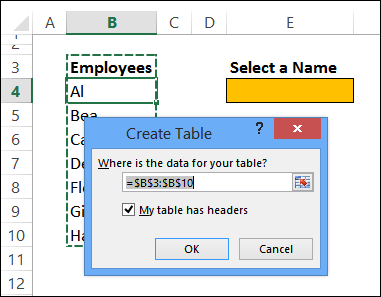
Stay on top of things with Excel's Watch Window blog.contextures.com/Do you ever use the Watch window, to keep an eye on the results in one cell, while changing the data in another part of the workbook?

I used it last week, while working in a client’s price list file, where there was a multiplier on one sheet, and the final price on another sheet. After flipping back and forth between the worksheets a few times, I finally remembered the Watch window, and it made the job much easier!

Coincidentally, Mike “ExcelIsFun” Girvin, recently posted a video tutorial that shows how to use this handy feature. Mike is the author of Ctrl+Shift+Enter: Mastering Excel Array Formulas, and posts lots of Excel videos on YouTube. And he likes to say Boom!

Contextures Posts

Here’s what I posted last week:

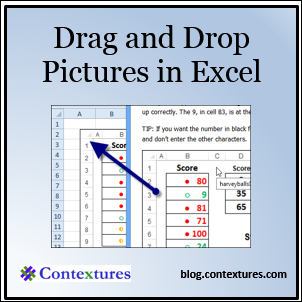
  • You can drag pictures from Windows Explorer into Word, but not into Excel. So, if you want to drag and drop images, drag them into Word first, and from there into Excel.
  • When working with pivot tables, you can click the Refresh All button, to update everything at once. If some updates are taking too long, you can stop one or more of them.
  • Finally, for a humorous peek at what other people are saying about Excel, read this week’s collection of Excel tweets, on my Excel Theatre blog.

Other Excel Articles

Here are a few of the Excel articles that I read last week, that you might find useful:

  • Mynda Treacy used Excel to design a Minecraft themed cake for her son’s birthday party. Read the comments too, to see what unusual things other people have done with Excel.
  • Chandoo would like to know which Excel book you’ll read next. See his pick, and check the comments for lots more suggestions.
  • Felienne Hermans, an assistant professor at Delft University of Technology based in the Netherlands, explains why spreadsheets stink, and 4 ways to improve them.
  • The Office Watch blog warns that even if you’re only showing a few items in the Most Recently Used (MRU) list in Excel 2013, more are being stored in the registry.

Excel Resources

Here are some upcoming events, courses and new books, related to Excel.

  • Registration is open for the Amsterdam Excel Summit. The one-day event runs on May 14, 2014, and features sessions by several Excel MVPs, such as Bill Jelen (Mr. Excel), Ken Puls and Charles Williams. All the sessions are in English, and the limit is 100 participants, so sign up now, if you’re interested.
  • The Cleveland Modern Excel User Group meets the second Monday of every month, from 5:30 – 7:30 PM, so that would be tonight! Registration is free and you can get the details here. At the March meeting, Jeff Mlakar from the BI Team at Bennett Adelson is going to speak on Power BI.

What Did You Read?

If you read any other interesting Excel articles recently, that you’d like to share, please add a comment below, or send me an email.

Please include a brief description, and a link to the article.

__________________________________
Stay on top of things with Excel's Watch Window blog.contextures.com/

Excel Roundup 20140303

Have you used Power Pivot yet? If you’d like a quick intro, and a few tips, watch this 15 minute video from Microsoft. Owen Duncan, Senior Content Developer for Power Pivot, takes you through some basics in this video, and talks about best practices.

If you’d like to learn more, their blog article has links to other Power Pivot articles on the Microsoft site.

VIDEO NO LONGER AVAILABLE

Contextures Posts

Here’s what I posted last week:

  • Instead of using the default icon sets in Excel, you can create colored Harvey Balls, or other icons, with conditional formatting and custom number formats.
  • Did you know that you can accidentally create calculated items in a pivot table? Learn how it happens, and how to remove them.
  • Finally, for a humorous peek at what other people are saying about Excel, read this week’s collection of Excel tweets, on my Excel Theatre blog.

Other Excel Articles

Here are a few of the Excel articles that I read last week, that you might find useful:

  • If you like trains, as much as you like Excel, the National Railway Museum (UK) is looking for volunteers to enter historical data into spreadsheets.
  • Scott Lyerly lists his favourite books and websites for getting started with Excel programming. What would you add to the list? And if Dick Kusleika is “Sam Malone”, who are the other characters at the Daily Dose of Excel?
  • Have you ever built a convoluted workbook, with formulas that make even your head hurt? John Rougeux shares his 3 Excel pro tips for helping others not hate you.
  • Jeff Weir explains Robert Mensa’s technique for creating robust dynamic drop downs, without VBA. Just remember, the best we can do is build things that are idiot resistant, not idiot proof.

Excel Resources

Here are some upcoming events, courses and new books, related to Excel.

  • Registration is open for the Amsterdam Excel Summit. The one-day event runs on May 14, 2014, and features sessions by several Excel MVPs, such as Bill Jelen (Mr. Excel), Ken Puls and Charles Williams. All the sessions are in English, and the limit is 100 participants, so sign up now, if you’re interested.

Excel 2013 for Scientists by Dr. Gerard Verschuuren

This 250 page book is published by Holy Macro! Books, and here’s the intro from Amazon:
”With examples from the world of science, this reference teaches scientists how to create graphs, analyze statistics and regressions, and plot and organize scientific data. Scientists can learn the tips and techniques of Excel—and tailor them specifically to their experiments, designs, and research. They will learn when to use NORMDIST vs NORMSDist and CONFIDENCE vs Z, how to keep data-validation lists on a hidden worksheet, use pivot tables to chart frequency distribution, generate random samples with various characteristics, and much more.”

What Did You Read?

If you read any other interesting Excel articles last week, that you’d like to share, please add a comment below.

Please include a brief description, and a link to the article.

_____________________