
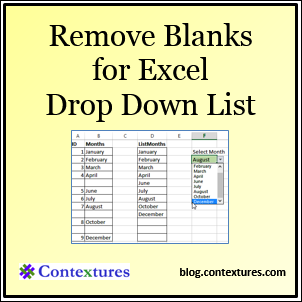
If a list contains blank cells, the usual method for creating a dynamic named range doesn’t work. Usually, you would use an OFFSET formula, and count the entries in the column, to calculate the number of rows in the range. Here is a workaround to create a dynamic list with blank cells.
Author: Debra Dalgleish
Create Colored Harvey Balls in Excel
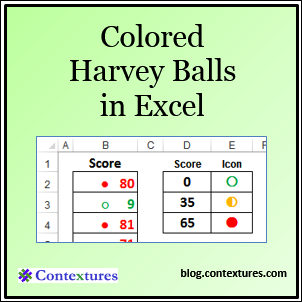
It’s easy to add conditional formatting icons in Excel, by selecting one of the built in options. There are limitations though.
For example, you can’t get all of the icons in any colour combination that you choose. For example, you can show Harvey Balls (the 5 Quarters icon set), but only in black and white.
Excel Roundup 20140224
If your laptop screen is too small, maybe you’re ready for an 82” touch screen, or start a bit smaller (and maybe cheaper) with a 55” version.
You can see Power Map in Excel on this giant screen, at the 7:15 mark, in the video below. My favourite moment is at 9:10, when the presenter says, “This is not the Excel spreadsheet I grew up with, that’s for sure.”
True! Excel was black and white only, with one sheet, when I started using it.
VIDEO NO LONGER AVAILALBE
Contextures Posts
Here’s what I posted last week:
- Shape Styles are flat in #Excel 2013, but you can change a setting to see rounded options, like the ones in Excel 2010.
- After deleting items from a pivot table’s source data, they can still appear in the pivot field drop downs. See how to remove them.
- If an Excel file is linked to another workbook, you can break the links. If the Break Link button is not available, this might be why.
- Finally, for a humorous peek at what other people are saying about Excel, read this week’s collection of Excel tweets, on my Excel Theatre blog.
Other Excel Articles
Here are a few of the Excel articles that I read last week, that you might find useful:
- Are you an Excel Ninja? On the Lifehacker blog, Eric Ravenscraft shows you Four Skills That Will Turn You Into a Spreadsheet Ninja. The article links to my page on how to build a simple Order Form in Excel – so it must be good!
- Winston Snyder shares his code for turning the field captions on and off in a pivot table. Tip: If it’s just the headings, “Row Labels” and “Column Labels” that you don’t like, change from Compact Layout to Tabular Layout.
- Office 365 is one year old now, and Ed Bott finds that it has improved steadily since it was introduced.
- Annie Cushing gives us 18 real life examples of when and why you’d want to combine text from multiple cells.
- Should they teach Excel programming in primary schools, instead of text based programming? Miles Berry explains why he likes the idea.
- If you do any programming in Excel, you might discover a few new tips, as Colin Legg takes us on a guided tour of the VBA IDE’s options.
- I use Feedly for my RSS feeds, to find and read Excel articles. If you’re using it too, remember to download your OPML file, to create a backup of all your feeds. You never know when a reader will suddenly disappear (Yes, I mean you, Google Reader.)
Excel Resources
Here are some upcoming events, courses and new books, related to Excel.
- Registration is open for the Amsterdam Excel Summit. The one-day event runs on May 14, 2014, and features sessions by several Excel MVPs, such as Bill Jelen (Mr. Excel), Ken Puls and Charles Williams. All the sessions are in English.
Microsoft Excel 2013 Programming by Example with VBA, XML, and ASP by Julitta Korol
The Amazon listing doesn’t have a “Look Inside” feature, and there aren’t any reviews yet, so I’m not sure what topics are covered. The book blurb says, “a practical how-to book on Excel programming, suitable for readers already familiar with the Excel user interface. The book introduces programming concepts via numerous multi-step, illustrated, hands-on exercises. More advanced topics are introduced via custom projects.”
What Did You Read?
If you read any other interesting Excel articles last week, that you’d like to share, please add a comment below.
Please include a brief description, and a link to the article.
__________________________________
Problem Breaking Links in Excel
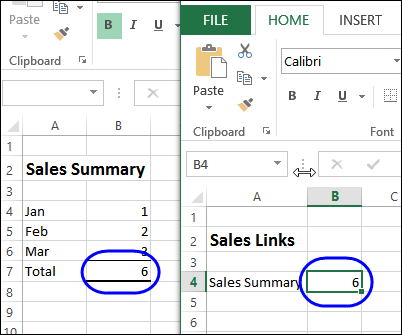
In the screen shot below, there are two files. Cell B4 in the worksheet at the right is linked to cell B7 in the sheet at the left. If you have a problem breaking links in Excel, this article might help fix that.
Create Rounded Shapes in Excel 2013
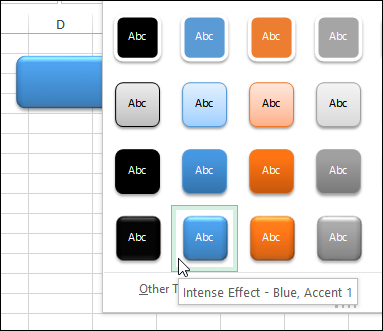
If a workbook has macros, or needs navigation buttons, I usually create a button by inserting a rounded rectangle on the worksheet. Instead of using the default flat shape, here’s how to create rounded shapes in Excel 2013.
Excel Roundup 20140217
On the Power BI blog, Microsoft Finance Director, Marc Reguera, explains how his department is using the new Power BI tools in Excel. Will you be using them too?
You can read more at the Power BI blog, or watch the video below.
The video is also on YouTube: Interview with Marc Reguera
Contextures Posts
Here’s what I posted last week:
- The heading text was filling in when I typed an “A” code in a column. See how I fixed the AutoComplete problem, and what caused it.
- Find the source data for an #Excel pivot table, to check that all rows are included.
- Select multiple items for a cell, by clicking the check boxes in a popup form. It opens when you select a cell with a drop down list.
- Finally, for a humorous peek at what other people are saying about Excel, read this week’s collection of Excel tweets, on my Excel Theatre blog.
Other Excel Articles
Here are a few of the Excel articles that I read last week, that you might find useful:
- Mitali Pattnaik wonders what kind of software could take Excel’s place. You can add your opinion in the comments on her Disrupting Excel article.
- Jon Peltier shows how to create and update a chart, using only part of a pivot table’s data.
- Tim Wolverson share his instructions for plotting a Fibonacci spiral in Excel, and there’s a sample file to download.
- Recently, I shared a formula for finding the last item in a category, in a sorted list. Oscar created a formula that works with an unsorted list.
- If you’re not sure what linear regression is, or how it works, read Mike Alexander’s excellent, and easy to understand, explanation.
- Microsoft’s Power BI pricing was announced, and the New York Times worries about feature creep in the tools.
- You can select numbers on a worksheet, and see a Sum, Count, or other summaries in the Status bar. There’s no Subtraction option, so Dick Kusleika created one of his own.
Excel Resources
Here are some upcoming events, courses and new books, related to Excel.
- If you’re near Tennessee, Rob Collie, from PowerPivot Pro, will be speaking at the first meeting of the Nashville Modern Excel User Group, on Thursday, Feb. 20th. The registration information is here, and there’s free admission to the meeting.
- Bill Jelen is presenting at the Orlando Florida Power Excel seminar, Saturday Feb 22 2014
- Chandoo has re-opened his Power Pivot online course, and you can get the course info and registration details here: Power Pivot Course
- Registration open today for the Amsterdam Excel Summit. The one-day event runs on May 14, 2014, and features sessions by several Excel MVPs, such as Bill Jelen (Mr. Excel), Ken Puls and Charles Williams.
Marketing Analytics: Data-Driven Techniques with Microsoft Excel by Wayne L. Winston
“This practical resource shows you how to tap a simple and cost-effective tool, Microsoft Excel, to solve specific business problems using powerful analytic techniques—and achieve optimum results. Practical exercises in each chapter help you apply and reinforce techniques as you learn.”
What Did You Read?
If you read any other interesting Excel articles last week, that you’d like to share, please add a comment below.
Please include a brief description, and a link to the article.
__________________________________
Select Cell Items From ListBox
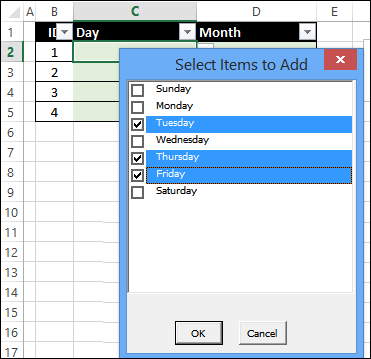
I’ve posted a few techniques for selecting multiple items from the drop down list in a cell. In the screen shot below, there is a drop down list in cell C3. When you select an item from the list, it’s added to the cell, instead of overwriting the previously selected value. Now, instead of a cell drop down, here’s how to select cell items from ListBox.
Stop Unwanted AutoComplete in Cells
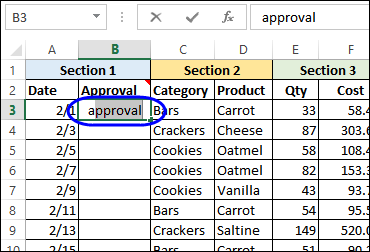
Like almost every other program, Excel comes with a few (?) annoyances, along with its great features. I butted heads with AutoComplete feature last week, and after a few attempts, we reached an agreement on how to work together nicely. Here’s how you can stop unwanted AutoComplete in cells.
Excel Roundup 20140210
The ModelOff Live Final for the 2013 Financial Modeling World Championships were held last December, in New York City, and Hilary Smart, from London, was the winner.
The organizer have just published an infographic about the competition, and you can see the full image on their blog.

Contextures Posts
Here’s what I posted last week:
- To find the last item in a list category, you can use a formula with the INDEX and MATCH functions.
- In Excel 2010 and later, you can turn repeating item labels on and off in a pivot table
- To make your favourite commands easier to use, you can add them to the Quick Access Toolbar. Show the buttons for all workbooks, or just one.
- Finally, for a humorous peek at what other people are saying about Excel, read this week’s collection of Excel tweets, on my Excel Theatre blog.
Other Excel Articles
Here are a few of the Excel articles that I read last week, that you might find useful:
- On Microsoft’s Excel team blog, Jeff Johnson shows 4 ways that you can filter your data, to show only part of the data in a chart.
- Ken Puls is in the design stage of a new reporting system for his company. He’d like to know how you start designing software, so leave a comment on his blog post.
- On the Daily Dose of Excel blog, Jeff Weir shows how you can add leader lines to non-pie charts, in Excel 2010 and earlier. If you have Excel 2013, this feature is now built-in.
- It’s not just Excel that changes its format occasionally, causing compatibility problems with older versions. John Thysell explains the pain of maintaining spreadsheets in OpenOffice / LibreOffice.
- Do you have a favourite Excel book? Chandoo shared his top picks, and you can see other people’s choices in the comments. Add your own list of favourites to the discussion.
- Mike Alexander shows how to use Power Query to combine data from multiple Excel files into one table. It’s an amazing way to clean up your data, and you can see a demo in the End-to-End Power BI webinar (see the 24 Hour PASS Replays link below)
Online Courses
- Last week, there were free Business Analytics courses online, in promotion of the upcoming PASS conference. If you missed them, the replays are available: 24 Hour PASS Replays
- Chandoo has just re-opened his Power Pivot online course, and you can get the course info and registration details here: Power Pivot Course
What Did You Read?
If you read any other interesting Excel articles last week, that you’d like to share, please add a comment below.
Please include a brief description, and a link to the article.
__________________________________
Put Add-in Buttons on Excel QAT
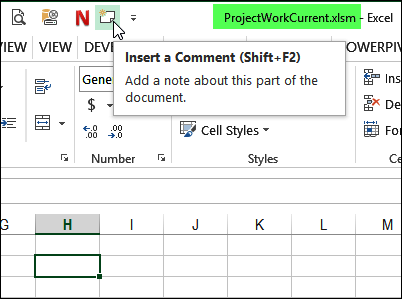
Instead of searching through the Ribbon, to find and click a command, you can save time by putting your favourite commands on the Quick Access Toolbar (QAT). You can see the written steps and a video below.