Happy Thanksgiving, if you’re celebrating tomorrow! And then it’s Black Friday, so get your shopping list spreadsheet ready for that!
Continue reading “Get Ready for an Excellent Holiday Season”
Excel tips and tutorials

Happy Thanksgiving, if you’re celebrating tomorrow! And then it’s Black Friday, so get your shopping list spreadsheet ready for that!
Continue reading “Get Ready for an Excellent Holiday Season”
If you love Excel, and want to expand your horizons a bit, there are a couple of great opportunities for you to learn something new, beyond Excel features and formulas. Are you ready for an adventure?
There are a few upcoming Excel-related events that you might be interested in. These are online sessions, and all of them are free.
You can read the details below, and watch for the availability dates and deadlines.
Continue reading “Upcoming Free Online Events for Excel Fans”
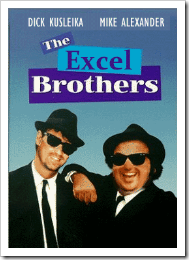 They didn’t ask for my advice, but Mike Alexander and Dick Kusleika need a poster for their upcoming Excel and Access Power User Workshop.
And, if you can’t make it to their Excel training workshop, I’ve listed a couple of online courses that you can check out. The list is at the bottom of this post, so take a look, if you want to bump up your Excel skills!
The event is in Chicago, and who better represents that city than the Blues Brothers? Your Photoshop skills are probably better than mine (non-existent), so here is my attempt at morphing Mike and Dick into The Excel Brothers. (Sorry Mike, I had to widen your face a little!)
I’ve spent many hours with Mike and Dick at Microsoft events, and they are both extremely knowledgeable, and highly entertaining. If you can make it to Chicago next month, and want to power up your Excel and Access skills, I highly recommend signing up for this workshop.
The two day workshop runs Wednesday, May 18, 2011 – Thursday, May 19, 2011, and the schedule is jam packed with sessions that will make your Excel/Access skills even more amazing than they are now.
Bring your laptop to the workshop, so you can follow along, and hone your skills, while Mike and Dick guide you. Here’s a summary of what you’ll learn in the sessions:
And of course, when you attend a power user workshop like this, you’ll learn even more during the breaks and informal sessions, by chatting with Mike and Dick, and your fellow attendees.
I’ve been to Chicago a few times, and it’s my favourite city in the USA. Granted, my experience is limited – I’m comparing it to Atlantic City, Orlando, Buffalo and Seattle.
If you register for the Excel and Access Power User Workshop, add a couple of days to your trip, and spend the weekend doing touristy things in Chicago.
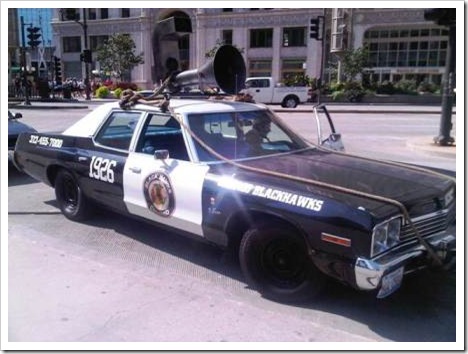
During a visit last fall, I saw the Blues Brothers’ police car – stalled in the middle of The Magnificent Mile!
The Chicago Mayfest is celebrated May 20-22, and it sounds like fun. Who knows – you might run into Ferris Bueller!
The 17th annual Chicago Mayfest brings in three days of celebration – featuring; Chicago’s BEST Bands, Festival Cuisine, Maypole dancing, pretzels, beer, artisans, and a broad spectrum of super cool entertainment.
Just tell your boss that you want to get to Chicago for some Excel/Access training, and Maypole dancing. Who could argue with that?

If you can’t make it to Chicago, there are online courses to improve your Excel power skills. I highly recommend the following two training sites, based on my experiences with their Excel courses.
This course is offered by Mynda Treacy, at My Online Training Hub
The Power Pivot for Excel Course (affiliate link) includes 5.5 hours of video tutorials covering everything from installing Power Pivot, importing data, DAX formulas, PivotTables and more. Download the sample files, and follow along with the lessons.
In this hands-on project-based course, you will build a Power Pivot model from start to finish. The training is delivered online and tutorials are available to watch 24/7 at your own pace. Pause, rewind, replay as many times as you like.
Ken Puls, Matt Allington, and Miguel Escobar offer courses in Power BI, Power Query, Power Pivot, and Microsoft Excel.
See course details on their Skillwave website.
There’s a free course too – Power Query Fundamentals. Start with that course, to see if the content and teaching style fits with what you need.
_____________
If you use Excel at work, or list it on your résumé, what tasks should you be able to do? Are there basic skills for Excel users that office workers should be able to perform with little or no help?