
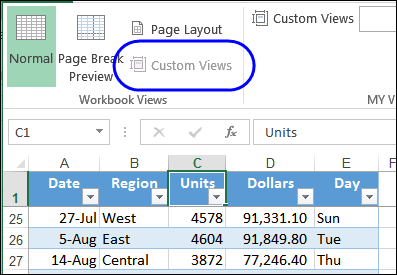
To save time when printing reports, you can save filter and print setting in Custom Views. Unless, of course, your workbook contains a Named Excel table – you can’t use Custom Views in those files.
Category: Excel tips
Excel Roundup 20140505
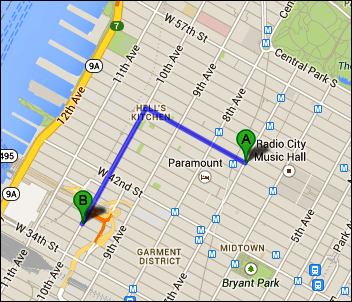
Do you ever use Google Maps to estimate your travel time? I use it for road trips, and it seems fairly accurate – except at rush hour!
Jeff, from the Jeffrey Fan blog, lives in downtown New York City, and walks to work. He wasn’t satisfied with the accuracy of the walking times that Google estimated, so he built his own estimator in Excel.
You can download Jeff’s sample file, to see how it works.
Excel Roundup 20140428
If you’re a parent, have you had that all-important conversation with your children? Or, do you hope that your spouse will have that talk with them, because you’re not sure of the best way to approach it?
Don’t worry, Zach Rosenberg shows how to broach this sensitive topic, in his blog post, “An Open Letter to My Son About Microsoft Excel”.
Continue reading “Excel Roundup 20140428”
Hide Table Details With No Macros
Last week, I was preparing reports for a client, and needed to find a quick and easy way to show or hide details in a long list. After a bit of thought, and experimenting, I found a way to do this – without macros.
You could use this technique on a table or pivot table, to make it easier to explore the data. You could also use this technique on an Excel dashboard, where real estate is in high demand!
Continue reading “Hide Table Details With No Macros”
Excel Roundup 20140421
Last week, Microsoft’s Excel team announced several welcome improvements to Excel online. The new feature that I like best is that you can now edit files that contain VBA, without the code being removed or corrupted. Of course, it would be even better to use VBA online, but we’re making progress!
Other new features include:
- Hiding and unhiding rows and columns with a right-click
- Easier access to Excel Online – just go to https://office.com and click the type of document you want to create
- Add, remove and edit comments
- Navigate quickly with the Go To shortcut (Ctrl + G)
Adding Form Controls on a Worksheet
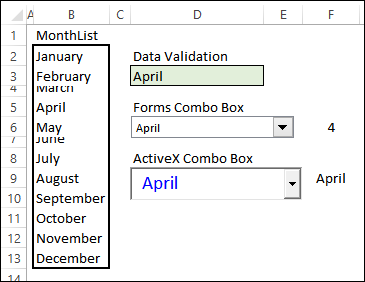
Do you spend your days, and maybe your nights, talking about Excel with your friends? It’s amazing how quickly the time passes, while you chat about all the awesome features and tricks that you know. You know, exciting things like adding form controls on a worksheet.
Excel Roundup 20140414
Mike Alexander is having a contest on his Bacon Bits blog – create an Excel meme, and you have a chance to win a couple of Mike’s books. The deadline is April 16th, and the rules are on Mike’s blog.
If you aren’t sure what a meme is, Wikipedia describes it as an idea or picture that is shared on the internet. Mike posted a couple of examples on his blog, and here is my contribution. I’m sure you’ve met someone like this guy!
I made this in Excel, using the Insert Online Pictures command, and the text in WordArt. What can you come up with?

Change Characters to Superscript
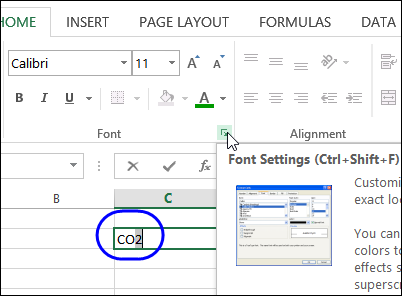
Do you ever use the Subscript or Superscript fonts formats in Excel? Maybe you’re reporting on chemical usage, and you need to enter CO2 as one of the row headings. Here’s how to change characters to Superscript – you could use similar steps to change characters to Subscript.
Excel Roundup 20140407
Last Friday, Microsoft’s Excel team hosted an AMA on Reddit, where anyone could submit a question about Excel. You can read all the questions and replies at this link.
It looks like the event went very well, so they might host another one sometime in the future. What would you ask the Excel team, if you had the chance? Think of your questions now, so you’ll be ready for the next opportunity.
Here’s one of the questions, and an answer by program manager, Ben Rampson:
Q: Do you guys ever see a use for Excel that you didnt even think was possible. Crazy forumals, etc
A: I’ve seen lots of crazy uses of Excel that I never expected. Some of my favorites:
- A customer issue escalation from NASA complaining the space shuttle launch would be delayed by a few months if we didn’t address the problem they found.
- A customer escalation from military with a business justification that was basically “innocent people will die” because of shapes being shifted over a few pixels in a spreadsheet.
- A manufacturing company that used Excel to run robots responsible for testing the electronics they were building on a manufacturing line. The amount of code they had written around their spreadsheet shocked me.
Contextures Posts
Here’s what I posted last week:
- Here’s how I cleaned an imported list in Excel, and split one column of data into 2 columns. There are other suggestions in the comments too.
- Can you send out a pivot table and prevent people from seeing all the source data? It’s not an easy task, but there are a few options that you can try.
- You can add headers to a combo box drop down list, so the columns are easier to understand.
- Finally, for a humorous peek at what other people are saying about Excel, read this week’s collection of Excel tweets, on my Excel Theatre blog.
Other Excel Articles
Here are a few of the Excel articles that I read last week, that you might find useful:
- You can’t use ActiveX controls on a Macintosh, so Prof. Lee Townsend shows how to create dependent drop downs using Form control combo boxes.
- And speaking of the Mac, one of the earliest spreadsheets was Trapeze. Its creator, Andrew Wulf, has decided to build a simple version of Trapeze from scratch for the iPad.
- Doug Glancy found that the SheetActivate event isn’t triggered if a workbook has multiple windows, so he added a workaround.
- I don’t want to be overly optimistic, but it looks like winter is finally over. At Neoformix, Jeff Clark used the weather data to show that winter in the Toronto area was the coldest in 20 years. You could download data for your area, and make a similar report in Excel.
- Scott Lyerly discovered that you can use VBA with the Ribbon in Microsoft Project, so why can’t you do something similar in Excel?
- How much money will you need to retire? The Blunt Bean Counter shares a retirement planning spreadsheet, and there a couple of other links in the comments.
Excel Resources
Here are some upcoming events, courses and new books, related to Excel.
- Registration is open for the Amsterdam Excel Summit. The one-day event runs on May 14, 2014, and features sessions by several Excel MVPs, such as Bill Jelen (Mr. Excel), Ken Puls and Charles Williams. All the sessions are in English, and the limit is 100 participants, so sign up now, if you’re interested.
- The European Spreadsheet Risks Interest Group – EuSpRIG –has announced the preliminary program for Eursprig 2014. This event will be held in Delft (Netherlands) on July 3, 2104.
Excel Dashboards and Reports for Dummies, by Mike Alexander.
336 pages, published March 31, 2014
Learn to: Analyze data and report it in a way that makes sense; slice and dice data from different perspectives; create eye-catching and understandable reports, visualizations, and dashboards; automate redundant reporting
Dashboarding and Reporting with Power Pivot and Excel, by Kasper de Jonge.
195 pages, published April 1, 2014
This book, written by a member of Microsoft’s Power Pivot team, provides a practical step by step guide on creating a financial dashboard. The book covers in detail how to combine and shape the relevant data, build the dashboard in Excel, providing layout and design tips and tricks, prepare the model to work with fiscal dates, and show values used in many financial reports.
What Did You Read or Write?
If you read or wrote any other interesting Excel articles recently, that you’d like to share, please add a comment below, or send me an email. Please include a brief description, and a link to the article.
[Update] Thanks for suggesting the following articles:
- Randy Rhea advises us to use a delimiter that’s not in the data, for easier imports.
- To help organize your data, Randy suggests using a macro that enters the date and user’s initials in a task list.
- Barb Darrow doesn’t think that Excel on the iPad is much use, if it doesn’t have macros.
_______________________________
Change Single Column List to 2 Column Table
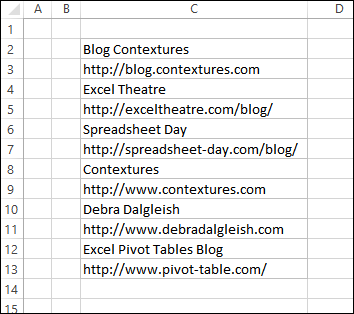
On the weekend, I copied a list of blog names and URLs into Excel. On the website that I copied it from, the list was in 2 columns, but it pasted into a single column in Excel. Having everything mixed together in one column wasn’t going to be very helpful. Here’s what I did to change single column list to 2 column table.
Continue reading “Change Single Column List to 2 Column Table”