Excel Roundup 20140728

The Office 365 Garage Series has a video on what’s new in the Office Apps, and they demonstrate some cool new features. The Excel App is mentioned at the 7:12 mark, when they look at the new APIs for formatting.

However, at the 3:12 mark, they downplay the old development methods, including VBA and COM, and rave about the new methods — HTML and JavaScript, that are used for the online versions of Office.

Apparently it’s almost impossible to find people who are still working in the older development platforms. What do you think of the chart they use to “validate” the trend? Are they really using a sample size of 12 COM jobs, compared to a final number of 5 JavaScript jobs? I’m not a statistician, but that doesn’t qualify as “dramatic decline” versus a “huge insurgence” in my opinion!

I did like the way that he drew on the chart though, to change it from a column to a line chart. You can see that at the 4:20 mark in the video below.

Or watch on YouTube: What’s new in the world of apps for Office?

Continue reading “Excel Roundup 20140728”

Excel Roundup 20140714

Here’s this week’s Excel roundup, with news, tips, and announcements.

Contextures Posts

Here’s what I posted recently:

  • Enter a number in the input box, and that amount is added to each cell in the selected range, with this macro. I use this to add a week, to a  group  of date cells.
  • I sent out an update for my PivotPower Premium add-in last week. If you missed the email, or didn’t open it before the deadline, please let me know and I’ll send you a new link. You can read about the new features on my Pivot Table blog. [Update: This product is no longer available]
  • Finally, for a humorous peek at what other people are saying about spreadsheets, read the latest collection of Excel tweets, on my Excel Theatre blog.

Other Excel Articles

Here are a few of the Excel articles that I read recently, that you might find useful:

  • On Microsoft’s MSDN Blog, Eric Ligman shared a list of free ebooks, including Excel shortcuts and quick start guide.

Excel Announcements

Here are some upcoming events, courses, recently published books, and other new items, related to Excel.

  • Mynda Treacy’s Excel Dashboard course is open for registration, and I highly recommend this online course, which has excellent content, and great student support from Mynda. Save 20% if you sign up by July 24th. Registration closes on July 31st.
    BONUS: If you sign up for the course through this link, you can have a copy of any one of my Contextures Products. When you sign up, type DebraD in the Referral Code box (below the Buy Now button), and email me your receipt number.Excel Dasboard Course
  • Charles Williams has released a new version his add-in, FastExcel V3, and you’ll get 50% off the bundle price, if you use Coupon Code FXLV3Intro Warning: The 50% Discount ends soon — July 31 2014. Don’t miss the deadline!
Excel Tables: A Complete Guide (pdf version)
by Zack Barresse and Kevin Jones

”The book begins by explaining what tables are, how to create them, and how they can be used in reporting before moving on to slightly more advanced topics, including slicers and filtering, working with VBA macros, and using tables in the Excel web app. Novice Excel users and experts alike will find relevant, useful, and authoritative information in this one-of-a-kind resource. “

Share Your Events and Articles

If you read or wrote any other interesting Excel articles recently, or have upcoming Excel events, please share a link in the comments below, with a brief description. Thanks!

_____________________

Learn Excel Dashboard Course

____________________

Excel Roundup 20140616

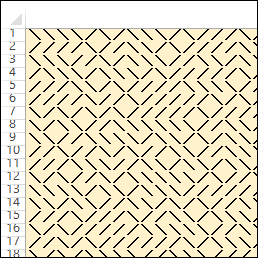
If you still have a Commodore 64 in your basement, you could run a one-line maze generator, in Basic. If your mom threw out that C64, years ago, you can do something similar in Microsoft Excel.

On Google+, Graeme McRae posted a VBA function that will create a maze, using a random string of / and \ characters.

Here’s a maze that I created in Excel 2013, with a gold background, and bold font. That should keep your kids (or you) busy for a while!

Excel Maze
Excel Maze

Continue reading “Excel Roundup 20140616”

Excel Roundup 20140609

What’s the oldest version of Excel, or other spreadsheet program, that you have lying around your office? In my office, there’s an old Multiplan disc and manual, and before that, I probably used a rock and chisel.

Gough Lui took a trip back in time, and installed Excel for Windows Version 3.0 – nine floppies, all 5.25″ in DD 360kB format. There are lots of screen shots, which might make you nostalgic for the good old days.

multiplandisk01

Continue reading “Excel Roundup 20140609”

Excel Roundup 20140602

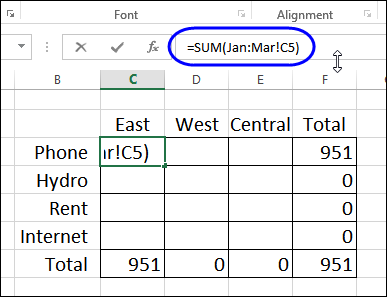
At PC World, Julie Sartain shows how to set up a workbook with a sheet for each month, and 3D formulas to summarize the Year to Data expenses. It’s not the way I’d set it up, but that’s a topic for another blog post.
What struck me was the comment,

“One of Excel’s greatest tricks is the dimensional or 3D reference…In Excel 2013, Microsoft has beefed it up with enhanced options and formulas.”

There are new functions, and other features in Excel 2013, but I don’t know of any new options in this area – did I miss something?
Excel Roundup 20140602
Continue reading “Excel Roundup 20140602”

Excel Roundup 20140512

The Tech Republic blog takes a look at 5 free Excel add-ins, that you can download from the Microsoft Store website. It looks like they only work with Excel 2013 – have you upgraded to that version yet?

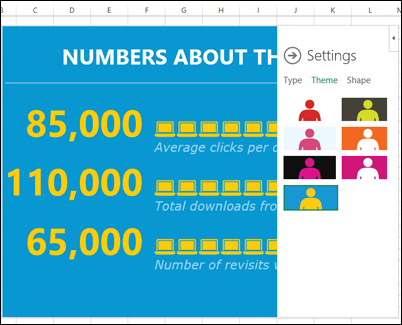
One of the add-ins is People Graph, from Microsoft, and it lets you infographic-style charts, with eye-hurting colours, and a variety of shapes. Do you agree with the author’s description of this add-in?

“Rather than displaying standard bar charts, People Graph displays icons that better convey business data that’s related to people (such as the number of people who purchase a product).”
peoplegraph01


Contextures Posts

Here’s what I posted last week:

  • Save filter and print settings in Custom Views, then show the selected view’s name on the worksheet
  • Make simple changes to VBA code in sample files that you copy from my website, or other sites on the web.
  • Finally, for a humorous peek at what other people are saying about Excel, read this week’s collection of Excel tweets, on my Excel Theatre blog.

Other Excel Articles

Here are a few of the Excel articles that I read last week, that you might find useful:

  • If you’ve ever had to make changes to the VBA code in an Excel file that someone else built, you might appreciate the code that one new developer was told not to change, because it had worked just fine for years. Yikes!

Excel Resources

Here are some upcoming events, courses and new books, related to Excel.

Business Intelligence Tools for Excel Analysts, by Michael Alexander, Jared Decker, Bernard Wehbe

384 pages, published May 5, 2014

“For the first time, Excel is an integral part of the Microsoft BI stack – capable of integrating multiple data sources, defining relationships between data sources, processing analysis services cubes, and developing interactive dashboards that can be shared on the web. With these new tools, it’s becoming important for Excel analysts to expand their knowledge to include new skills, like database management, query design, data integration, multidimensional reporting, and a host of other practices.”

Excel Data Analysis for Dummies, by Stephen L. Nelson, E. C. Nelson

360 pages, published May 5, 2014

“If you’re like most people, you probably don’t take full advantage of Excel’s data analysis tools. This friendly guide walks you through the features of Excel to help you discover the insights in your rough data. From input, to analysis, to visualization, this book shows you how to use Excel to uncover what’s hidden within the numbers.”

What Did You Read or Write?

If you read or wrote any other interesting Excel articles recently, that you’d like to share, please add a comment below, or send me an email.

Please include a brief description, and a link to the article.

__________________________________