Excel Roundup 20141208

Christmas is only 2-1/2 weeks away, so it’s time to start planning! Of course you’ll want to organize everything in a spreadsheet, so you can download the free Excel Holiday Planner, from my Contextures website.

It has shopping lists, budget sheets, task lists, and even a dinner planner, so get your copy, and get the holidays under control.
Continue reading “Excel Roundup 20141208”

Excel Roundup 20141201

Wow! It’s December already – how did that happen? It’s Cyber Monday too – a big online shopping day. Did you find any Excel bargains?

To start the countdown to Christmas, Mynda Treacy created an Advent Calendar in Excel. You can download the file, if you’d like a bit of fun while you count the days until Christmas

You’ll have to answer a quiz each day, to open the calendar doors. To get a head start, you can start thinking about the answer to the December 5th question, shown in the screen shot below.

Continue reading “Excel Roundup 20141201”

Convert Currency With Different Separators

Happy Thanksgiving, if you’re celebrating today. Tomorrow is Black Friday – the biggest shopping day of the year, in the USA. Up here in Canada, we celebrate the day too, so I’ll put one of my Excel products on sale for the day. Remember to check this blog tomorrow, to get the coupon code.

If you’re doing your shopping around the world, you might end up with a worksheet filled with amounts in a different currency. Let’s see how Excel can help with that problem!

Continue reading “Convert Currency With Different Separators”

Ignore Blank Cells When Pasting

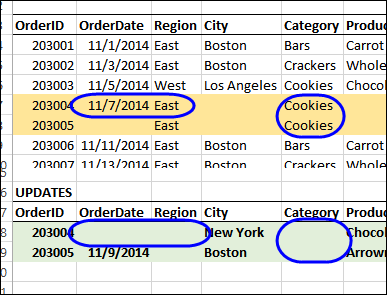
Last week, I was working on a client’s file, and we wanted to get any new information from an update file, and paste it into the current record.

Both files were set up with the same columns, but the update file only had a few of the fields filled in. We could have used a macro to loop through the fields, grab any new information, and paste it to the current record. However, that would be a slow way to update the records, especially in a large file.

Continue reading “Ignore Blank Cells When Pasting”

Excel Roundup 20141117

In this Garage Series episode, Power BI and Excel go to Spain, to expose data patterns in past matches between Real Madrid and FC Barcelona.

“By combining historical El Clásico and player data, outside forces like temperature, humidity and moon phases, Jeremy tries to predict the outcomes and puts these predictions to the test among fans in Barcelona.”

They didn’t use good hair as one of the factors, but they predict 2-1 for Madrid, in the Oct. 25th match. (The final score was 3-1 for Madrid.)

You can watch the video below, or on YouTube: Power BI takes on El Clásico

Continue reading “Excel Roundup 20141117”

Excel Roundup 20141110

One Excel annoyance is that after you select a group of cells, you can’t unselect one of them. For example, you might want to format specific cells, or create a named range, and you accidentally include a cell that shouldn’t be in the group. You can’t click on that cell to unselect it – you have to start over, and select more carefully the next time.

To solve that problem, Doug Glancy has created a free tool that you can download — SelecTracker.

Next, we need a version that lets you unselect one cell within an large area, e.g. if you drag down from A2:A7, click on cell A5, to unselect it.

Continue reading “Excel Roundup 20141110”