
This weekend is our Canadian Thanksgiving, and we’ll have 16 people here for dinner. To make sure that all the dishes are ready on time, I’ll use Excel to schedule everything that has to be done. We’ve been using this meal planner for years now, and would be lost without it!
Category: Excel Formulas
Keeping Track of Garbage in Excel
I’ve worked with “garbage” data many times in Excel. You know what I mean – data that is so messy it takes you hours (or days) to clean it up. This week though, I did a different type of garbage tracking. Maybe I went a little overboard, but you’ve probably done that too, right? Anyway, here’s how I spent way too much time on an Excel project, but had fun doing it. Don’t judge!
Excel Lookup With Two Criteria
If you need to get a product price in Excel, you can use VLOOKUP or INDEX/MATCH to get the price from a lookup table, based on a product code. But what if you have two pieces of information, such as a product name, and a size, and you want to find the price based on that information? How can you do an Excel lookup with two criteria?
Enter Complex Excel Formulas Fast
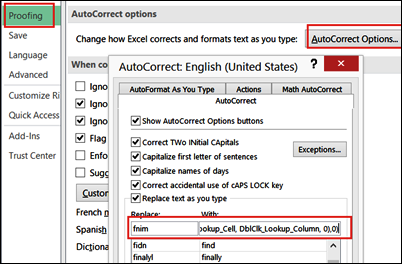
On Chandoo’s blog, Hui is running a series of articles with Excel Tips. There were some great tips in this week’s list, but my favourite one was down in the comments section – how to enter complex Excel formulas fast.
I’ve been using Excel for a long time, and I’ve never seen this suggestion before. And it’s a real time saver!
Choose From List to Change Excel Data
Do you need a quick way to show different data in a worksheet? For example, on an order form, you could let people select a region, and automatically include the shipping cost or tax rate for the selected region. I added an English/French selector to a workbook last week, so a formula would work correctly, in either language.
Highlight the Latest Lottery Number Matches
Did you win the big prize? Have you ever picked those winning numbers? If you’re keeping track of lottery ticket numbers, use Excel conditional formatting to highlight the winning numbers in a list. Each week, enter the numbers from the latest draw, and Excel will colour all the cells that have matching numbers. You can use a different colour to highlight the latest lottery number matches. The screen shot below shows an example.
Continue reading “Highlight the Latest Lottery Number Matches”
Excel VLOOKUP Sorting Problem
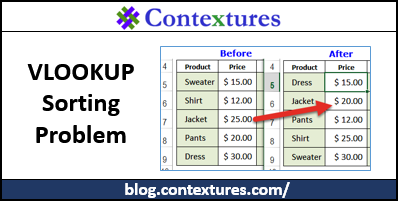
You can use an Excel formula to pull data from a lookup table – for example, enter a product name, and automatically see its price. Be careful though, or things can go horribly wrong, and you’ll end up selling things at the wrong price.
How to Split Date and Time in Excel
If you download data into Excel, one column might have a combined date and time value. If you’re going to create reports from that data, it’s usually easier if you have the date and times in separate columns. See how you can do that with a simple formula, or a quick bit of typing.
How to Fix Excel Numbers That Don’t Add Up
If you download bank statement data into Excel, or copy numbers from a website, those numbers might not add up correctly. The bank data might look like numbers, but Excel might see those numbers as text — not real numbers.
You can fix the numbers manually, as shown in the video below, or use a macro to automate the fix.
Continue reading “How to Fix Excel Numbers That Don’t Add Up”
Customize Weekends With Excel WORKDAY Function
If you’re trying to figure out when a project will be completed, you can use the WORKDAY.INTL function (Excel 2010 or later). It’s more flexible than the older WORKDAY function – it doesn’t assume that you work Monday to Friday any more!
Continue reading “Customize Weekends With Excel WORKDAY Function”