
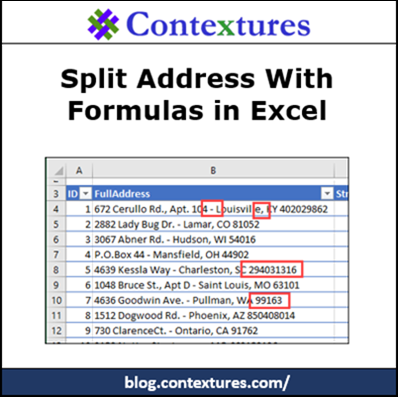
If a cell contains a full address, what formulas would you use to show the street address, city, state and zip code in separate cells? That was the challenge that I gave to my weekly newsletter readers. A few rows of the sample data are show below, and you can download the “Split Address with Excel Formulas” sample file, to see all the data.
Category: Excel Formulas
Excel Price Lookup Date Product Name
If there’s just one price per product in an Excel lookup table, you could use the INDEX and MATCH functions to to get that price. But what if the price changes occasionally, and your pricing list has multiple dates and prices for each product? How can you do a product price lookup based on invoice date and product name?
7 Ways to Round in Excel
It’s not usually as obvious as the error in the screen shot below, but have you ever seen Excel adding things up incorrectly? No wonder some people take out a calculator, to check the totals! Your trusty old calculator wouldn’t tell you that 2+2=5.
SUMIFS Formula With Empty Criteria Cells
I recently learned about The 100-Day Project (#The100DayProject), in which you work on making something every day, for 100 days. Would Excel formulas (#100DaysOfXL) be considered an artistic project? Maybe not, but I had fun working on this SUMIFS formula with empty criteria cells!
Combine VLOOKUP and MATCH for Flexible Formula
With the Excel VLOOKUP function, you can pull data from a specific column in a lookup table. For example, if the lookup table has Product ID, Product Name and Price, you’d use column 3 to get the price. To make your formulas more flexible, and to prevent problems, you can combine VLOOKUP and MATCH.
Continue reading “Combine VLOOKUP and MATCH for Flexible Formula”
Take the Excel Name Fix Challenge
Last week, in my Contextures Newsletter, I posted an Excel Name Fix challenge. There was a short list of names, which needed to be fixed. Then we needed to count how many were fixed. Take the challenge yourself – download the workbook to see how you’d solve it.
Excel RANK IF Formula Example
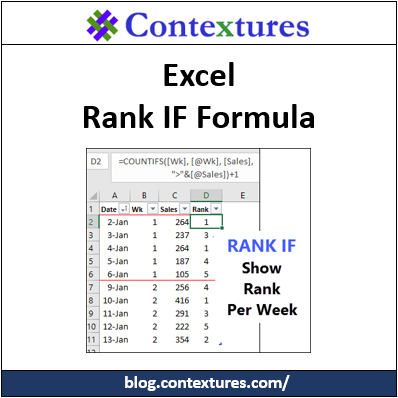
There is a Microsoft Excel RANK function, so you can calculate where each number stands in a list of numbers. There isn’t a RANKIF function though, if you need to rank based on criteria. Someone asked me for help with ranking daily sales, so I used COUNTIFS to make an Excel Rank If formula workaround.
Excel VLOOKUP Problem Numbers
Recently, someone asked me for help with VLOOKUP problem numbers:
- He had a list of 8-digit numbers.
- In the next column, there was a formula to get the first 3 numbers: =LEFT(A2,3)
- Based on that number, a VLOOKUP formula should find the category in a lookup table
- Problem – Instead of a category name, the result is an #N/A error.
The VLOOKUP formula looks okay, so why doesn’t it work?
Analyze Food Tracker Data in Excel
To keep track of what I’m eating, I use the LoseIt food tracker app on my iPhone and iPad. It’s easy to use, and creates nice summaries for each day and week. To see how things are going, I’d like to analyze that food tracker data in Excel, instead of being limited to the preset options in LoseIt.
Take the Excel COUNTIF Challenge
Last week, in my Contextures Newsletter, I posted an Excel COUNTIF challenge. There were 100 codes on a worksheet, but when counted, the occurrences for each letter only added up to 99. What was causing the problem? Take the challenge yourself – download the workbook to see how you’d solve it.