It’s time for an Excel giveaway! Just describe one of the telltale signs of Excel nerdery (is that a word?), and you could be the proud owner of a shiny new Excel book, e-book or utility.
To enter, write an original (and suitable for work!) comment below, completing the sentence, “You might be an Excel nerd if…”
For example, you might be an Excel nerd if:
you’ve written 3 books on pivot tables.
long-lost friends and relatives call you, not for money, but for Excel help.
you understand Dave’s “accept labels” comment, that inspired this giveaway.
The submission deadline is 12:00 noon (EDT) on Tuesday, July 28, 2009. Winners will be announced here on July 29th.
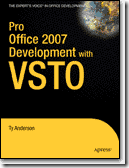
Pro Office 2007 Development with VSTO, by Ty Anderson
(e-books)
Contextures
And finally, from Contextures – three prizes
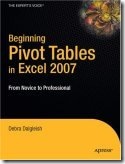
Beginning Pivot Tables in Excel 2007
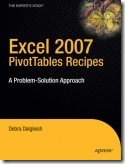
Excel 2007 PivotTables Recipes
Excel Pivot Tables Recipe Book
The Rules
To enter, just write an original (and suitable for work!) comment below, completing the sentence, “You might be an Excel nerd if…”
The comment must be submitted before the deadline of 12:00 noon (EDT) on Tuesday, July 28, 2009
One entry per person – any additional entries will be deleted from the draw
A random draw will select each prize and its winner. No substitution of prizes.
Winners will be notified by email, so please provide a valid email address. This will not be publicly visible, but may be shared with the contest sponsors, so they can contact prize winners to arrange delivery.
Physical prizes will be shipped, postage paid, but taxes or other charges (if any) will be the responsibility of the recipient.
Do people email you, asking for Excel help? Co-workers? Family members? Strangers from the Internet?
Email Message
Here’s a favourite “Email Help” message from my mailbox this week:
Subject: help me in excel
Dear sir,
I have a problem in excel i requesting to you solve this. I am sending the data of excel sheet pls look in to that
If you have want any information on that please get back to me
I am waiting for your reply
Regards
Anonymous
Those “Dear Sir” emails make me feel like Peppermint Patty. At least the attached Excel file was small, unlike some of the multi-megabyte files I’ve been sent.
Sorry Anonymous, but I can’t help with your Excel problem today. My desk is piled high with work, and I won’t have any extra time to decipher your file.
Where to Get Help
Fortunately, there are places where Anonymous, or you, can get free help with your Excel problems, or ask questions about other Microsoft products.
You can post questions in the online Excel help forums, which provide free peer-to-peer support
You could even post a short cry for help in Twitter, and it’s likely that someone will respond. Use the hashtag #Excel in your tweet
Ask Questions in Public
These are much better options than emailing me, and asking for private help. Why?
There are people reading those messages 24 hours a day, 7 days a week – you have a much better chance of getting a quick reply.
Thousands of people are reading the messages, and probably some of them are experts in the area where you need help.
Responses are usually very quick, and you’ll sometimes get multiple replies, giving you a variety of solutions.
When you post a question and get a response, it might help someone else who has the same question later. They can find your question and answer by searching in Google.
Good luck, Anonymous! I hope you find someone who can help with that Excel question.
_______________________
For information on other Excel Resources, such as tips and tutorials, Excel videos, and online courses, see the following pages on my Contextures website.
Monday was Victoria Day in Canada, which is the unofficial start of summer. However, my tomato plants are huddled in the garage, wearing little polar fleece sweaters, hoping it will warm up soon.
It dipped to 1°C last night, but at least it didn’t snow!
Despite the frosty weather, I’m putting the Contextures Blog on summer hours, and will be posting Monday, Wednesday and Friday.
For Excel related news, watch the Microsoft Excel blog. They did a great job leading up to Excel 2007, and I hope they’ll do the same for this version.
There are even a few screen shots in the Microsoft press gallery.
Last week, the UK Excel User Group Conference was held at the Microsoft offices in London.
You can see a few conference photos by Bob Phillips, including shots of speakers Nick Hodge, Simon Murphy and Andy Pope, and a few pictures of the attendees.
UK Excel User Group Conference April 2009
Microsoft Event
The UK Excel User Group Conference was a free event, hosted by Microsoft, and it filled to capacity quickly, after registration opened.
There may be another conference in the fall, and I’ll post the details here if one is announced.
There’s also a list of upcoming Excel Events on my website.
________________________
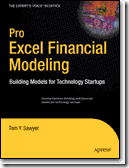
Today is the publication date for Pro Excel Financial Modeling: Building Models for Technology Startups, by Tom Y. Sawyer.
I was the technical editor for the book, and was impressed by Tom’s knowledge, and his ability to clearly explain the complex financial modeling topics that his book covers.
Author & Expert Tom Sawyer
Drawing from his extensive experience with technology startup companies, Tom explains the business thinking behind financial modeling.
Then, using a step–by–step approach, he shows how to develop financial models in Excel.
The book includes extensive case studies and you can download the Excel templates from the Apress website.
Adapt for Any Version
The templates and screen shots are from Excel 2007, but you could adapt the techniques for any version of Excel.
What you’ll learn:
Business thinking behind successful financial modeling aimed at investors.
How to communicate effectively with investors.
Advanced modeling with Excel, including Cost of Information Technology, Customer ROI, Cost of Sales and Marketing, Cost of Goods Sold, Team and Staffing, Profit and Loss.
Best practices for modeling using Microsoft Excel.
Do you have a few Excel files that you usually have open all at the same time?
Maybe the files are linked, and you update one and check the results in the other file.
Or maybe there are a few files that you open first thing every morning, to enter or update the data.
Open and Arrange Files
After you open the files, you might spend a minute or two arranging the files so you can see everything as you work.
Then you make the changes, close everything, and do the same thing again tomorrow.
Save Time With Excel Workspace
To save time, you can use Excel’s Save Workspace feature. It remembers which files are open, how you have them arranged, and where the files are located.
The Workspace file doesn’t contain the files themselves.
You’ll still be able to open the files individually, and use the Workspace file when you want to open them together.
[UPDATE: Unfortunately, Excel’s Save Workspace feature is not available in newer versions of Excel]
Prepare the Files
Open all the files that you want to use.
Arrange the files any way you’d like (Tiled, Vertical, etc.)
Create a Workspace File
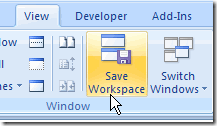
In Excel 2007 / 2010, click Save Workspace, on the Ribbon’s View tab.
Excel 2007 / 2010, click Save Workspace
Excel 2003 Workspace
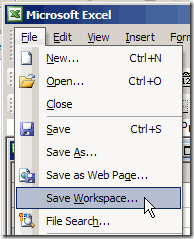
In Excel 2003, click the File menu, then click Save Workspace.
Type a name for the Workspace file, and click OK. The xlw extension will be automatically added to the file name.
Close a Workspace File
In Excel 2003, hold the Shift key, click the File menu, and click Close All.
In Excel 2007, close each file individually, or add the Close All command to the Quick Access Toolbar.
Or, to close all the files, and Excel, hold the Shift key, and click the X at the top right of the Excel window.
Open a Workspace File
Open a Workspace File, just as you would open any other Excel File.
Click the Open button, select the Workspace file, and click Open.
__________________