
Excel doesn’t have a MAXIF function, but we’re able to create our own version, by combining the MAX and IF functions. But how about a bigger dream – MAX IF with multiple criteria? Could we create our own MAXIFS function too, with multiple IFs?
- [Update]: In Excel 2019, and Excel for Office 365, you can use the new MINIFS and MAXIFS functions. There is more information on the MIN and MAX page on my Contextures site.
Using MAX and IF
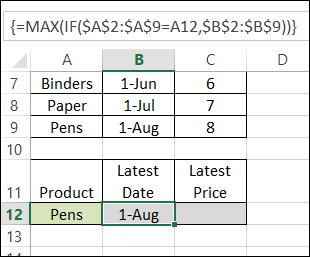
Last week, we used MAX and IF in an array-entered formula, to find the latest date that a product price was changed. Remember to press Ctrl + Shift + Enter after typing this formula, instead of just pressing Enter.
=MAX(IF($A$2:$A$9=A12,$B$2:$B$9))
Note: For more information on array formulas, I recommend Mike Girvin’s book, Ctrl+Shift+Enter: Mastering Excel Array Formulas.
Customers and Products
This week, our sample data has another column included – the customer name.
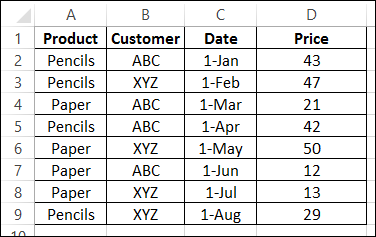
We’d like to revise that MAX and IF formula, to check for the latest date that a product price was changed, for a specific customer.
Select a Customer and Product
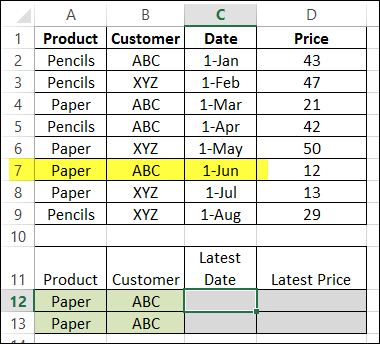
The product name, Paper, is entered in cell A12, and the customer name, ABC, is in B2. By manually checking the list, we can see that the latest price change was on June 1st.
Modify the MAX and IF formula
The original formula just checked the product name, and then returned the latest date, from column B.
=MAX(IF($A$2:$A$9=A12,$B$2:$B$9))
Now, we want the formula to check both the product name (column A), and the customer name (column B), and return the latest date (column C).
Entered in cell C12, the formula will start the same, by checking the product name:
=MAX(IF($A$2:$A$9=A12,
Then we’ll add a second IF function, to check the customer name:
=MAX(IF($A$2:$A$9=A12,IF($B$2:$B$9=B12,
Finally, we’ll get the date from column C:
=MAX(IF($A$2:$A$9=A12, IF($B$2:$B$9=B12,$C$2:$C$9)))
IMPORTANT: After typing the formula, array-enter it, by pressing Ctrl + Shift + Enter.
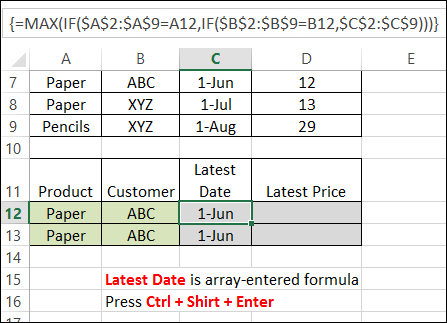
The formula is copied down to cell C13, and both cells show the correct result – June 1st.
Get the Latest Price
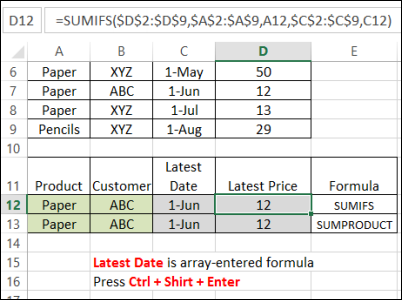
Finally, the Latest price is calculated using SUMIFS (Excel 2007 or later):
=SUMIFS($D$2:$D$9,$A$2:$A$9,A12,$C$2:$C$9,C12)
or SUMPRODUCT:
=SUMPRODUCT(($A$2:$A$9=A13)*($C$2:$C$9=C13)*($D$2:$D$9))
Download the Sample File
You can download the sample file from the MIN and MAX Functions page on my website.
- [Update]: In Excel 2019, and Excel for Office 365, you can use the new MINIFS and MAXIFS functions. There is more information on the MIN and MAX page on my Contextures site.
_____________________
Hi,
I am trying to find the most current date in a series when looking up a set of values but there are many of the same values. I need the most recent date for each of these purchase orders and have hundreds of purchase orders I need this for. I was trying to use a combo formula of Vlookup and Max but its not working.
I need a cell that returns a date of 7/15/15 for Purchase Order# 7150
For example:
Purchase Order# Date
7150 7/16/15
7150 7/17/15
7150 7/18/15
7153 7/01/15
7153 8/06/15
7153 9/12/15
7156 5/16/15
7156 6/15/15
7156 7/20/15
7156 8/19/15
7156 9/18/15
7156 3/12/15
Thanks,
Correction… I need a date of 7/18/15 for Purchase Order #7150
Adding a bump from 2016 – I found this after a quick google, it was just what I needed & the example excel file was very helpful – there were enough variants of the formulas given that I could do what I needed.
@Kirk, thanks for letting me know that the sample file helped you!
This structure isn’t working for me. I’m guessing it’s because I’ve exceeded some threshold number of rows (I have >150,000). If that’s the case, it would be good to state the limit in this blog. Thanks anyway.
press Ctrl + Shift + Enter after typing this formula!!!!!! worked the way I wanted. Thanks a lot 🙂
Hi Experts!!, Pls. Help me.. I’ve followed a lot of exmaples here and tried different combination of MAX, IF & INDEX functions..even trying to nest MAX inside of Index but it doesnt work. Im frustrated and I cant seem to get a reliable formula to work consistently. I’ve attached my sample XLS which has essentially 2 active sheets- its in the link below
https://drive.google.com/file/d/0B5iyWwANed1BcldwT2dfQ2FsMlE/view?usp=sharing
What I need to build at work is:
In Sheet Port Watch, cell D3 thru D500, I’d like it to give latest(most recent by date) BUY price of Stock in cell A3 thru A500 as referenced in Sheet “Past Trades”.
Similary In Sheet Port Watch, cell E3 thru E500, I’d like it to give latest(most recent by date) SOLD price of Stock in cell A3 thru A500 as referenced in Sheet “Past Trades”.
In Sheet Port Watch, cell F3 thru F500, it should calculate NET remaining shares by adding and substracting bought and sold (in Sheet past trades) of stock in cell A3.
In Sheet Port Watch, cell G3 thru G500, it should calculate NET cost of remaining shares (referenced in Sheet Past Trades) of stock in cell A3.
The past trade sheet may grow fairly big like 10K lines..once all data is brought over. SO any efficient formulae like Index match may be suited for performance.
BUY & SELL is referenced in Sheet “Past Trades” in Column H marked Trade and also column D (any +ive Qty is BUY and -ive is SOLD)
This is urgently required…Pls. help ASAP. thanks a lot
Hi,
How do I prevent it from returning 0 (zero) when there is no match?
Thanks, Simon