
Excel doesn’t have a MAXIF function, but we’re able to create our own version, by combining the MAX and IF functions. But how about a bigger dream – MAX IF with multiple criteria? Could we create our own MAXIFS function too, with multiple IFs?
- [Update]: In Excel 2019, and Excel for Office 365, you can use the new MINIFS and MAXIFS functions. There is more information on the MIN and MAX page on my Contextures site.
Using MAX and IF
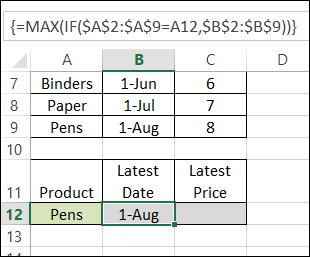
Last week, we used MAX and IF in an array-entered formula, to find the latest date that a product price was changed. Remember to press Ctrl + Shift + Enter after typing this formula, instead of just pressing Enter.
=MAX(IF($A$2:$A$9=A12,$B$2:$B$9))
Note: For more information on array formulas, I recommend Mike Girvin’s book, Ctrl+Shift+Enter: Mastering Excel Array Formulas.
Customers and Products
This week, our sample data has another column included – the customer name.
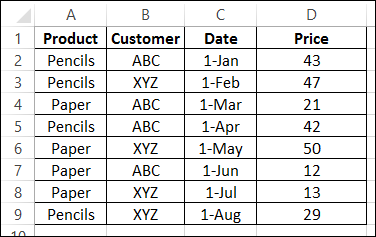
We’d like to revise that MAX and IF formula, to check for the latest date that a product price was changed, for a specific customer.
Select a Customer and Product
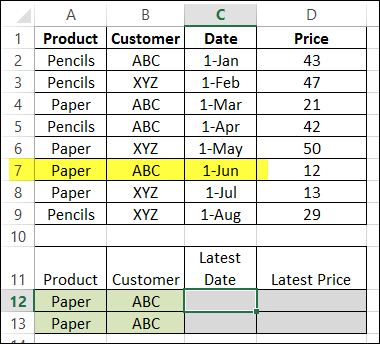
The product name, Paper, is entered in cell A12, and the customer name, ABC, is in B2. By manually checking the list, we can see that the latest price change was on June 1st.
Modify the MAX and IF formula
The original formula just checked the product name, and then returned the latest date, from column B.
=MAX(IF($A$2:$A$9=A12,$B$2:$B$9))
Now, we want the formula to check both the product name (column A), and the customer name (column B), and return the latest date (column C).
Entered in cell C12, the formula will start the same, by checking the product name:
=MAX(IF($A$2:$A$9=A12,
Then we’ll add a second IF function, to check the customer name:
=MAX(IF($A$2:$A$9=A12,IF($B$2:$B$9=B12,
Finally, we’ll get the date from column C:
=MAX(IF($A$2:$A$9=A12, IF($B$2:$B$9=B12,$C$2:$C$9)))
IMPORTANT: After typing the formula, array-enter it, by pressing Ctrl + Shift + Enter.
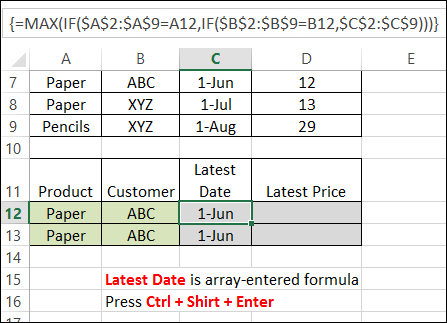
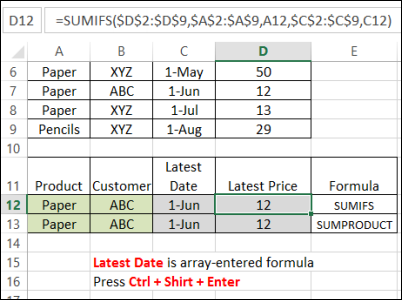
The formula is copied down to cell C13, and both cells show the correct result – June 1st.
Get the Latest Price
Finally, the Latest price is calculated using SUMIFS (Excel 2007 or later):
=SUMIFS($D$2:$D$9,$A$2:$A$9,A12,$C$2:$C$9,C12)
or SUMPRODUCT:
=SUMPRODUCT(($A$2:$A$9=A13)*($C$2:$C$9=C13)*($D$2:$D$9))
Download the Sample File
You can download the sample file from the MIN and MAX Functions page on my website.
- [Update]: In Excel 2019, and Excel for Office 365, you can use the new MINIFS and MAXIFS functions. There is more information on the MIN and MAX page on my Contextures site.
_____________________
How can I do use Max If in a portfolio transaction sheet. In the PORT tab you will see the incorrect USO # of shares are being pulled from the TRANS tab. It should show 15 not 25 and also the cost basis is wrong. It is pulling the “max” value of a previously bought and sold position. Can anyone help me correct my formula? Thanks!
https://docs.google.com/spreadsheets/d/1d4tAxF8d3w6GUJrLRIfEke39GZ2JpWIzmxzkSIJs2lc/edit?usp=sharing
I want to convert the daily trading data of stocks having Open, High, Low and Close level to weekly Open, High, Low and Low levels. How to convert the same, as week trading days vary for holidays.
Hi, I need a formula to identify highest num for each employee containing multiple employees can any one help me
Emp Date Hrs
111 12/8/2015 19:40 8
111 12/8/2015 19:33 9
111 12/8/2015 18:00 5
222 12/8/2015 19:40 8
222 12/8/2015 19:33 9
222 12/8/2015 18:00 3
@Kiran, you could create a pivot table based on the data, with Emp in the row area, and hours in the Values area. Then, change the calculation for the Hours field to Max.
There are details here:
http://www.contextures.com/excel-pivot-table-summary-functions.html
I,m trying to find the MAX value in a range of cells based on couple of conditions. Example as follows: There is continuity in the data for different dates for same person A or B Or C.. we have different numbers. For one day there will be unique Identity. I need the MAX value of that day from No1. Any Suggestions.?
Date Name No1 Unique
day1 A 100 0
day1 A 100 0
day1 A 200 1 ?
day1 B 50 0
day1 B 60 1
day1 B 100 0
day1 C 100 0
day1 C 100 0
day1 C 200 1
day1 D 50 0
day1 D 60 0
day1 D 100 0
day1 D 200 1
day2 A 100 0
day2 A 100 0
day2 A 150 1 ?
Thank you!!
Hai, I have a problem in multiple criteria. Can u explain to me.
This is my problem:
CUSTOMER CODE AMOUNT INV max amount invoice
#00056 23.9 I1012312
#00056 30.8 I1003212
#00056 30.8 I1012322
#00056 57.2 I1060001
#00056 42.8 I1020001
#00056 35 I9080000
#00056 18 I1022222
#00056 86.4 I1035222
#00056 27 I1053666
#00056 Total 0 86.4 I1035222
#00053 15.4 I0000222
#00053 40.3 I3210000
#00053 20.9 I1025300
#00053 20.1 I1035000
#00053 27.6 I1022000
#00053 86.4 I1068221
#00053 57.2 I1068223
#00053 71.7 I1068224
#00053 23.9 I1032000
#00053 24.4 I1044500
#00053 40.3 I1066000
#00053 20 I1022200
#00053 Total 0 86.4 I1035222
Can i know why the two invoice number were same. Its is the formula wrong?
In amount part I use =MAX(IF(A:A=A24,C:C)).
In invoice part I use =VLOOKUP(E:E,C:D,2,0).
VLOOKUP will return the first match that it finds, and that is the 86.4 value from the 00056 Customer.
You could inset a new column after the invoice number column, and use this formula to combine the customer code and amount: =A2&”|”&B2
Then in the Invoice column, use this invoice to find the max invoice for each customer, based on the customer code in A11 and max amount in E11:
=INDEX(C:C,MATCH(A11&”|”&E11,D:D,0))
Thanks for that, I’ve been trying to do something similar for ages