
Excel doesn’t have a MAXIF function, but we’re able to create our own version, by combining the MAX and IF functions. But how about a bigger dream – MAX IF with multiple criteria? Could we create our own MAXIFS function too, with multiple IFs?
- [Update]: In Excel 2019, and Excel for Office 365, you can use the new MINIFS and MAXIFS functions. There is more information on the MIN and MAX page on my Contextures site.
Using MAX and IF
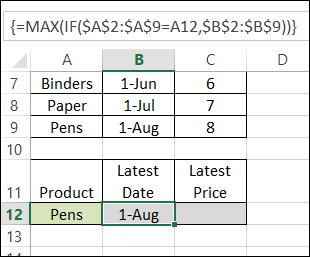
Last week, we used MAX and IF in an array-entered formula, to find the latest date that a product price was changed. Remember to press Ctrl + Shift + Enter after typing this formula, instead of just pressing Enter.
=MAX(IF($A$2:$A$9=A12,$B$2:$B$9))
Note: For more information on array formulas, I recommend Mike Girvin’s book, Ctrl+Shift+Enter: Mastering Excel Array Formulas.
Customers and Products
This week, our sample data has another column included – the customer name.
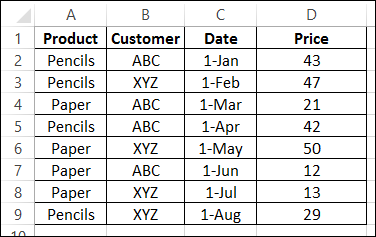
We’d like to revise that MAX and IF formula, to check for the latest date that a product price was changed, for a specific customer.
Select a Customer and Product
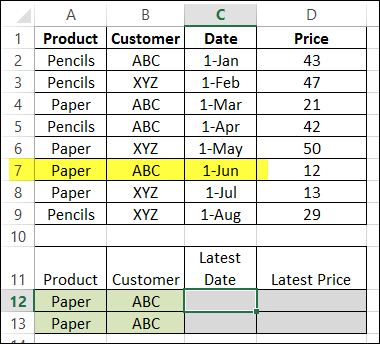
The product name, Paper, is entered in cell A12, and the customer name, ABC, is in B2. By manually checking the list, we can see that the latest price change was on June 1st.
Modify the MAX and IF formula
The original formula just checked the product name, and then returned the latest date, from column B.
=MAX(IF($A$2:$A$9=A12,$B$2:$B$9))
Now, we want the formula to check both the product name (column A), and the customer name (column B), and return the latest date (column C).
Entered in cell C12, the formula will start the same, by checking the product name:
=MAX(IF($A$2:$A$9=A12,
Then we’ll add a second IF function, to check the customer name:
=MAX(IF($A$2:$A$9=A12,IF($B$2:$B$9=B12,
Finally, we’ll get the date from column C:
=MAX(IF($A$2:$A$9=A12, IF($B$2:$B$9=B12,$C$2:$C$9)))
IMPORTANT: After typing the formula, array-enter it, by pressing Ctrl + Shift + Enter.
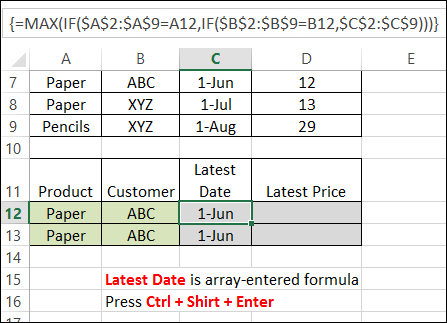
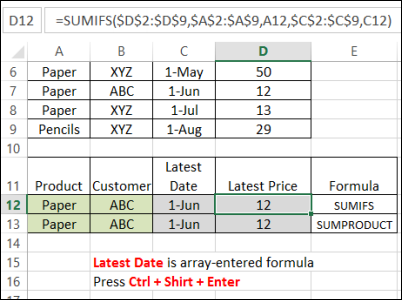
The formula is copied down to cell C13, and both cells show the correct result – June 1st.
Get the Latest Price
Finally, the Latest price is calculated using SUMIFS (Excel 2007 or later):
=SUMIFS($D$2:$D$9,$A$2:$A$9,A12,$C$2:$C$9,C12)
or SUMPRODUCT:
=SUMPRODUCT(($A$2:$A$9=A13)*($C$2:$C$9=C13)*($D$2:$D$9))
Download the Sample File
You can download the sample file from the MIN and MAX Functions page on my website.
- [Update]: In Excel 2019, and Excel for Office 365, you can use the new MINIFS and MAXIFS functions. There is more information on the MIN and MAX page on my Contextures site.
_____________________
Dear Mr/Ms:
I have a problem and do not know how to solve it, let me illustrate using this example:
suppose you have the following columns and rows
c1 5 10 12
C2 4 5 6
c2 7 14 8
c3 3 4 5
c2 1 2 3
c3 2 3 4
and I wanna sort the last 3 columns according to the first column depending on the max values of them
so I will end up by the following
c1 5 10 12
C2 7 14 8
c2 4 5 6
c2 1 2 3
c3 3 4 5
c3 2 3 4
column 1 will be sorted ascendingly, and the rest 3 columns will be affected, after thatpick the highest three values of the last 3 columns according to the column 1 and remove the other values, then sort them again
how can i do that ??
thanks in advance!
Thanks a lot, i knew this formula but it didn’t clicked.
Thanks again !
how can i repeat Max And If function on a lot of cells ?
Let me thank you firt for your post very helpful.
Q: I want have to boxe k8 and G13, with differents values, 18 and 10, but I need to excel to choose bigger number and place it in i13. This boxes are not connected by other boxes. I just need to find the way to compare this two values, not following a vertical or horizontal sum. Thanks.
how to extract the report of Min and Max date for below ID’s
report should be something like “789” “C” “6 july” “16 Oct”
Id Name St. Dt. Ed. Dt
123 A 26-May-15 31-Dec-15
456 B 12-Aug-15 11-Sep-15
456 B 14-Sep-15 16-Oct-15
456 B 3-Aug-15 11-Aug-15
789 C 12-Aug-15 28-Aug-15
789 C 31-Aug-15 16-Oct-15
789 C 6-Jul-15 31-Jul-15
789 C 3-Aug-15 11-Aug-15
x=75
y=80
z=200
if x>=75, then x*4 but value not be greater than 500