
Excel doesn’t have a MAXIF function, but we’re able to create our own version, by combining the MAX and IF functions. But how about a bigger dream – MAX IF with multiple criteria? Could we create our own MAXIFS function too, with multiple IFs?
- [Update]: In Excel 2019, and Excel for Office 365, you can use the new MINIFS and MAXIFS functions. There is more information on the MIN and MAX page on my Contextures site.
Using MAX and IF
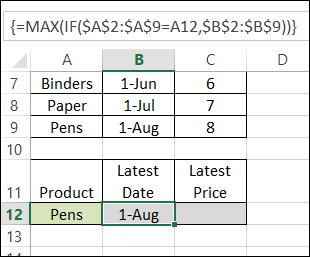
Last week, we used MAX and IF in an array-entered formula, to find the latest date that a product price was changed. Remember to press Ctrl + Shift + Enter after typing this formula, instead of just pressing Enter.
=MAX(IF($A$2:$A$9=A12,$B$2:$B$9))
Note: For more information on array formulas, I recommend Mike Girvin’s book, Ctrl+Shift+Enter: Mastering Excel Array Formulas.
Customers and Products
This week, our sample data has another column included – the customer name.
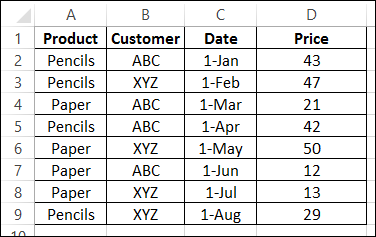
We’d like to revise that MAX and IF formula, to check for the latest date that a product price was changed, for a specific customer.
Select a Customer and Product
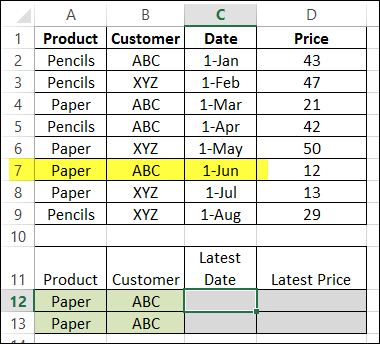
The product name, Paper, is entered in cell A12, and the customer name, ABC, is in B2. By manually checking the list, we can see that the latest price change was on June 1st.
Modify the MAX and IF formula
The original formula just checked the product name, and then returned the latest date, from column B.
=MAX(IF($A$2:$A$9=A12,$B$2:$B$9))
Now, we want the formula to check both the product name (column A), and the customer name (column B), and return the latest date (column C).
Entered in cell C12, the formula will start the same, by checking the product name:
=MAX(IF($A$2:$A$9=A12,
Then we’ll add a second IF function, to check the customer name:
=MAX(IF($A$2:$A$9=A12,IF($B$2:$B$9=B12,
Finally, we’ll get the date from column C:
=MAX(IF($A$2:$A$9=A12, IF($B$2:$B$9=B12,$C$2:$C$9)))
IMPORTANT: After typing the formula, array-enter it, by pressing Ctrl + Shift + Enter.
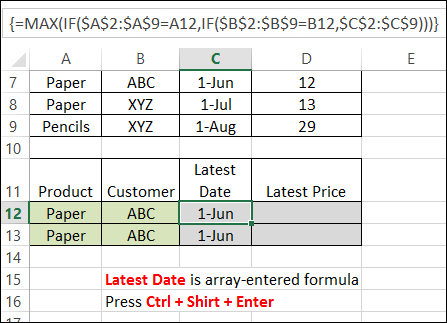
The formula is copied down to cell C13, and both cells show the correct result – June 1st.
Get the Latest Price
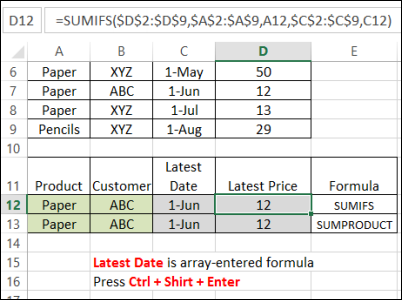
Finally, the Latest price is calculated using SUMIFS (Excel 2007 or later):
=SUMIFS($D$2:$D$9,$A$2:$A$9,A12,$C$2:$C$9,C12)
or SUMPRODUCT:
=SUMPRODUCT(($A$2:$A$9=A13)*($C$2:$C$9=C13)*($D$2:$D$9))
Download the Sample File
You can download the sample file from the MIN and MAX Functions page on my website.
- [Update]: In Excel 2019, and Excel for Office 365, you can use the new MINIFS and MAXIFS functions. There is more information on the MIN and MAX page on my Contextures site.
_____________________
Hello,
I am using this exact formula, Max if and it is no longer working. It worked when I first created the formula and now all of the sudden the formula returns #VALUE!. Here is the exact formula I used: =MAX(IF(‘Guide Bike Log’!$C3:$C2495=$A2,’Guide Bike Log’!$B$3:$B$2495)). I’m referencing another tab called “Guide Bike Log” obviously. Originally it was, set for $C3:$C1000. Now that the data has extended past 1000 cells, I am expanding the number in the formula but it no longer works. Is there another way to diagnose this problem? All of the Microsoft Excel tips didn’t help. I checked that the C column doesn’t have any non-numerical text.
Thanks in advance
@Robin, did you press Ctrl+Shift+Enter to complete the formula, instead of just pressing Enter?
This is an array-entered formula, so it won’t work correctly, if you just press Enter.
Hello,
In Excel 2016 we can use the new function “MAXIFS”
Thanks
I used your formula =MAX(IF($A$2:$A$9=A12,IF($B$2:$B$9=B12,$C$2:$C$9))) to find the latest date for a distance & speed of my run. The speed is based on my start time, finish time & distance run. Today I discovered an oddity.
The latest date till today for a 5.3 km run @ 10.1 kph was 13 April 2017, based on a start time of 10:05 and a finish time of 10:39:30 = 34:30 mins. Today I added another record for the exact same distance & speed, but based on a start time of 06:30 and a finish time of 07:04:30 = 34:30 mins. The formula still returns the latest date of 13 April, but when I changed the start & finish times to 07:00 and 07:34:30 respectively, it returned today’s date. I then did some trial & error & found that with a start time of 06:42:26 & 07:16:56 (= 34:30 mins) it returns today’s date, but if I move both start & finish time down by 1 sec (06:42:25 and 07:16:55 resp.) it returns 13 April as the latest date !!!
I have checked the formatting & formulae, everything is right. I just cannot figure this out. Any suggestions?
Klaas, there must be a minute difference in the speed results, even though the run times are the same.
Try rounding your speed calculation, to just a few decimals. Then, see if the formula returns the correct date. For example, =ROUND(A2/F2,4)
Thanks for your input Debra. I have 2 speed cols.: 1 in kph & 1 in mph, with latter being a derivative of the former, i.e. mph = kph/1.6.
Using the data from the mph col. in your formula returned that quirky result, whereas using the data from the kph col. returned the right result. Looking at the calculated data in all the cols. I cannot pinpoint where the problem is, but since I get the right result with the kph data I will leave it at that. Thanks again for your help, and also for your instructive website 🙂
You’re welcome, and thanks for the additional details. Glad you got it working.
Awesome tip! Thanks for posting.
=INDEX(G14:G10000,MATCH(MAX(IF((C14:C10000>=$C$3)*(C14:C10000<=$C$4)*(D14:D10000=$D$4),C14:C10000,0)),C14:C10000,0))
plz help!! is this formula wrong??
When you finish the formula, press Ctrl+Shift+Enter, instead of just pressing Enter.
Fantastic! I searched lots of other sites and this is by far the most direct and simple answer. Can’t believe the ridiculously complex things some of the other sites posted to solve this.