
There’s a popular sample file on my website, that lets you select multiple items from a data validation drop down list. Since the original article, I’ve posted updates:
- how to set up multiple selection
- edit multiple selection cells
- prevent duplicates in multiple selection column
And here is the latest update.
Remove Previous Selections From Cell
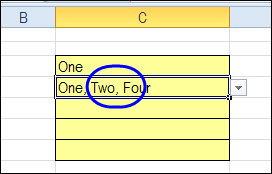
In the comments on the original post, Dan asked for a way to remove items if they been previously selected. For example, the cell contains four items — “One, Two, Three, Four”.
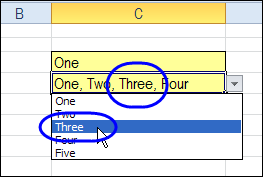
When you select Three again, that number is removed from the cell, instead of being added at the end of the cell.
Download the Sample File
To experiment with this technique, you can download the sample file from the Contextures website, on the Excel Data Validation – Select Multiple Items page. The file is in Excel 2003 format and zipped. There are macros in the file so enable them to test the features.
The new sample is on the SameCellAddRemove worksheet.
Please let me know in the comments if there are other features you’d like to see in this workbook. Thanks!
Watch the Excel Tutorial Video
This video shows how the multiple select and remove features work. You can also see the Excel VBA code, and the steps that it goes through, when you make a selection in the drop down list.
________________
Hi -Is it possible to have each menu item when selected appear on a separate line instead of separated by a comma
?
Thanks in advance,
Brian.
I have a quick question…I found out finally how to be able to add more than one selection to the cell, thank you very much for your help. However I have one last question about removing if you accidentally hit a selection that you do not want in that cell? So my question is even after watching the video, I am having difficulties. Can I combine all these codes into one worksheet that I need all these things to happen:
Adding more than 1 selection
Removing any additional selections I might have chosen.
How do I go about that adding all these codes into one worksheet, or do I need to keep them separate on their own worksheet, but then how do I get all these things to work on a spreadsheet column? Please help. Thank you so much.
How could I make the font style of the 1st selection to be (Bold) ” One, Three, Four” (one)to be Bold in this example . What is the suitable code for this to be added with the multiple selection drop down list code?
Also, what if i have more then two cells with drop down menu and i want that all my cells get a multiple selection too?
while all my cells can have multiple selection, can i have one cell with only one selection?
I am unable to get your workbook to work properly, specifically the SameCellEdit, but nothing appears to work.