
You probably know how to quickly copy Excel formula down a column, if there is data in the next column. But how can you do the same thing, if there are blank rows?
Problem Copying a Formula Down
Recently, I saw this tweet, from someone stuck on an Excel problem:
- An Excel problem I have never solved – easily copying a formula down tens of thousands of rows where the row next to it may be blank.
Fill Down Beside Filled Cells
Yes, it’s easy to copy a formula down a column, if the adjacent column is filled. Follow these steps to copy the formula down to the first blank cell in the adjacent column.
- Select the cell with the formula
- Point to the fill handle, at the bottom right of the selected cell
- When the pointer changes to a black plus sign, double-click the fill handle
The formula will automatically copy down to the last row of data.
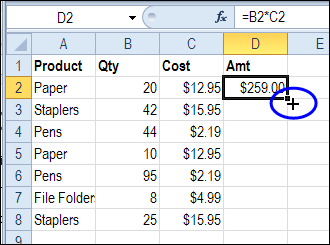
Fill Down with Empty Adjacent Column
However, if the adjacent column is empty, this fill handle trick doesn’t work. How can you quickly enter formulas in a column, if you’re setting up a workbook, with lots of empty cells?
Here’s how I do it – maybe you have another trick to do the same thing:
- Select the cell with the formula
- Click in the Name Box, and type the range where you want the formula entered. In this example, the formula is in cell D2, and it should go down to cell D2000.
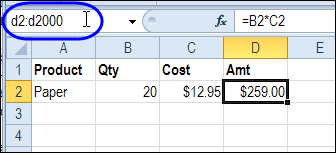
- Press the Enter key, to select the range of cells
- On the keyboard, press Ctrl + D, to fill the formula down through the selected cells.
More Data Entry Tip
For more data entry tips, go to the Data Entry page on my Contextures website. There are written steps, screen shots, and videos.
And there are more shortcuts on the Excel Double-Click Tips page too.
_________
Leave it to a real user to give much better info than the MS website. Thanks for a quick way to do exactly what I needed to do.
This is an excellent tip – thank you! If your workbook is not set up to automatically calculate, press F9 when you are done the above steps to show the new calculations.
Thanks a lot. This is is new to me. And excellent one. Keep it up. We want to learn more from you. Thanks.
Thanks, double click, it works, but I can’t believe I never knew that. This is a big relief as I have 300,000 rows to copy a formula down through.
Thanx,It was helpful..
Thank you so much. Saved my time and effort.