
To help users enter data in a workbook, you can create an Excel UserForm, with text boxes and combo boxes. Then, with a quick bit of code, you can show UserForm when Excel file opens, so the form is easy to find and use.
Parts Inventory Data Entry Form
Here is the parts inventory data entry form from the sample file.
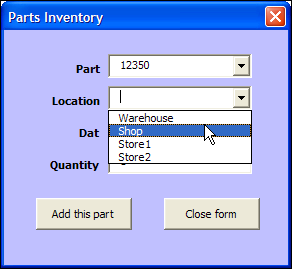
In the original UserForm sample file, there was a button on the worksheet, and users could click it to open the UserForm.

Open the UserForm Automatically
In some workbooks, you might want people to get right to work, and see the UserForm immediately.
So, instead of putting a button on the worksheet, for people to click, you can show the UserForm automatically, when the file opens.
Code to Open the Form Automatically
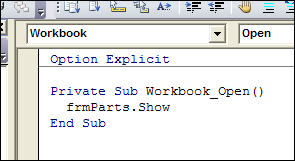
To make the UserForm open automatically, you’ll add a bit of code to the workbook’s code module, in the Workbook_Open procedure.
To add the code:
- In the UserForm workbook, press Alt + F11, to open the Visual Basic Editor.
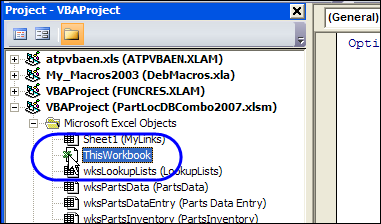
- At the left, in the Project Explorer, find the UserForm workbook, and double-click on its ThisWorkbook module (in the Microsoft Excel Objects folder).
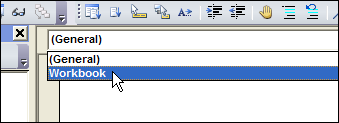
- At the top left of the main code window, from the Object drop down, select Workbook
- At the top right, from the Procedure drop down, select Open
- The Workbook_Open procedure will be automatically created, with the cursor positioned between the first and last lines of code.
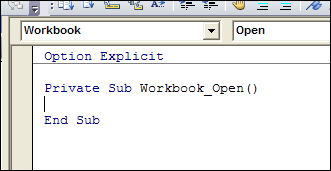
- Where the cursor is flashing, type a line that opens the UserForm. In this example, the UserForm is named frmParts, so type the following line of code in the Workbook_Open event:
- frmParts.Show
Test the Workbook_Open Code
To test the Workbook_Open code, follow these steps:
- Save and close the UserForm workbook.
- Open the workbook, and enable macros, if prompted.
- The UserForm will open automatically.
______
Hi All,
when i always open my userform my background excel are disabled to do multitasking work.
please suggest me…
‘thisworkbook module
Private Sub Workbook_Open()
Application.Visible = False
useform1.Show
End Sub
I have managed to close my workbook and opened just the userform whenever I click on the workbook, but I cant get back into the VBA editor and change the form whenever I want to make adjustments. Every time I close the userform it doesn’t open the editor or workbook. Any ideas??
How do i know what my useform’s name is? I made the userform in the worksheet not in VBA.
If you don’t know what you called it, more than likely userform1. Check by clicking on the developer tab, click the editor button, and it should show you a project window with all items associated with worksheet. Click on associated user forms to confirm.
hi everybody,
I want to create a Combobox with the name of every sheet of my workbook in it and when value is chosen in the combobox it will bring up a next Userform according to the sheetname.In the new userform what opens i want create a preview print button of that sheet and a go back button to the first userform. Can somebody help me with the codes to create this?? Im new to writing codes but this will help me alot.
i want to know how to get code. please