
To help users enter data in a workbook, you can create an Excel UserForm, with text boxes and combo boxes. Then, with a quick bit of code, you can show UserForm when Excel file opens, so the form is easy to find and use.
Parts Inventory Data Entry Form
Here is the parts inventory data entry form from the sample file.
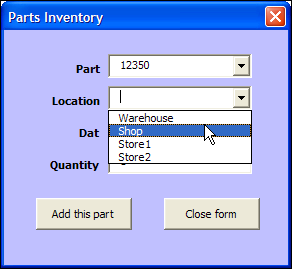
In the original UserForm sample file, there was a button on the worksheet, and users could click it to open the UserForm.

Open the UserForm Automatically
In some workbooks, you might want people to get right to work, and see the UserForm immediately.
So, instead of putting a button on the worksheet, for people to click, you can show the UserForm automatically, when the file opens.
Code to Open the Form Automatically
To make the UserForm open automatically, you’ll add a bit of code to the workbook’s code module, in the Workbook_Open procedure.
To add the code:
- In the UserForm workbook, press Alt + F11, to open the Visual Basic Editor.
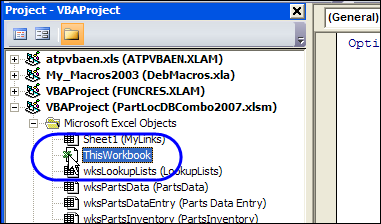
- At the left, in the Project Explorer, find the UserForm workbook, and double-click on its ThisWorkbook module (in the Microsoft Excel Objects folder).
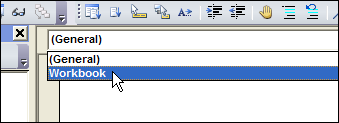
- At the top left of the main code window, from the Object drop down, select Workbook
- At the top right, from the Procedure drop down, select Open
- The Workbook_Open procedure will be automatically created, with the cursor positioned between the first and last lines of code.
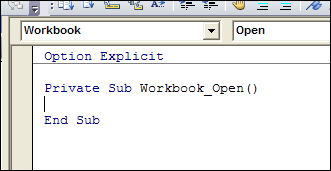
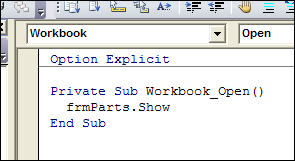
- Where the cursor is flashing, type a line that opens the UserForm. In this example, the UserForm is named frmParts, so type the following line of code in the Workbook_Open event:
- frmParts.Show
Test the Workbook_Open Code
To test the Workbook_Open code, follow these steps:
- Save and close the UserForm workbook.
- Open the workbook, and enable macros, if prompted.
- The UserForm will open automatically.
______
Thanks. This really helps
Hi, Can you tell me what is the coding for bring the data in our desired row using macro after created the userform.
Example,
Everyday i am entering data in excel manually.One day i created userform to enter data in that excel.after done everything(create userform&coding),when i am run that userform,the information which i put in the userform overrights the existing line which i typed manually.
The userform data’s doesn’t start from blank cell or row.it’s over right the existing cell
I need the assistance for this please
@Divya, there is code in the sample file at the link in the first paragraph.
You can also see the code to add the data to a worksheet:
http://www.contextures.com/xlUserForm02.html#ButtonsCode
The code finds the last row, and adds 1 to that number, and the data is entered in that row.
Small question. I can auto open the form as per your instructions for my team. But if I want to edit it, how can I do it. As on click, it loads the form always. How to open the work book for editing .
open the code editor, go to the project tree and open the code from Book1 inside Microsoft Excel Objects.
You should have something like this:
Private Sub Workbook_Open()
UserForm1.Show
End Sub
Just erase the second line ! Just leave the workbook sub / end sub.
cheers
Hello , First of all Thank you for your suggestion. I have tried this code but when userform appears on the screen , when i am click outside of the form ,the form is hidden permanently . can you please tell me some alternative of this problem.Thanks in Advance.
Hi Guys
I have a problem in that when I use this code (UserForm1.Show) I get the following error message:
Run time error 424: Object required
How do I solve this?