
To help users enter data in a workbook, you can create an Excel UserForm, with text boxes and combo boxes. Then, with a quick bit of code, you can show UserForm when Excel file opens, so the form is easy to find and use.
Parts Inventory Data Entry Form
Here is the parts inventory data entry form from the sample file.
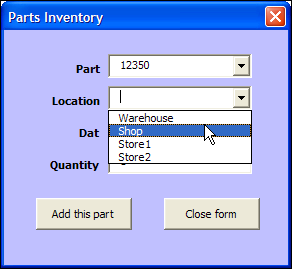
In the original UserForm sample file, there was a button on the worksheet, and users could click it to open the UserForm.

Open the UserForm Automatically
In some workbooks, you might want people to get right to work, and see the UserForm immediately.
So, instead of putting a button on the worksheet, for people to click, you can show the UserForm automatically, when the file opens.
Code to Open the Form Automatically
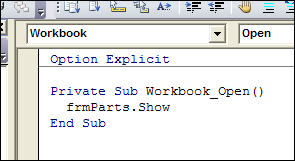
To make the UserForm open automatically, you’ll add a bit of code to the workbook’s code module, in the Workbook_Open procedure.
To add the code:
- In the UserForm workbook, press Alt + F11, to open the Visual Basic Editor.
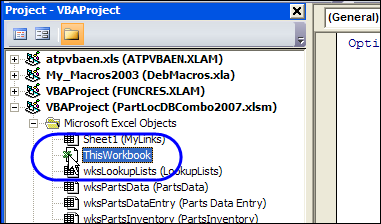
- At the left, in the Project Explorer, find the UserForm workbook, and double-click on its ThisWorkbook module (in the Microsoft Excel Objects folder).
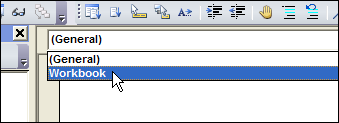
- At the top left of the main code window, from the Object drop down, select Workbook
- At the top right, from the Procedure drop down, select Open
- The Workbook_Open procedure will be automatically created, with the cursor positioned between the first and last lines of code.
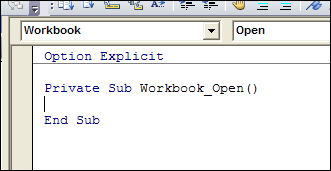
- Where the cursor is flashing, type a line that opens the UserForm. In this example, the UserForm is named frmParts, so type the following line of code in the Workbook_Open event:
- frmParts.Show
Test the Workbook_Open Code
To test the Workbook_Open code, follow these steps:
- Save and close the UserForm workbook.
- Open the workbook, and enable macros, if prompted.
- The UserForm will open automatically.
______
3 Tables are in a workbook, one on each differently names tab, e.g. Tab A, B, C.
When workbook is opened the built in “data entry form” shows for Tab A
Cannot figure out VBA code to add so that when Tab B is selected or Tab C is selected – the
“data entry form” for that worksheet is displayed.
Thank you so much!
Hi Morton.. Im not sure how to define to check what Tab is selected.. But maybe try it this way (i did the same in past)
In some cell that is free to be used, lets say A1, put Tab name into.. I mean like in Tab A, put “A” into A1cell. In Tab B, put “B” into A1cell. In Tab C, put “C” into A1cell.
lets say you have dataentries called -userformA, userformB, userformC-
Then define in VBA to check cell A1 value, no matter what sheet is selected.. And based on value correct userform will be showed… Something like this.. (change it to fit your values, ranges and names)
……..
Private Sub Workbook_Open()
range(“A1”).select
if selection.value = “A” then
userformA.show
else
GoTo 2
end if
2:
if selection value = “B” then
userformB.show
else
GoTo 3
end if
3:
if selection.value = “C” then
userformC.show
else
exit sub
end if
end sub
I am new to coding. I am following your instructions to open my form automatically. The form’s name is UserForm1, which I am adding the ca\ode as follows.
Private Sub Workbook_Open()
frmUserForm1.Show
End Sub
Keeps asking for a variable, not sure what that is. Any help would be greatly appreciated.
@John, use your form’s name in the show line:
UserForm1.Show
UserForm1.Show vbModeless
thank you
Debra:
Thank You for the reply. Worked great!
John
John,
I have a module inserted into a combo box to show options for users to choose. I can get the form to auto open, but the module won’t populate the combo box. I am using excel 2011 for Mac. The module is called ‘module 1’. Any ideas?
Sean:
I took my list that I was using for the combo box and created dynamic name ranges. Under formulas you can click on Define names and create this. I also copied the data I am using and in the upper left hand corner of the spreadsheet you will see it is labeled as A1, change this to something easier like DEPARTMENTS so you will know what it is. Go to your combo box, click in the field and click on properties. Look on the left hand side for RowSource, enter the name you gave your dynamic range, mine is DEPARTMENTS. This should allow the range to populate to the combo box.
Good Luck
john