
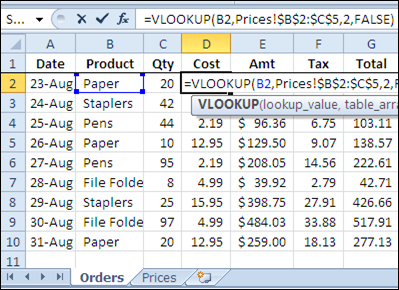
If you’re filling in an order form in Excel, you can use the VLOOKUP function to find the selling price for each item in the sales order. For example, in the screen shot below, the order form is on the Orders worksheet, and a VLOOKUP formula in column D pulls the cost from a pricing table on the Prices worksheet.
Lookup Range in Another Workbook
However, you might want to keep your price list separate from the orders workbook, so the prices are easy to update. If your price list is in a different workbook, you can still use a VLOOKUP formula to pull the data, by referring to the external list.
To refer to another workbook in a VLOOKUP formula, follow these steps.
- Open both workbooks (this step isn’t mandatory, but makes it easier to create the link)
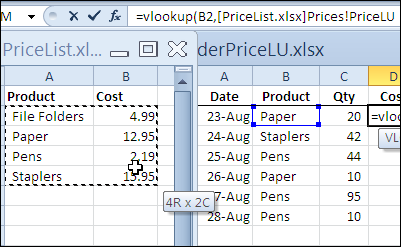
- Create the VLOOKUP formula, and for the table_array argument, select the lookup range in the other workbook. Excel will automatically add the other workbook’s name and the worksheet name in the formula.
In the screen shot below, the lookup table is in the PriceList.xlsx workbook, on the Prices sheet, in a range named PriceLU.
Closing the Lookup Workbook
While the price list lookup table workbook is open, the VLOOKUP formula will show the workbook name and the referenced range address or range name.
You can see the PriceLU name and workbook information in the formula bar, in the screen shot below.

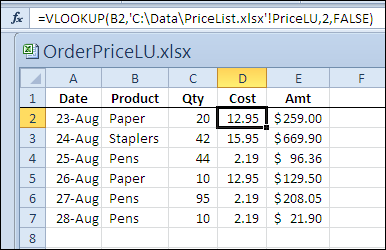
If the price list lookup table workbook is closed, the VLOOKUP formula will still work, and the full file path for the price list lookup table workbook will be shown in the formula.
Watch the Video
To see the steps for referring to a VLOOKUP range in another workbook, please watch this short Excel tutorial video.
More Lookup Links
VLOOKUP Number/Text Troubleshooting
_____________
I do not get the reply when David asked “looking up info from a workbook with multiple sheets”. VLookup is always pointing from worksheets to worksheets even at different workbook. For example, what can be specified in the formula =VLOOKUP(C1,'[Database.xlsx](XXXXX)!,1) – denoted with XXXXX, if I am looking for a specific match in the entire workbook?
Thank you for the information about How to Use VLookup With Different Workbooks on Excel .It is very helpful to me.
Thanks & Regards,
Ebin Varghese
I am trying to reference the last cell in a column of a spreadsheet which is located in another workbook
Thanks for the super helpful instructions. I am slow with technology so the video helped alot.
how to use voolkup
Hello Debra
I have a manufacturing program and a stock program both in excel 2013
The manufacturing program needs to look up some data in the stock program
every time it opens a new jobcard.
However the stock program is continually being update and rows and columns
added, hidden or deleted .
Therefore vlookup( look_for_what, look_where,return_data_from_column_X,false ) wont work
because the order of the stock table columns are continually being changed.
Is it possible to say
(Lets say i am looking for thye column call “Price”)
“use the stock table and find the column called price then return the column number
of that column as varialble priccolumn1”
then vlookup( price ,look in stocktable from column (pricecolumn1):pricecolumn1+1, return the value of pricecolumn1, false)
Would this be a way of working round the colmn position changes ?
regards
fred