
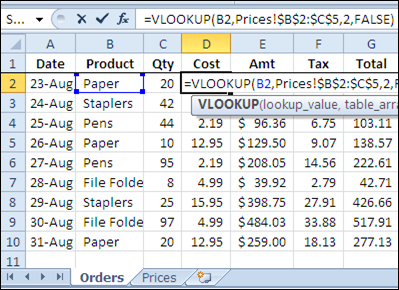
If you’re filling in an order form in Excel, you can use the VLOOKUP function to find the selling price for each item in the sales order. For example, in the screen shot below, the order form is on the Orders worksheet, and a VLOOKUP formula in column D pulls the cost from a pricing table on the Prices worksheet.
Lookup Range in Another Workbook
However, you might want to keep your price list separate from the orders workbook, so the prices are easy to update. If your price list is in a different workbook, you can still use a VLOOKUP formula to pull the data, by referring to the external list.
To refer to another workbook in a VLOOKUP formula, follow these steps.
- Open both workbooks (this step isn’t mandatory, but makes it easier to create the link)
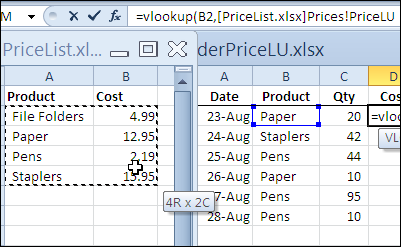
- Create the VLOOKUP formula, and for the table_array argument, select the lookup range in the other workbook. Excel will automatically add the other workbook’s name and the worksheet name in the formula.
In the screen shot below, the lookup table is in the PriceList.xlsx workbook, on the Prices sheet, in a range named PriceLU.
Closing the Lookup Workbook
While the price list lookup table workbook is open, the VLOOKUP formula will show the workbook name and the referenced range address or range name.
You can see the PriceLU name and workbook information in the formula bar, in the screen shot below.

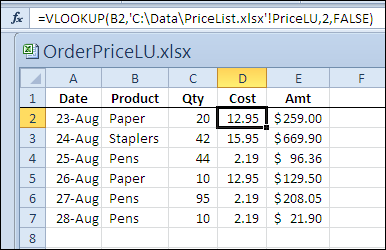
If the price list lookup table workbook is closed, the VLOOKUP formula will still work, and the full file path for the price list lookup table workbook will be shown in the formula.
Watch the Video
To see the steps for referring to a VLOOKUP range in another workbook, please watch this short Excel tutorial video.
More Lookup Links
VLOOKUP Number/Text Troubleshooting
_____________
Hi
I have a simple vlookup that works between worksheets but will only work between workbooks if both are open. Am I missing something?
Thanks
Nik
I have this same issue. Can someone respond?
Hi
I’m having a nightmare!
I have two worksheets, large stock/range lists. One worksheet has 35 items (created from stock list system) and the other is a range list.
When I do a V Look Up, some of the data shows in the column I wish to place it in, however, some cells just say #n/a. I’ve checked the data between both. Why won’t the formula paste in all of the cells?
Help please!
Catherine,
When you apply a vlookup formula between two worksheets within a workbook, you must freeze the lookup range (either use $ sign or press F4 to freeze the lookup range) so that the formula remains consistent.
it’s possible to use the name of the workbook dinamicaly using data from one specific row?
I have the following formula
=+BUSCARV(ESPACIOS(A2)&ESPACIOS(B2);'[BODEGA-1.xlsx]INVENTARIO’!$A:$E;4;FALSO)
I need to find on the file BODEGA-X where X is a specifica value in a cell on the original worbook
Any Idea?
Thanks
sir how to copy the vlookup values from one excel sheet document from another excel sheet document plz give me the suggation
In the place of B2, I want B2(Eg.ID),B3(Eg.Name),B4(Eg.Place).i.e 3
different datas. And i want a formula to fetch all the details regarding
the person even if we give any one data(i.e.,B2 or B3 or B4) and also
if there are many persons in the same place i want all the person’s
details to be displayed. Is there any possibility?
I have an excel to be used by several users. The vlookup table is located in every users local homepath.
How do I use %HOMEPATH% in the vlookup?
Kind regards