
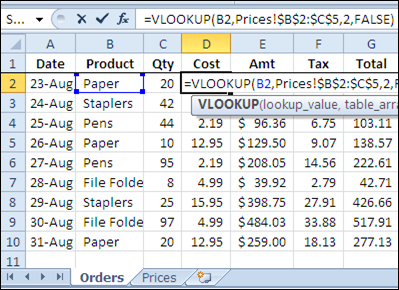
If you’re filling in an order form in Excel, you can use the VLOOKUP function to find the selling price for each item in the sales order. For example, in the screen shot below, the order form is on the Orders worksheet, and a VLOOKUP formula in column D pulls the cost from a pricing table on the Prices worksheet.
Lookup Range in Another Workbook
However, you might want to keep your price list separate from the orders workbook, so the prices are easy to update. If your price list is in a different workbook, you can still use a VLOOKUP formula to pull the data, by referring to the external list.
To refer to another workbook in a VLOOKUP formula, follow these steps.
- Open both workbooks (this step isn’t mandatory, but makes it easier to create the link)
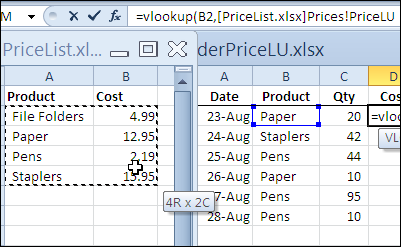
- Create the VLOOKUP formula, and for the table_array argument, select the lookup range in the other workbook. Excel will automatically add the other workbook’s name and the worksheet name in the formula.
In the screen shot below, the lookup table is in the PriceList.xlsx workbook, on the Prices sheet, in a range named PriceLU.
Closing the Lookup Workbook
While the price list lookup table workbook is open, the VLOOKUP formula will show the workbook name and the referenced range address or range name.
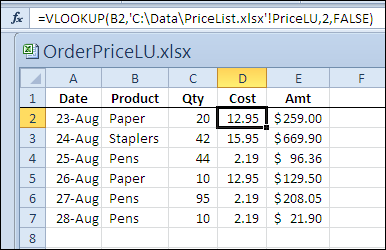
You can see the PriceLU name and workbook information in the formula bar, in the screen shot below.

If the price list lookup table workbook is closed, the VLOOKUP formula will still work, and the full file path for the price list lookup table workbook will be shown in the formula.
Watch the Video
To see the steps for referring to a VLOOKUP range in another workbook, please watch this short Excel tutorial video.
More Lookup Links
VLOOKUP Number/Text Troubleshooting
_____________
Is there any way to retrieve the Lookup table Range Data by following the link even if we don’t have the range file.
Thank you! This is very helpful! =)
VBA code to insert a row in the beginning and add vlookup from different workbook in excel.
Should ask select workbook name and worksheet where need to select and it should add the above once for multiple sheets.