
You can use the VLOOKUP function to find data in a lookup table, based on a specific value. If you enter a product number in an order form, you can use a VLOOKUP formula to find the matching product name or price. See how to use Excel VLOOKUP in different ranges.
NOTE: The examples below use VLOOKUP to get the value from the correct table. You could do a similar lookup with the INDEX and MATCH functions.
Two Lookup Tables
In some Excel workbooks, you might need to pull data from a specific table, depending on an option that the user has selected.
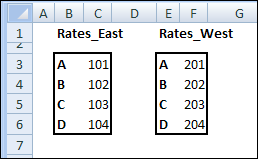
For example, in the screen shot below, there are different rate tables for the East and West regions.
- Range B3:C6 is named Rates_East
- Range E3:F6 is named Rates_West.
Create the VLOOKUP Formula
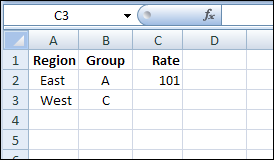
On the data entry sheet, if East is entered in column A, then the VLOOKUP formula should use Rates_East as the lookup table.
If West is entered as the region, the rate should come from the Rates_West table.
If there are only a couple of lookup tables, you could use an IF function to select the correct table in the VLOOKUP.
=VLOOKUP(B3,IF(A3=”East”,Rates_East,Rates_West),2,0)
This solution could work in this example, where there are only two rate tables.
Select the Correct Lookup Table
For situations when there are multiple lookup tables, an IF function probably wouldn’t be practical.
Instead, you can use the INDIRECT function to return the correct lookup range.
=VLOOKUP(B3,INDIRECT(“Rates_” & A3),2,0)
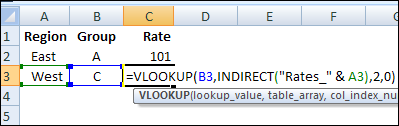
The INDIRECT function combines the text string “Rates_” with the region entered in column A, and returns the range with that name.
In the screen shot above, “West” was entered as the Region in cell A3. The VLOOKUP formula will use Rates_West as the lookup table, and return the value for Group C in that table.
Using the INDIRECT function with named ranges makes the VLOOKUP formula very flexible, and you could use any number of lookup tables in the workbook.
______________
Vlookup On A List Of Items Where Appears More Than Once. Could you please help how to do
@Jagdish: can you describe in more detail what you want to do? For instance, if you get more than one match, are you wanting to sum the result? Or do you want to return a list of all matching items?
Jagdish sent the following reply to me, but didn’t answer Jeff’s question — what do you want to do if there is more than one match?
‘————
I’m trying to do a vlookup on a list of items where the item I’m looking up appear more than once. when this happens it will only post the result of the first one it comes to in the list when I use the standard vlookup.
Here is the table. I hope this information will help you to find out my problem’s solution.
Item Invoice No. Invoice Date Description Dr.
Installation EV13001 April 1, 2013 25A Staple Gun 79.84
Repair & Maint. – Others EV13001 April 1, 2013 Staples fr USE IN T25 Staple Gun 11.52
Postage EV13001 April 1, 2013 Various 4.57
Visa Card No. EV13001 April 1, 2013 Visa 1942 95.93
Installation EV13002 April 1, 2013 Jamie 10.00
Electricity EV13002 April 1, 2013 for Feb13 45.77
Travel Exp EV13002 April 1, 2013 for Feb13 30.00
Installation EV13003 April 2, 2013 As per statement attached 45.00
Electricity EV13004 April 2, 2013 For Mar13 60.00
Jeff,
When there is more then one item match I want to catch that transaction in separate sheet as and when I make entry in this main transaction sheet. For Example the all this transaction are in main Sheet1 and Sheet2,Sheet3 has to catch item match installation and Electricity in respective sheet.
Regds
Jagdish
Jagdish: I still don’t understand. Do you want to put each duplicate on a seperate sheet?
For instance, if you were looking up “Electricity” then what would you want to have happen in this case?
Item Invoice No. Invoice Description Dr.
Electricity EV13004 1/04/2013 For Mar 2013 60
Electricity EV13005 1/05/2013 For Apr 2013 60
Electricity EV13006 1/06/2013 For May 2013 60
Electricity EV13007 1/07/2013 For Jun 2013 60
Electricity EV13008 1/08/2013 For Jul 2013 60
Electricity EV13009 1/09/2013 For Aug 2013 60
Electricity EV13010 1/10/2013 For Sep 2013 60
not sure what Jagdish is looking for; but this is EXACTLY what I want to accomplish. How can I pull the ‘electricity’ data you pulled from one jumbled worksheet into another worksheet which will house only the ‘electricity’ data? What formula did you use? I tried =INDEX(DEPOSIT!A1:F200,SMALL(IF(DEPOSIT!$A$1:$A$200=$G$1,ROW(DEPOSIT!A2:A200)),ROW(1:1)),2) in a new worksheet, with DEPOSIT being the name of the main worksheet housing all of the data and cell G1 being electricity.
In such a case all this Elctricity transaction should go the next sheet where i am using lookup for Electricity.