
You can use the VLOOKUP function to find data in a lookup table, based on a specific value. If you enter a product number in an order form, you can use a VLOOKUP formula to find the matching product name or price. See how to use Excel VLOOKUP in different ranges.
NOTE: The examples below use VLOOKUP to get the value from the correct table. You could do a similar lookup with the INDEX and MATCH functions.
Two Lookup Tables
In some Excel workbooks, you might need to pull data from a specific table, depending on an option that the user has selected.
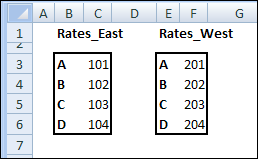
For example, in the screen shot below, there are different rate tables for the East and West regions.
- Range B3:C6 is named Rates_East
- Range E3:F6 is named Rates_West.
Create the VLOOKUP Formula
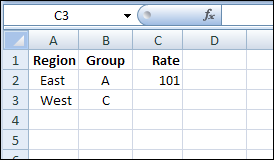
On the data entry sheet, if East is entered in column A, then the VLOOKUP formula should use Rates_East as the lookup table.
If West is entered as the region, the rate should come from the Rates_West table.
If there are only a couple of lookup tables, you could use an IF function to select the correct table in the VLOOKUP.
=VLOOKUP(B3,IF(A3=”East”,Rates_East,Rates_West),2,0)
This solution could work in this example, where there are only two rate tables.
Select the Correct Lookup Table
For situations when there are multiple lookup tables, an IF function probably wouldn’t be practical.
Instead, you can use the INDIRECT function to return the correct lookup range.
=VLOOKUP(B3,INDIRECT(“Rates_” & A3),2,0)
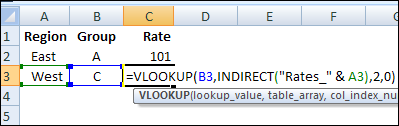
The INDIRECT function combines the text string “Rates_” with the region entered in column A, and returns the range with that name.
In the screen shot above, “West” was entered as the Region in cell A3. The VLOOKUP formula will use Rates_West as the lookup table, and return the value for Group C in that table.
Using the INDIRECT function with named ranges makes the VLOOKUP formula very flexible, and you could use any number of lookup tables in the workbook.
______________
Kind of a cascading lookup? I think you’re going to have to post a sample workbook online somewhere, and put a link to it here. This is a bit hard to get my head around.
Guys Kindly help me, I run a small business of my own where in I want to track the weekly sales figure of my products, I have a master sheet which contains all my products, and my weekly sales report contains product only sold that week, I need to get the sales figures of the particular products in the master sheet.
egg my master sheet will have
Rice
Wheat
Maize
Sugar
Salt
while my weekly sales sheet may have
Salt 1 KG
Maize 3 KG
wheat 5 kg
Rice 2 kg,
How do I get the sales quantity in the master sheet
Kindly help, thanks in advance
regards,
Gowrishanker