
There’s a sample Excel workbook on my Contextures website that uses a bit of Excel VBA to automatically add new items to an Excel data validation drop down list.
Add New Item to List
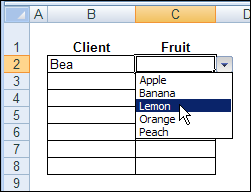
For example, if the drop down list shows Apple, Banana and Peach, you can type Lemon in the data validation cell.
Then, as soon as you press the Enter key, Lemon is added to the named range that the data validation list is based on.
The source list is sorted too, so that Lemon appears between Banana and Peach.
Read the Instructions
Someone emailed me last week, and asked if I would explain how the Excel VBA code works.
It rained (and even snowed a little) on Friday, so it was a good day to stay in, and work on a new page for the website.
If you’re interested in setting up a similar file, you can wander over to my Contextures website, and read Excel Data Validation – Add New Items.
Watch the Video
Here’s a short video that demonstrates the file, and briefly explains how the code works.
You can watch this, if it’s too early in the day to read about Excel VBA code.
Download the Sample File
If you’d rather just play with the file, and figure it our for yourself, you can download the workbook from my Contextures website.
Go to the sample workbooks page, and in the data validation section, look for DV0021 – Update Multiple Validation Lists
It’s in Excel 2003 format, and contains macros. You can enable macros if you want to test the code.
___________
Wynand, what version of Excel are you using, and what error do you see?
Excel 2003 SP3 does not give any problems. I use an older version (not sure which) as well that closes down Exel as soon as I hit Tab, with the normal dialogue ‘send error report, don’t send’ )Enter works fine in the older version
This is great! Thank you for your seay to follow video and sample file. I was wondering if you are aware of a quick key for adding data validation to a cell that you are working on. Not a QK for bringing the list down (ie the list already exists in the cell) but to make a cell a data validation cell without using the menu. Ideas? Thanks again!!!
Add New Items – Works a treat! Thank you Debra! Cheers
Hello Debra!
Following on from “Adding New Items”, is it possible to do the same, if Column C (Fruit) is dependant upon the Item Selected in Column B (Client).
Say I have a new client, Mary, so she needs to be added in to the client list, and she likes all five fruits (Apple, Banana, Lemon, Orange and Peach), but she also likes Pears, so that fruit needs to be added to the list. How do we go about having such a facility.
It may be that Bea only likes Apples & Lemons, Al likes Lemons, Oranges & Peaches and EM likes Apples, Bananas & Peaches, and when we select each client it only shows what they like. So with a new client, we select from an existing list of fruits and add those that are not on the list. Those not on the list are then added to the main list.
I hope you understand what i’m trying to do! Cheers
How am able to take the codes in the template to add directly into my drop down list so I can add new items to my drop down list